

編輯:關於 Android 程式設計
前言
本章將實現一個非常實用的功能——下載在線視頻。這部分涉及多線程、線程更新 UI 等技術,同時也需要思考產品設計:如何把新功能更好地融入現有產品,而不是簡單地加一個界面就行。歡迎大家交流產品設計與技術細節的實現。
系列目錄:
1、Vitamio 打造萬能播放器(1)——準備
2、Vitamio 打造萬能播放器(2)——手勢控制亮度、音量、縮放
3、Vitamio 打造萬能播放器(3)——本地播放(主界面、視頻列表)
4、Vitamio 打造萬能播放器(4)——本地播放(快捷搜索、數據存儲)
5、Vitamio 打造萬能播放器(5)——在線播放(播放優酷視頻)
6、Vitamio 打造萬能播放器(6)——在線播放(播放列表)
本章實現視頻下載功能。
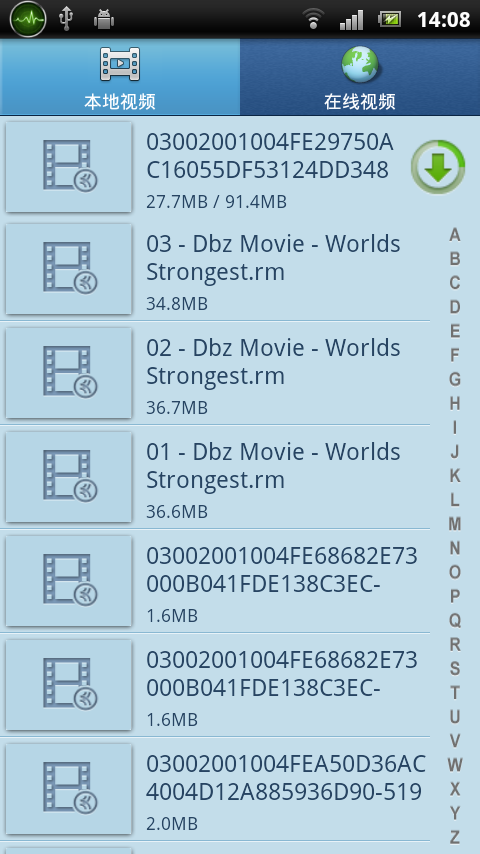
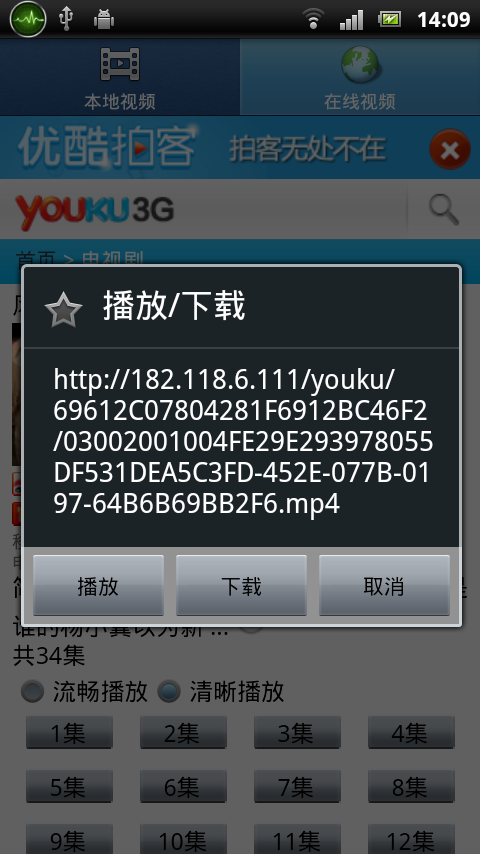
使用說明:進入在線視頻,點擊播放時會彈出選擇框,詢問是播放還是下載;點擊下載後,進度條會顯示在本地視頻列表頂部。如果想邊看邊下載,直接點擊本地列表中正在下載的視頻即可。
首先是下載核心類 FileDownloadHelper,它封裝了線程池、下載任務管理以及進度通知:
public class FileDownloadHelper { private static final String TAG = "FileDownloadHelper"; /** 線程池 */ private ThreadPool mPool = new ThreadPool(); /** 開始下載 */ public static final int MESSAGE_START = 0; /** 更新進度 */ public static final int MESSAGE_PROGRESS = 1; /** 下載結束 */ public static final int MESSAGE_STOP = 2; /** 下載出錯 */ public static final int MESSAGE_ERROR = 3; /** 中途終止 */ private volatile boolean mIsStop = false; private Handler mHandler; public volatile HashMap<String, String> mDownloadUrls = new HashMap<String, String>(); public FileDownloadHelper(Handler handler) { if (handler == null) throw new IllegalArgumentException("handler不能為空!"); this.mHandler = handler; } public void stopALl() { mIsStop = true; mPool.stop(); } public void newDownloadFile(final String url) { newDownloadFile(url, Environment.getExternalStorageDirectory() + "/" + FileUtils.getUrlFileName(url)); } /** 下載一個新的文件 */ public void newDownloadFile(final String url, final String savePath) { if (mDownloadUrls.containsKey(url)) return; else mDownloadUrls.put(url, savePath); mPool.start(new Runnable() { @Override public void run() { mHandler.sendMessage(mHandler.obtainMessage(MESSAGE_START, url)); HttpClient client = new DefaultHttpClient(); HttpGet get = new HttpGet(url); InputStream inputStream = null; FileOutputStream outputStream = null; try { HttpResponse response = client.execute(get); HttpEntity entity = response.getEntity(); final int size = (int) entity.getContentLength(); inputStream = entity.getContent(); if (size > 0 && inputStream != null) { outputStream = new FileOutputStream(savePath); int ch = -1; byte[] buf = new byte[1024]; //每秒更新一次進度 new Timer().schedule(new TimerTask() { @Override public void run() { try { FileInputStream fis = new FileInputStream(new File(savePath)); int downloadedSize = fis.available(); if (downloadedSize >= size) cancel(); mHandler.sendMessage(mHandler.obtainMessage(MESSAGE_PROGRESS, downloadedSize, size, url)); } catch (Exception e) { } } }, 50, 1000); while ((ch = inputStream.read(buf)) != -1 && !mIsStop) { outputStream.write(buf, 0, ch); } outputStream.flush(); } } catch (Exception e) { Log.e(TAG, e.getMessage(), e); mHandler.sendMessage(mHandler.obtainMessage(MESSAGE_ERROR, url + ":" + e.getMessage())); } finally { try { if (outputStream != null) outputStream.close(); } catch (IOException ex) { } try { if (inputStream != null) inputStream.close(); } catch (IOException ex) { } } mDownloadUrls.remove(url); mHandler.sendMessage(mHandler.obtainMessage(MESSAGE_STOP, url)); } }); } }
代碼說明:
a) ThreadPool 是線程池,可參考項目代碼。
b) 這裡特意用 Timer 定時刷新進度,而沒有在每次 write 數據時直接更新。原因是每秒 write 次數較高,若過於頻繁地更新 UI,可能導致超時等問題,因此改為每秒更新一次。
接著是處理下載消息的 Handler:
public Handler mDownloadHandler = new Handler() { @Override public void handleMessage(Message msg) { PFile p; String url = msg.obj.toString(); switch (msg.what) { case FileDownloadHelper.MESSAGE_START://開始下載 p = new PFile(); p.path = mParent.mFileDownload.mDownloadUrls.get(url); p.title = new File(p.path).getName(); p.status = 0; p.file_size = 0; if (mDownloadAdapter == null) { mDownloadAdapter = new FileAdapter(getActivity(), new ArrayList<PFile>()); mDownloadAdapter.add(p, url); mTempListView.setAdapter(mDownloadAdapter); mTempListView.setVisibility(View.VISIBLE); } else { mDownloadAdapter.add(p, url); mDownloadAdapter.notifyDataSetChanged(); } break; case FileDownloadHelper.MESSAGE_PROGRESS://正在下載 p = mDownloadAdapter.getItem(url); p.temp_file_size = msg.arg1; p.file_size = msg.arg2; int status = (int) ((msg.arg1 * 1.0 / msg.arg2) * 10); if (status > 10) status = 10; p.status = status; mDownloadAdapter.notifyDataSetChanged(); break; case FileDownloadHelper.MESSAGE_STOP://下載結束 p = mDownloadAdapter.getItem(url); FileBusiness.insertFile(getActivity(), p); break; case FileDownloadHelper.MESSAGE_ERROR: Toast.makeText(getActivity(), url, Toast.LENGTH_LONG).show(); break; } super.handleMessage(msg); } };
代碼說明:
a) mTempListView 是新增的,默認隱藏,可參考項目代碼的 layout 部分。
b) 下載流程為:開始(顯示 mTempListView)→ 正在下載(更新進度圖片和大小)→ 完成(寫入數據庫)。
最後是點擊播放時彈出的選擇對話框:
if (FileUtils.isVideoOrAudio(url)) { Dialog dialog = new AlertDialog.Builder(getActivity()).setIcon(android.R.drawable.btn_star).setTitle("播放/下載").setMessage(url).setPositiveButton("播放", new OnClickListener() { @Override public void onClick(DialogInterface dialog, int which) { Intent intent = new Intent(getActivity(), VideoPlayerActivity.class); intent.putExtra("path", url); startActivity(intent); } }).setNeutralButton("下載", new OnClickListener() { @Override public void onClick(DialogInterface dialog, int which) { MainFragmentActivity activity = (MainFragmentActivity) getActivity(); activity.mFileDownload.newDownloadFile(url); Toast.makeText(getActivity(), "正在下載 .." + FileUtils.getUrlFileName(url) + " ,可從本地視頻查看進度!", Toast.LENGTH_LONG).show(); } }).setNegativeButton("取消", null).create(); dialog.show(); return true; }
自本章節往後,代碼均不再提供下載,請移步 Google Code:
https://code.google.com/p/android-oplayer
以上就是關於用 Vitamio 開發視頻下載功能的資料整理,需要開發 Android 播放器的朋友可以參考。
 Android 使用環信 SDK 開發即時通訊功能的整合重點
為何選擇環信 SDK在 Android 應用中導入即時聊天功能時,開發者通常會評估介面是否簡潔、文件是否清楚、是否支援 Android、iOS 與後端服務。環信 SDK
 用 GridLayout 打造自定義日曆控件
系統沒有現成的日曆選擇器?那就自己畫一個。GridLayout 天生適合這種棋盤式排版——設定行數與列數,把日期按鈕一個個填進去,再補上月份推導邏輯,一個完整的日曆控件就
 ObjectAnimator 屬性動畫入門:用自訂物件屬性完成數值變化
ObjectAnimator 除了常見的 View 動畫,也能操作自訂物件的屬性。關鍵在於屬性型別與 setter 方法必須符合動畫傳入值。 例如 Student 類別中
 解決 Android Studio 反覆提示重啟 ADB 的問題
用手機連上電腦除錯時,Android Studio 常常跳出提示要你重啟 ADB,但點了重啟之後,那個提示對話框又立刻跳出來。會這樣反覆出現,是因為 ADB 根本沒有重啟