

編輯:關於 Android 程式設計
本文分享一個完整的實例:在 Android 中遍歷所有文件夾與子目錄,按關鍵字搜索匹配的文件並展示其路徑。整個例子包含界面、業務邏輯與字符串資源三部分。
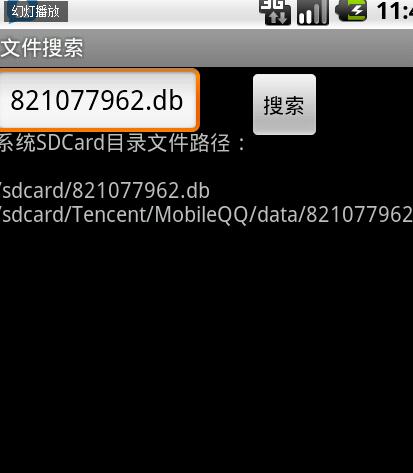
搜索的核心是一個遞歸方法 search:遍歷當前目錄下的每個文件,若是文件就判斷文件名是否包含關鍵字,若是目錄則遞歸深入:
import java.io.File; import android.app.Activity; import android.os.Bundle; import android.view.View; import android.view.View.OnClickListener; import android.widget.Button; import android.widget.EditText; import android.widget.TextView; import android.widget.Toast; public class ShuosouwenjianActivity extends Activity implements OnClickListener { private File file; private String path; private String info; private String key; private TextView result; private EditText et; private Button search_btn; @Override public void onCreate(Bundle savedInstanceState) { super.onCreate(savedInstanceState); setContentView(R.layout.main); result = (TextView)findViewById(R.id.TextView_Result); et = (EditText)findViewById(R.id.key); search_btn = (Button)findViewById(R.id.button_search); file = new File("/sdcard/"); info = getString(R.string.info); search_btn.setOnClickListener(this); } @Override public void onClick(View v) { path = ""; result.setText(""); key = et.getText().toString(); BrowserFile(file); } public void BrowserFile(File fileold) { if (key.equals("")) { Toast.makeText(this, getString(R.string.pleaseInput), Toast.LENGTH_LONG).show(); } else { search(fileold); if (result.getText().equals("")) { Toast.makeText(this, getString(R.string.notFound), Toast.LENGTH_SHORT).show(); } } } private void search(File fileold) { try{ File[] files=fileold.listFiles(); if(files.length>0) { for(int j=0;j<files.length;j++) { if(!files[j].isDirectory()) { if(files[j].getName().indexOf(key)> -1) { path += "\n" + files[j].getPath(); result.setText(info+path); } } else{ this.search(files[j]); } } } } catch(Exception e) { } } }
<AbsoluteLayout xmlns:android="https://schemas.android.com/apk/res/android" android:orientation="vertical" android:layout_width="fill_parent" android:layout_height="fill_parent" android:id="@+id/widget0" > <Button android:layout_width="wrap_content" android:layout_height="wrap_content" android:id="@+id/button_search" android:layout_x="253px" android:layout_y="5px" android:text="@string/toSearch" /> <EditText android:layout_width="wrap_content" android:layout_height="wrap_content" android:id="@+id/key" android:text="821077962.db" /> <TextView android:layout_width="fill_parent" android:layout_height="370px" android:id="@+id/TextView_Result" android:layout_x="0px" android:layout_y="60px" /> </AbsoluteLayout>
<resources> <string name="hello">Hello World, Activity07!</string> <string name="app_name">文件搜索</string> <string name="toSearch">搜索</string> <string name="info">系統SDCard目錄文件路徑:\n</string> <string name="pleaseInput">請輸入關鍵字!</string> <string name="notFound">SD卡中沒有相關文件!!</string> <string name="pathError">讀取路徑出錯!!</string> </resources>
需要提醒的是,訪問 /sdcard 目錄要在清單文件中聲明讀取外部存儲的權限,否則會因權限不足而搜索失敗。以上就是本文的全部內容,希望對大家有所幫助。
 Android Lint 使用指南:用靜態檢查做資源清理
做資源清理時,Android Lint 幾乎是必備工具。本文記錄 Lint 的用法,以及實戰中踩到的幾個坑。 Lint 是 SDK Tools 16(ADT 16)之後才
 從零開始:用 Android Studio 創建並跑通你的第一個項目
一、創建 HelloWorld 項目 幾乎所有編程語言的第一個程序都是 Hello World,這個傳統從上世紀 70 年代流傳至今,早已成為編程界的經典儀式。這次我們就
 Android 屬性動畫完全指南:從 ObjectAnimator 到自定義 TypeEvaluator
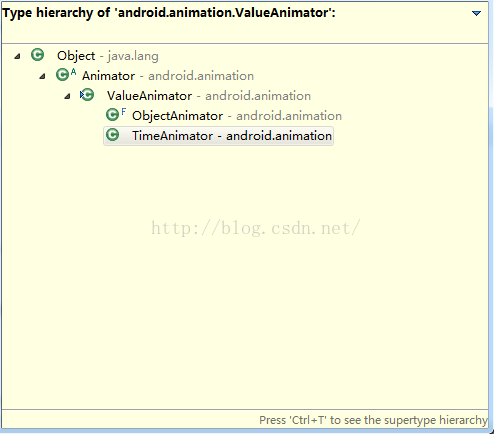
當我們看到別人的 App 裡那些炫酷的動畫效果時,是否會心癢癢地想知道源代碼到底怎麼寫的,為什麼自己只能做出平移、縮放、旋轉、透明度變化這幾種簡單動畫呢?如果有這種困惑,
 布局與控件(七):ListView 入門完全指南(上)
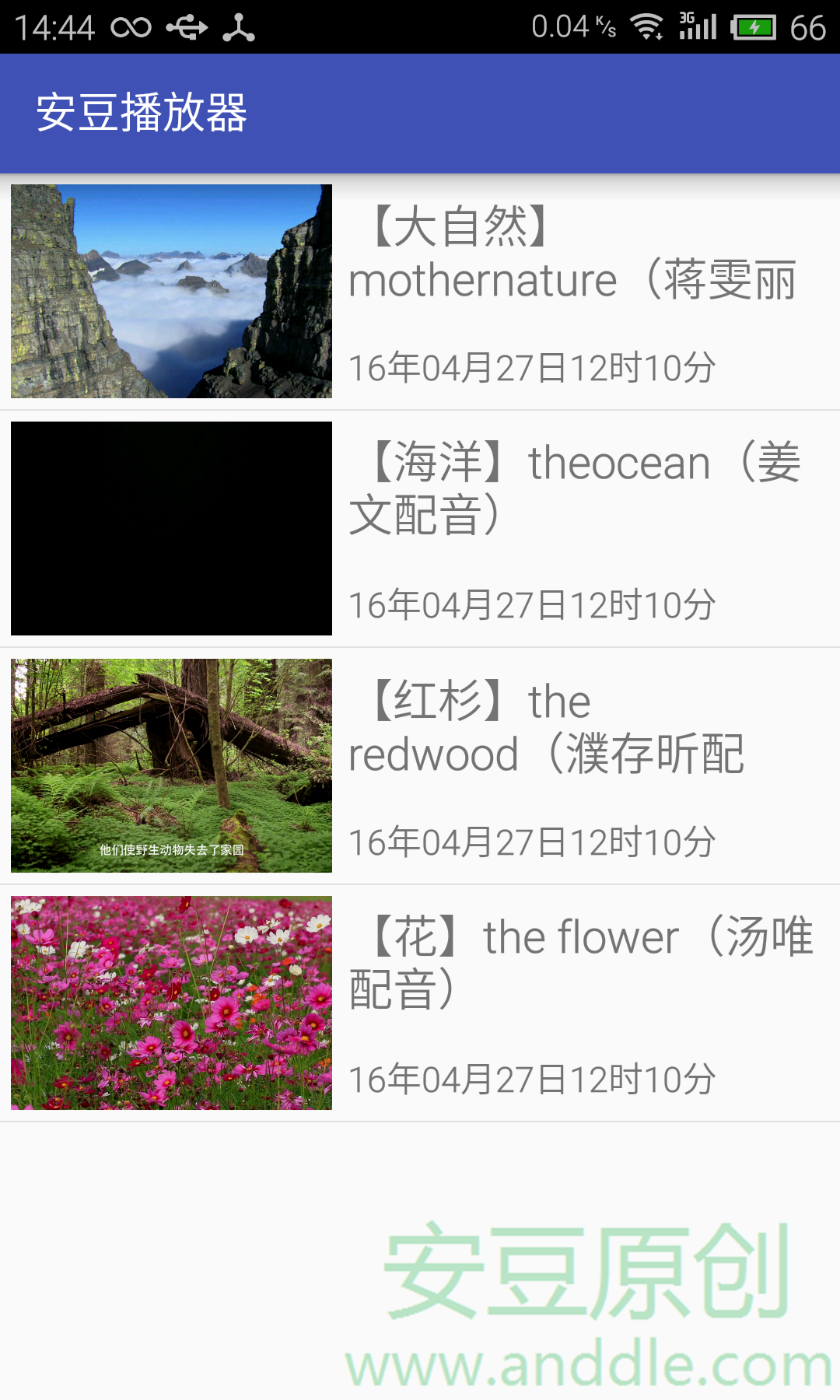
第 9 節 ListView 幾乎每一個 App 都需要用列表來呈現資料,Android SDK 為此提供了 ListView 這個經典控制項。 ListView 必須搭