

編輯:關於 Android 程式設計
關於 Android 6.0 的網路請求
Android 早期版本的網路請求主要採用:1. HttpUrlConnection;2. Apache Http Client。而在 Android 6.0 版本中,改為:1. HttpUrlConnection;2. OkHttp。新版淘汰了舊的網路請求方式,那麼 OkHttp 的優勢何在?
1. 支援 SPDY,可用同一個 Socket 處理同一台伺服器的所有請求;
2. 若 SPDY 不可用,則透過連接池減少請求延遲;
3. 無縫支援 GZIP,降低資料傳輸量;
4. 快取回應資料,減少重複的網路請求。
以 POST 送出 JSON 給伺服器
我們先看一個範例,更詳細的請求細節後面會再說明。
public class MainActivity extends AppCompatActivity { public static final String TAG = "MainActivity"; public static final MediaType JSON=MediaType.parse("application/json; charset=utf-8"); @Override protected void onCreate(Bundle savedInstanceState) { super.onCreate(savedInstanceState); setContentView(R.layout.activity_main); //開啟一個線程,做聯網操作 new Thread() { @Override public void run() { postJson(); } }.start(); } private void postJson() { OkHttpClient okHttpClient = new OkHttpClient(); RequestBody requestBody = RequestBody.create(JSON, json); Request request = new Request.Builder() .url("https://192.168.0.102:8080/TestProject/JsonServlet") .post(requestBody) .build(); try { Response response=okHttpClient.newCall(request).execute(); if(response.isSuccessful()){ Log.i(TAG,response.body().string()); } } catch (IOException e) { e.printStackTrace(); } } }
SPDY(讀作「SPeeDY」)是 Google 開發的、基於 TCP 的應用層協議,用來最小化網路延遲、提升速度、優化使用者體驗。SPDY 並非用來取代 HTTP,而是對 HTTP 的增強,具備資料流多工、請求優先級與 HTTP 標頭壓縮等功能。
GZIP 最早由 Jean-loup Gailly 與 Mark Adler 為 UNIX 系統創建,如今已成為網路上極為普遍的資料壓縮格式。HTTP 上的 GZIP 編碼是一種改善 Web 應用效能的技術,通常可將純文字內容壓縮到約原大小的 40%,讓傳輸更快、頁面顯示更迅速,代價則是略增伺服器負載。
JSON 解析
這裡我們採用泛型統一解析的方式,結合 Java 反射機制來解析泛型物件 Class<?>。
1. 首先宣告一個 TypeInfo.java 類別,用來封裝泛型相關屬性:
import java.lang.reflect.Array; import java.lang.reflect.GenericArrayType; import java.lang.reflect.ParameterizedType; import java.lang.reflect.Type; public class TypeInfo { private Class<?> componentType; private Class<?> rawType; private Type type; private TypeInfo(Class<?> rawType, Class<?> componentType) { this.componentType = componentType; this.rawType = rawType; } public static TypeInfo createArrayType(Class<?> componentType) { return new TypeInfo(Array.class, componentType); } public static TypeInfo createNormalType(Class<?> componentType) { return new TypeInfo(null, componentType); } public static TypeInfo createParameterizedType(Class<?> rawType, Class<?> componentType) { return new TypeInfo(rawType, componentType); } public TypeInfo(Type type) { this.type = type; if (type instanceof ParameterizedType) { this.rawType = (Class<?>) ((ParameterizedType) type).getRawType(); Type[] actualTypeArguments = ((ParameterizedType) type).getActualTypeArguments(); this.componentType = (Class<?>) actualTypeArguments[0]; } else if (type instanceof GenericArrayType) { this.rawType = Array.class; this.componentType = (Class<?>) ((GenericArrayType) type).getGenericComponentType(); } else { this.componentType = (Class<?>) type; } } public Type getType() { return type; } public Class<?> getComponentType() { return componentType; } public Class<?> getRawType() { return rawType; } }
2. 宣告 ReqClassUtils.java,用於透過反射取得泛型物件的 TypeInfo:
import java.lang.reflect.ParameterizedType; import java.lang.reflect.Type; public class ReqClassUtils { public static TypeInfo getCallbackGenericType(Class<?> clazz) { Type genericSuperclass = clazz.getGenericSuperclass(); TypeInfo type = getGetnericType(genericSuperclass); if (type == null) { Type[] genericInterfaces = clazz.getGenericInterfaces(); if (genericInterfaces != null && genericInterfaces.length > 0) { type = getGetnericType(genericInterfaces[0]); } } return type; } private static TypeInfo getGetnericType(Type type) { if (type != null && type instanceof ParameterizedType) { Type[] args = ((ParameterizedType) type).getActualTypeArguments(); if (args != null && args.length > 0) { return new TypeInfo(args[0]); } } return null; }
3. 接著是重點,宣告一個 JSON 解析工具類 ReqJsonUtils.java,用於依據 TypeInfo 屬性進行不同類型的 JSON 解析:
import com.alibaba.fastjson.JSON; import com.alibaba.fastjson.JSONException; import com.alibaba.fastjson.JSONObject; import java.lang.reflect.Array; import java.util.Collection; import java.util.HashMap; import java.util.Map; import static com.alibaba.fastjson.JSON.parseObject; public class ReqJsonUtils { private static final Map primitiveWrapperTypeMap = new HashMap(8); static { primitiveWrapperTypeMap.put(Boolean.class, boolean.class); primitiveWrapperTypeMap.put(Byte.class, byte.class); primitiveWrapperTypeMap.put(Character.class, char.class); primitiveWrapperTypeMap.put(Double.class, double.class); primitiveWrapperTypeMap.put(Float.class, float.class); primitiveWrapperTypeMap.put(Integer.class, int.class); primitiveWrapperTypeMap.put(Long.class, long.class); primitiveWrapperTypeMap.put(Short.class, short.class); } public static <T> T parseHttpResult(TypeInfo type, String jsonData) throws JSONException { if (Void.class.isAssignableFrom(type.getComponentType())) { return null; } Class<?> rawType = type.getRawType(); boolean isArray = rawType != null && Array.class.isAssignableFrom(rawType); boolean isCollection = rawType != null && Collection.class.isAssignableFrom(rawType); boolean isMap = rawType != null && Map.class.isAssignableFrom(rawType); Class<?> componentType = type.getComponentType(); T result = null; if (isCollection) { result = (T) JSON.parseArray(jsonData, componentType); } else if (isArray) { result = (T) JSON.parseArray(jsonData, componentType).toArray(); } else if (isMap) { result = (T) JSONObject.parseObject(jsonData, type.getType()); } else if (componentType.isAssignableFrom(String.class)) { return (T) jsonData; } else { if (isPrimitiveOrWrapper(componentType)) { result = (T) parseObject(jsonData); } else { result = (T) parseObject(jsonData, componentType); } } return result; } public static boolean isPrimitiveOrWrapper(Class clazz) { return (clazz.isPrimitive() || isPrimitiveWrapper(clazz)); } public static boolean isPrimitiveWrapper(Class clazz) { return primitiveWrapperTypeMap.containsKey(clazz); }
如何使用?
1. 實現解析:
TypeInfo typeInfo = ReqClassUtils.getCallbackGenericType(callBack.getClass()); callBack.onReqSuccess(ReqJsonUtils.parseHttpResult(typeInfo, jsonData));
2. 發送請求:
HashMap<String, String> paramsMap = new HashMap<>(); paramsMap.put("sourceType", "2"); paramsMap.put("sourceDesc", "[Android]" + Build.VERSION.RELEASE + "[Mobel]" + Build.BRAND + " " + Build.MODEL + Build.DEVICE); HashMap<String, String> params = dealStringBody(paramsMap); RequestManager.getInstance(this).requestAsyn("xxx/actionUrl", RequestManager.TYPE_POST_JSON, params, new ReqCallBack<String>() { @Override public void onReqSuccess(String result) { request_tv.setText(result); } @Override public void onReqFailed(String errorMsg) { } });
3. 支援的類型:
new ReqCallBack<List<Object>>();//集合 collection new ReqCallBack<Map<String, User>>();//map new ReqCallBack<Void>();//Void new ReqCallBack<Long>();//基礎類型
透過這套泛型反射機制,便能以統一的解析邏輯處理集合、Map、基本型別與自訂物件等多種回傳型別。
 Android 4.4 ContentResolver 查詢圖片失效與圖庫不更新問題排查
問題背景做了一個圖片瀏覽功能,用 ContentResolver 掃描圖庫照片,並嚴格依拍攝時間排序顯示在 ListView 中。結果踩了兩個坑:第一,在 4.2 的手機
 Android 的 .9.png 是怎麼回事?原理、切圖規則與 draw9patch 實操
一、需求從哪裡來 做聊天類介面時幾乎都會碰到同一個問題:一段文字要裝進一個帶圓角、漸層和陰影的對話框裡,而文字的長短是動態的,背景必須跟著內容伸縮。最直白的思路,就是找一
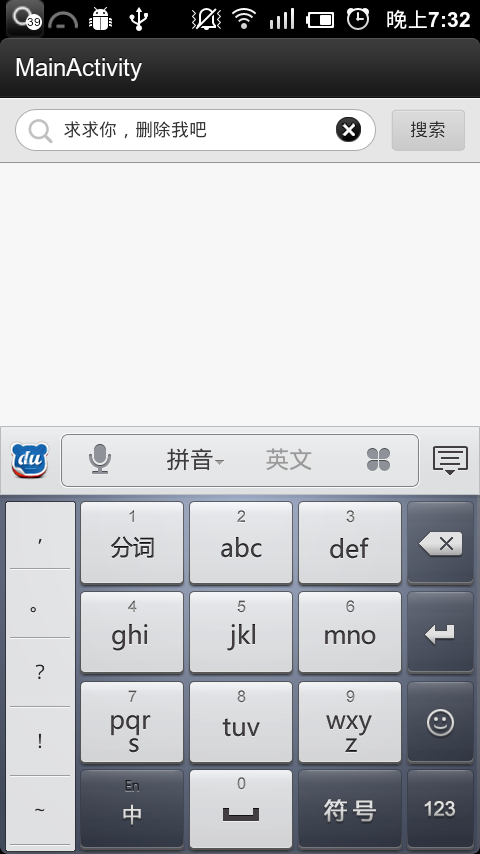 Android 搜索框即時顯示清空按鈕
在搜索相關頁面中,加入一鍵清空輸入內容的功能,可以提升使用者體驗,讓刪除文字更直覺。常見做法是把 EditText 與一個清空 ImageView 放在同一個相對佈局中。
 Android 學習小 Demo:SQLiteDatabase 使用
SQLiteDatabase 是 Android 中很常用的本機資料庫方案。本文以一個待辦清單的小範例,說明如何建立資料庫、封裝增刪改查,並與 ListView 結合。