

編輯:關於 Android 程式設計
OkHttp 的 HTTP 連線基礎
雖然使用 OkHttp 發送 HTTP 請求時只需提供 URL,但 OkHttp 在實作中仍需綜合考慮三種要素,才能確定與伺服器之間實際建立的連線,以達到最佳效能。
第一個要素是 URL 本身,它給出要訪問的資源路徑。其中最重要的部分是訪問時使用的協議,即 HTTP 還是 HTTPS,這會決定 OkHttp 建立的是明文 HTTP 連線還是加密的 HTTPS 連線。
第二個要素是伺服器位址,例如 baidu.com。每個位址都有對應的設定,包括連接埠、HTTPS 設定與傳輸協議。同一個位址上的 URL 可以共享同一個底層 TCP 連線,OkHttp 提供一個連線池來復用連線,藉此獲得顯著的效能提升。
第三個要素是連接伺服器時使用的路由,包括具體連接的 IP(透過 DNS 查詢取得)與所使用的代理伺服器;對於 HTTPS 連線還包括 TLS 版本。對於同一個位址可能存在多個不同路由,OkHttp 在遇到訪問錯誤時會自動嘗試備選路由,因此能自動處理可能出現的網路問題。
請求完成後,目前的連線會被放回連線池中供後續請求復用,連線池則會定期關閉閒置連線以釋放資源。
檔案上傳與下載實例
1. 不帶參數上傳檔案
public <T> void upLoadFile(String actionUrl, String filePath, final ReqCallBack<T> callBack) { String requestUrl = String.format("%s/%s", BASE_URL, actionUrl); File file = new File(filePath); RequestBody body = RequestBody.create(MEDIA_OBJECT_STREAM, file); final Request request = new Request.Builder().url(requestUrl).post(body).build(); final Call call = mOkHttpClient.newBuilder().writeTimeout(50, TimeUnit.SECONDS).build().newCall(request); call.enqueue(new Callback() { @Override public void onFailure(Call call, IOException e) { Log.e(TAG, e.toString()); failedCallBack("上傳失敗", callBack); } @Override public void onResponse(Call call, Response response) throws IOException { if (response.isSuccessful()) { String string = response.body().string(); Log.e(TAG, "response ----->" + string); successCallBack((T) string, callBack); } else { failedCallBack("上傳失敗", callBack); } } }); }
2. 帶參數上傳檔案
public <T>void upLoadFile(String actionUrl, HashMap<String, Object> paramsMap, final ReqCallBack<T> callBack) { try { String requestUrl = String.format("%s/%s", upload_head, actionUrl); MultipartBody.Builder builder = new MultipartBody.Builder(); builder.setType(MultipartBody.FORM); for (String key : paramsMap.keySet()) { Object object = paramsMap.get(key); if (!(object instanceof File)) { builder.addFormDataPart(key, object.toString()); } else { File file = (File) object; builder.addFormDataPart(key, file.getName(), RequestBody.create(null, file)); } } RequestBody body = builder.build(); final Request request = new Request.Builder().url(requestUrl).post(body).build(); final Call call = mOkHttpClient.newBuilder().writeTimeout(50, TimeUnit.SECONDS).build().newCall(request); call.enqueue(new Callback() { @Override public void onFailure(Call call, IOException e) { Log.e(TAG, e.toString()); failedCallBack("上傳失敗", callBack); } @Override public void onResponse(Call call, Response response) throws IOException { if (response.isSuccessful()) { String string = response.body().string(); Log.e(TAG, "response ----->" + string); successCallBack((T) string, callBack); } else { failedCallBack("上傳失敗", callBack); } } }); } catch (Exception e) { Log.e(TAG, e.toString()); } }
3. 帶參數並顯示進度上傳檔案
public <T> void upLoadFile(String actionUrl, HashMap<String, Object> paramsMap, final ReqProgressCallBack<T> callBack) { try { String requestUrl = String.format("%s/%s", upload_head, actionUrl); MultipartBody.Builder builder = new MultipartBody.Builder(); builder.setType(MultipartBody.FORM); for (String key : paramsMap.keySet()) { Object object = paramsMap.get(key); if (!(object instanceof File)) { builder.addFormDataPart(key, object.toString()); } else { File file = (File) object; builder.addFormDataPart(key, file.getName(), createProgressRequestBody(MEDIA_OBJECT_STREAM, file, callBack)); } } RequestBody body = builder.build(); final Request request = new Request.Builder().url(requestUrl).post(body).build(); final Call call = mOkHttpClient.newBuilder().writeTimeout(50, TimeUnit.SECONDS).build().newCall(request); call.enqueue(new Callback() { @Override public void onFailure(Call call, IOException e) { Log.e(TAG, e.toString()); failedCallBack("上傳失敗", callBack); } @Override public void onResponse(Call call, Response response) throws IOException { if (response.isSuccessful()) { String string = response.body().string(); Log.e(TAG, "response ----->" + string); successCallBack((T) string, callBack); } else { failedCallBack("上傳失敗", callBack); } } }); } catch (Exception e) { Log.e(TAG, e.toString()); } }
4. 建立帶進度的 RequestBody
public <T> RequestBody createProgressRequestBody(final MediaType contentType, final File file, final ReqProgressCallBack<T> callBack) { return new RequestBody() { @Override public MediaType contentType() { return contentType; } @Override public long contentLength() { return file.length(); } @Override public void writeTo(BufferedSink sink) throws IOException { Source source; try { source = Okio.source(file); Buffer buf = new Buffer(); long remaining = contentLength(); long current = 0; for (long readCount; (readCount = source.read(buf, 2048)) != -1; ) { sink.write(buf, readCount); current += readCount; Log.e(TAG, "current------>" + current); progressCallBack(remaining, current, callBack); } } catch (Exception e) { e.printStackTrace(); } } }; }
5. 不帶進度的檔案下載
public <T> void downLoadFile(String fileUrl, final String destFileDir, final ReqCallBack<T> callBack) { final String fileName = MD5.encode(fileUrl); final File file = new File(destFileDir, fileName); if (file.exists()) { successCallBack((T) file, callBack); return; } final Request request = new Request.Builder().url(fileUrl).build(); final Call call = mOkHttpClient.newCall(request); call.enqueue(new Callback() { @Override public void onFailure(Call call, IOException e) { Log.e(TAG, e.toString()); failedCallBack("下載失敗", callBack); } @Override public void onResponse(Call call, Response response) throws IOException { InputStream is = null; byte[] buf = new byte[2048]; int len = 0; FileOutputStream fos = null; try { long total = response.body().contentLength(); long current = 0; is = response.body().byteStream(); fos = new FileOutputStream(file); while ((len = is.read(buf)) != -1) { current += len; fos.write(buf, 0, len); } fos.flush(); successCallBack((T) file, callBack); } catch (IOException e) { failedCallBack("下載失敗", callBack); } finally { try { if (is != null) { is.close(); } if (fos != null) { fos.close(); } } catch (IOException e) { e.printStackTrace(); } } } }); }
6. 帶進度的檔案下載
public <T> void downLoadFile(String fileUrl, final String destFileDir, final ReqProgressCallBack<T> callBack) { final String fileName = MD5.encode(fileUrl); final File file = new File(destFileDir, fileName); if (file.exists()) { successCallBack((T) file, callBack); return; } final Request request = new Request.Builder().url(fileUrl).build(); final Call call = mOkHttpClient.newCall(request); call.enqueue(new Callback() { @Override public void onFailure(Call call, IOException e) { Log.e(TAG, e.toString()); failedCallBack("下載失敗", callBack); } @Override public void onResponse(Call call, Response response) throws IOException { InputStream is = null; byte[] buf = new byte[2048]; int len = 0; FileOutputStream fos = null; try { long total = response.body().contentLength(); long current = 0; is = response.body().byteStream(); fos = new FileOutputStream(file); while ((len = is.read(buf)) != -1) { current += len; fos.write(buf, 0, len); progressCallBack(total, current, callBack); } fos.flush(); successCallBack((T) file, callBack); } catch (IOException e) { failedCallBack("下載失敗", callBack); } finally { try { if (is != null) { is.close(); } if (fos != null) { fos.close(); } } catch (IOException e) { e.printStackTrace(); } } } }); }
7. 介面 ReqProgressCallBack.java 的實作
public interface ReqProgressCallBack<T> extends ReqCallBack<T>{ void onProgress(long total, long current); }
8. 進度回呼的實作
private <T> void progressCallBack(final long total, final long current, final ReqProgressCallBack<T> callBack) { okHttpHandler.post(new Runnable() { @Override public void run() { if (callBack != null) { callBack.onProgress(total, current); } } }); }
透過以上八個部分,便能組裝出一套支援進度回報、可複用的檔案上傳與下載機制。
 Android 五大資料儲存方式完整解析:SharedPreferences、檔案、SQLite、ContentProvider 與網路
資料要存哪裡,是每個 App 一開始就得回答的問題。Android 提供了五種主要方式,各自的適用場景差異很大,選錯了後面改起來很痛苦。以下逐一拆解原理、API 與實作。
 TextView 顯示連結的兩種常見方法
在 Android 中,TextView 可以用來顯示一般文字,也能呈現可點擊的連結。常見做法有兩種:一種是透過 HTML 標籤解析,另一種是使用 autoLink 自動
 Android Tips(十):Android M 下模擬位置檢測的坑
做過地圖類應用的同學應該都不陌生:為了避免惡意用戶透過模擬位置作弊,我們通常會檢測手機是否開啟了「允許模擬位置」,若開啟則中斷流程並引導用戶關閉。然而在 Android
 Android Service 與 IntentService 入門理解
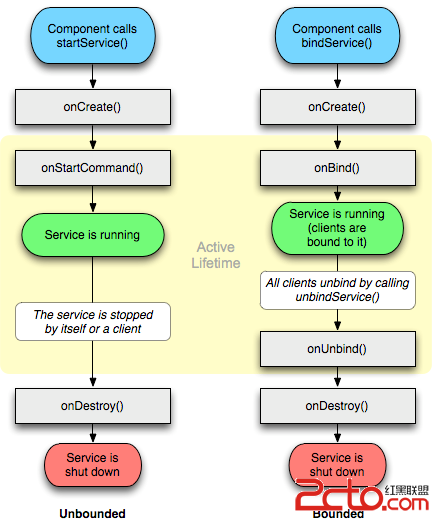
Service 是 Android 四大組件之一,適合執行不需要使用者介面的背景工作,例如播放音樂、監聽位置變化或持續執行某項任務。不過,Service 預設運行在主線程