

編輯:關於 Android 程式設計
最近在開發微信企業號時,發現微信 Android 版內建瀏覽器在打開檔案方面有問題,而 iOS 版卻沒有——原因是 iOS 版使用的是 Safari 瀏覽器,支援直接打開文檔;Android 版則使用騰訊 X5 內核,基於某種原因並不支援(可能是整合時出現的問題)。這裡提供一套解法,同樣適用手機瀏覽器或 Android 開發。透過此方法,即可在微信上開發自己的第三方應用,或解決自身專案的問題。
1. 判斷瀏覽器類型
HttpServletRequest req = ServletActionContext.getRequest(); String userAgent=req.getHeader("User-Agent");//裡面包含了設備類型
2. 分平台處理
iOS 版直接使用串流輸出即可;Android 版則利用 OpenOffice + jodconverter 轉換成 HTML,再對 HTML 內容重新編輯。若文件中有圖片,可將路徑改為網路路徑,或採用串流輸出(若改為網路路徑,需注意特殊符號,例如 + 號會變成空格)。
public String getFileFromOa(){ HttpServletRequest req = ServletActionContext.getRequest(); String userAgent=req.getHeader("User-Agent"); if(-1!=userAgent.indexOf("iPhone")){ //如果是蘋果手機,直接使用流輸出 String fileUrl = ServletActionContext.getRequest().getParameter("fileUrl"); fileUrl.replaceAll("%20", "\\+"); String strURL = MessageUtil.oaUrl+fileUrl; String fileType=strURL.substring(strURL.lastIndexOf(".")+1,strURL.length()); try { URL oaUrl = new URL(strURL); HttpURLConnection httpConn = (HttpURLConnection) oaUrl.openConnection(); InputStream in = httpConn.getInputStream(); HttpServletResponse response = ServletActionContext.getResponse(); req.setCharacterEncoding("UTF-8"); response.setCharacterEncoding("UTF-8"); String name=fileUrl.substring(fileUrl.lastIndexOf("/")+1, fileUrl.length()); response.setHeader("Content-Disposition", "attachment;filename=" + new String( (name ).getBytes(), "iso-8859-1")); if("doc".equals(fileType)||"docx".equals(fileType)){ response.setContentType("application/msword"); }else if("xls".equals(fileType)||"xlsx".equals(fileType)){ response.setContentType("application/msexcel"); }else{ response.setContentType("application/"+fileType); } OutputStream out = response.getOutputStream(); byte[] bytes = new byte[1024]; int cnt=0; while ((cnt=in.read(bytes,0,bytes.length)) != -1) { out.write(bytes, 0, cnt); } out.flush(); out.close(); in.close(); } catch (MalformedURLException e) { e.printStackTrace(); } catch (IOException e) { e.printStackTrace(); } return null; }else{ //如果非蘋果手機,自己處理文檔 String fileUrl = ServletActionContext.getRequest().getParameter("fileUrl"); fileUrl.replaceAll("%2B", "\\+"); String strURL = MessageUtil.oaUrl+fileUrl; try { URL oaUrl = new URL(strURL); HttpURLConnection httpConn = (HttpURLConnection) oaUrl.openConnection(); InputStream in = httpConn.getInputStream(); HttpServletResponse response = ServletActionContext.getResponse(); req.setCharacterEncoding("UTF-8"); response.setCharacterEncoding("UTF-8"); String name=fileUrl.substring(fileUrl.lastIndexOf("/")+1, fileUrl.length()); String path=req.getRealPath(""); path=path.substring(0, path.lastIndexOf("\\")+1); File htmlFile=new File(path + "OaFileToHtml\\"+name+".html"); if(!htmlFile.exists()){ String oaFilePath=path + "OaFile"; File oaFiles=new File(oaFilePath); if(!oaFiles.exists()){ oaFiles.mkdirs(); } File oafile=new File(oaFiles+ File.separator +name); OutputStream out = new FileOutputStream(oafile); byte[] bytes = new byte[1024]; int cnt=0; while ((cnt=in.read(bytes,0,bytes.length)) != -1) { out.write(bytes, 0, cnt); } out.flush(); out.close(); in.close(); String htmlFilePath =path + "OaFileToHtml"; String htmlcontext=ConvertFileToHtml.toHtmlString(oafile, htmlFilePath); req.setAttribute("htmlcontext", htmlcontext); }else{ StringBuffer htmlSb = new StringBuffer(); try { BufferedReader br = new BufferedReader(new InputStreamReader(new FileInputStream(htmlFile),Charset.forName("gb2312"))); while (br.ready()) { htmlSb.append(br.readLine()); } br.close(); } catch (FileNotFoundException e) { e.printStackTrace(); } catch (IOException e) { e.printStackTrace(); } String htmlStr = htmlSb.toString(); req.setAttribute("htmlcontext", ConvertFileToHtml.clearFormat(htmlStr, "")); } } catch (MalformedURLException e) { e.printStackTrace(); } catch (IOException e) { e.printStackTrace(); } return "lookfile"; } }
以下為將 Word 轉換成 HTML 並讀取內容的工具類:
package com.haiyisoft.wx.util; import java.io.BufferedReader; import java.io.File; import java.io.FileInputStream; import java.io.FileNotFoundException; import java.io.IOException; import java.io.InputStreamReader; import java.net.ConnectException; import java.nio.charset.Charset; import java.util.regex.Matcher; import java.util.regex.Pattern; import com.artofsolving.jodconverter.DocumentConverter; import com.artofsolving.jodconverter.openoffice.connection.OpenOfficeConnection; import com.artofsolving.jodconverter.openoffice.connection.SocketOpenOfficeConnection; import com.artofsolving.jodconverter.openoffice.converter.OpenOfficeDocumentConverter; /** * 端口啟動命令: * soffice -headless -accept="socket,port=8100;urp; */ public class ConvertFileToHtml { public static File convert(File docFile, String filepath) { String fileName=docFile.getName(); File htmlFile = new File(filepath + "/" + fileName + ".html"); OpenOfficeConnection con = new SocketOpenOfficeConnection(8100); try { con.connect(); } catch (ConnectException e) { System.out.println("獲取OpenOffice連接失敗..."); e.printStackTrace(); } DocumentConverter converter = new OpenOfficeDocumentConverter(con); converter.convert(docFile, htmlFile); con.disconnect(); return htmlFile; } public static String toHtmlString(File docFile, String filepath) { File htmlFile = convert(docFile, filepath); StringBuffer htmlSb = new StringBuffer(); try { BufferedReader br = new BufferedReader(new InputStreamReader(new FileInputStream(htmlFile),Charset.forName("gb2312"))); while (br.ready()) { htmlSb.append(br.readLine()); } br.close(); } catch (FileNotFoundException e) { e.printStackTrace(); } catch (IOException e) { e.printStackTrace(); } String htmlStr = htmlSb.toString(); return clearFormat(htmlStr, filepath); } public static String clearFormat(String htmlStr, String docImgPath) { String bodyReg = "<BODY .*</BODY>"; Pattern bodyPattern = Pattern.compile(bodyReg); Matcher bodyMatcher = bodyPattern.matcher(htmlStr); if (bodyMatcher.find()) { htmlStr = bodyMatcher.group().replaceFirst("<BODY", "<DIV").replaceAll("</BODY>", "</DIV>"); } htmlStr = htmlStr.replaceAll("<IMG SRC=\"../","<IMG SRC=\"" + MessageUtil.webUrl+"/******.do?action=***); String temp1=htmlStr.substring(htmlStr.indexOf("action=***"), htmlStr.length()); String temp2=temp1.substring(0,temp1.indexOf(".")); String temp3=temp2.replaceAll("\\+", "%2B"); htmlStr=htmlStr.substring(0,htmlStr.indexOf("action=***"))+temp3+temp1.substring(temp1.indexOf("."), temp1.length()); htmlStr = htmlStr.replaceAll("(<P)([^>]*)(>.*?)(<\\/P>)", "<p$3</p>"); htmlStr = htmlStr.replaceAll("<[/]?(font|FONT|span|SPAN|xml|XML|del|DEL|ins|INS|meta|META|[ovwxpOVWXP]:\\w+)[^>]*?>",""); htmlStr = htmlStr.replaceAll("<([^>]*)(?:lang|LANG|class|CLASS|style|STYLE|size|SIZE|face|FACE|[ovwxpOVWXP]:\\w+)=('[^']*'|\"\"[^\"\"]*\"\"|[^>]+)([^>]*)>","<$1$2>"); return htmlStr; } }
整體流程為:先透過 User-Agent 判斷裝置,iOS 直接串流輸出檔案;Android 則先在本機快取 OA 文檔,轉換成 HTML 並清理多餘標籤、調整圖片路徑後再輸出到頁面。這樣便能繞過微信 Android 內建瀏覽器無法直接開啟 Office 檔案的限制。
 別被表象騙了:RecyclerView 布局其實沒那麼簡單
如今 Android N 都已經問世,作為一個 Android 開發者,如果還不知道如何使用 Android 5.X 的 RecyclerView,未免有點說不過去。 R
 Android 仿微信聊天介面實作:文字訊息與語音錄製功能解析
仿微信聊天介面通常包含標題列、訊息列表、輸入框、語音切換按鈕與錄音提示層。設計重點在於讓文字輸入與語音輸入能自然切換,並提供清楚的錄音狀態回饋。 介面結構 聊天
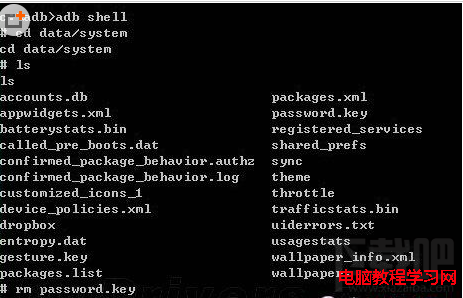 手機密碼忘了怎麼解鎖?三種常見方法
忘記手機密碼時,可先判斷是否開啟 USB 調試、是否登入 Google 帳號,以及是否能接受清除資料。 方法一:ADB 解鎖 前提是 USB 調試已開啟。將手機連電腦,
 Android Menu 按鍵功能
Android 應用可透過選單按鍵彈出選項。開發者可覆寫 onCreateOptionsMenu 加入選單項目,再覆寫 onOptionsItemSelected 處理點