

編輯:關於 Android 程式設計
在 Android 的 Java 層與 Native(C++)層交互時,經常會用到一些由 Linux 內核頭檔案自動生成的系統常量,例如路徑最大長度、檔名最大長度、可開啟檔案數上限等。這些定義被 bionic libc 引入,供使用者態程式呼叫內核時參考。下面是一個典型的 linux/limits.h 頭檔案內容:
/**************************************************************************** **************************************************************************** *** *** This header was automatically generated from a Linux kernel header *** of the same name, to make information necessary for userspace to *** call into the kernel available to libc. It contains only constants, *** structures, and macros generated from the original header, and thus, *** contains no copyrightable information. *** *** To edit the content of this header, modify the corresponding *** source file (e.g. under external/kernel-headers/original/) then *** run bionic/libc/kernel/tools/update_all.py *** *** Any manual change here will be lost the next time this script will *** be run. You've been warned! *** *** **************************************************************************** ****************************************************************************/ #ifndef _LINUX_LIMITS_H #define _LINUX_LIMITS_H #define NR_OPEN 1024 #define NGROUPS_MAX 65536 /* WARNING: DO NOT EDIT, AUTO-GENERATED CODE - SEE TOP FOR INSTRUCTIONS */ #define ARG_MAX 131072 #define CHILD_MAX 999 #define OPEN_MAX 256 #define LINK_MAX 127 /* WARNING: DO NOT EDIT, AUTO-GENERATED CODE - SEE TOP FOR INSTRUCTIONS */ #define MAX_CANON 255 #define MAX_INPUT 255 #define NAME_MAX 255 #define PATH_MAX 4096 /* WARNING: DO NOT EDIT, AUTO-GENERATED CODE - SEE TOP FOR INSTRUCTIONS */ #define PIPE_BUF 4096 #define XATTR_NAME_MAX 255 #define XATTR_SIZE_MAX 65536 #define XATTR_LIST_MAX 65536 /* WARNING: DO NOT EDIT, AUTO-GENERATED CODE - SEE TOP FOR INSTRUCTIONS */ #define RTSIG_MAX 32 #endif
其中幾個較常用的常量含義如下:
NAME_MAX(255):單個檔名(不含路徑)的最大位元組數。
PATH_MAX(4096):完整路徑字串的最大長度。
OPEN_MAX(256):單行程式可同時開啟的檔案描述符數量上限。
PIPE_BUF(4096):管道一次原子寫入的最大位元組數。
需要特別注意的是,這份檔案開頭反覆強調「不要手動修改」,因為它是由腳本從內核源碼自動生成的,任何手改都會在下次執行 update_all.py 時被覆蓋。若真要調整,應去修改 external/kernel-headers/original/ 下對應的原始檔案,再重新執行腳本生成。
 Android Matrix 矩陣詳解與進階(一):原理推導與基礎方法全解
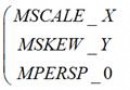
1. 概述 這一系列會把 Matrix 的每個方法與用法完整講一遍。Matrix 就是「矩陣」。前面談 ColorFilter 時我們見過 ColorMatrix,那是一
 自定義 DragGrid:為 GridView 加上長按拖拽排序能力
系統的 GridView 只支持展示和點擊,想要「長按某項然後拖到別的位置完成排序」就得自己動手。下面是一個可直接複用的 DragGrid 實現,最終效果如下: 實現思
 Android Studio 上最值得安裝的實用插件推薦
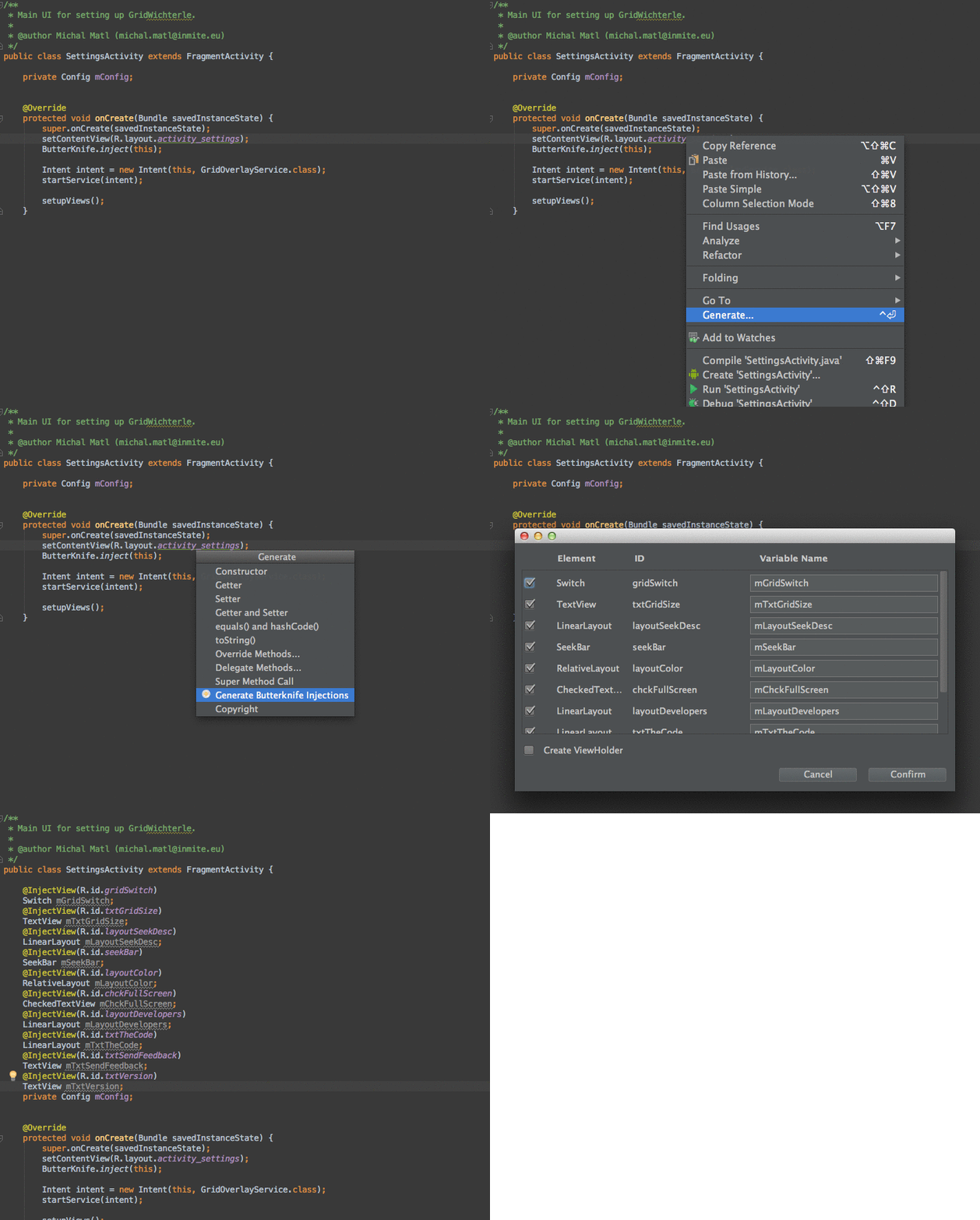
善用插件能大幅提升開發效率。以下整理幾款在 Android Studio 上相當實用的插件,涵蓋程式碼生成、JSON 轉換、生命週期管理等多種情境。 Android Bu
 Android 接入支付寶支付:從申請商家帳號到 RSA 簽章配置的完整流程
行動支付的普及,讓「付款」幾乎成了每個商業類 App 的標配。過去支付模組不在我負責的範圍內,總覺得那是塊硬骨頭;直到這次專案由我承接訂單模組,真正動手之後才發現——只要