

編輯:關於 Android 程式設計
在 Android 裡,檔案放的位置不同,讀取方式也會跟著不同。本文把資源檔、data 區、SD 卡三種儲存位置的讀寫,以及 RandomAccessFile 的進階用法一次整理清楚,並附上重點提醒,方便日後查閱。
APK 內的資源分兩種讀法。raw 目錄用 openRawResource,assets 目錄則用 getAssets().open():
// 從 raw 讀取 String res = ""; try{ InputStream in = getResources().openRawResource(R.raw.test); int length = in.available(); byte [] buffer = new byte[length]; in.read(buffer); res = EncodingUtils.getString(buffer, "BIG5"); in.close(); }catch(Exception e){ e.printStackTrace(); } // 從 asset 讀取 String fileName = "test.txt"; String res=""; try{ InputStream in = getResources().getAssets().open(fileName); int length = in.available(); byte [] buffer = new byte[length]; in.read(buffer); in.close(); res = EncodingUtils.getString(buffer, "UTF-8"); }catch(Exception e){ e.printStackTrace(); }
這個私有目錄只能用 openFileOutput 與 openFileInput 操作:
public void writeFile(String fileName,String writestr) throws IOException{ try{ FileOutputStream fout =openFileOutput(fileName, MODE_PRIVATE); byte [] bytes = writestr.getBytes(); fout.write(bytes); fout.close(); } catch(Exception e){ e.printStackTrace(); } } public String readFile(String fileName) throws IOException{ String res=""; try{ FileInputStream fin = openFileInput(fileName); int length = fin.available(); byte [] buffer = new byte[length]; fin.read(buffer); res = EncodingUtils.getString(buffer, "UTF-8"); fin.close(); } catch(Exception e){ e.printStackTrace(); } return res; }
SD 卡(/mnt/sdcard/)上的檔案則直接用 FileOutputStream 與 FileInputStream:
public void writeFileSdcardFile(String fileName,String write_str) throws IOException{ try{ FileOutputStream fout = new FileOutputStream(fileName); byte [] bytes = write_str.getBytes(); fout.write(bytes); fout.close(); } catch(Exception e){ e.printStackTrace(); } } public String readFileSdcardFile(String fileName) throws IOException{ String res=""; try{ FileInputStream fin = new FileInputStream(fileName); int length = fin.available(); byte [] buffer = new byte[length]; fin.read(buffer); res = EncodingUtils.getString(buffer, "UTF-8"); fin.close(); } catch(Exception e){ e.printStackTrace(); } return res; }
除了讀寫,File 類還提供不少實用方法:取得名稱與父目錄、絕對與相對路徑、建立檔案或資料夾、判斷型別、列出內容、重新命名與刪除等。
String Name = File.getName(); String parentPath = File.getParent(); String path = File.getAbsoultePath(); String path = File.getPath(); File.createNewFile(); File.mkDir(); File.isDirectory(); File[] files = File.listFiles(); File.renameTo(dest); File.delete();
RandomAccessFile 的功能相當強大,可以像 seek 一樣跳到檔案的任意位置,從當前指標處開始讀寫。它有兩種常見的建構方式:
new RandomAccessFile(f,"rw");//讀寫方式 new RandomAccessFile(f,"r");//只讀方式
以下範例示範了如何用 RandomAccessFile 寫入多種資料型別、讀回,並完成一次檔案複製:
import java.io.*; public class RandomAccessFileDemo { public static void main(String[] args) throws Exception { RandomAccessFile file = new RandomAccessFile("file", "rw"); file.writeInt(20); file.writeDouble(8.236598); file.writeUTF("這是一個UTF字符串"); file.writeBoolean(true); file.writeShort(395); file.writeLong(2325451l); file.writeUTF("又是一個UTF字符串"); file.writeFloat(35.5f); file.writeChar('a'); file.seek(0); System.out.println(file.readInt()); System.out.println(file.readDouble()); System.out.println(file.readUTF()); file.skipBytes(3); System.out.println(file.readLong()); file.skipBytes(file.readShort()); System.out.println(file.readFloat()); file.seek(0); RandomAccessFile fileCopy=new RandomAccessFile("fileCopy","rw"); int len=(int)file.length(); byte[] b=new byte[len]; file.readFully(b); fileCopy.write(b); System.out.println("復制完成!"); } }
FileInputStream 與 InputStream 都提供了 skip 與帶 offset 的 read 方法,能達到類似 seek 的效果:
public long skip (long byteCount); public int read (byte[] buffer, int offset, int length);
public String getRawString() throws IOException { String str = null; InputStream in = getResources().openRawResource(R.raw.read_raw); int length = in.available(); byte[] buffer = new byte[length]; in.skip(2); in.read(buffer,0,3); in.skip(3); in.read(buffer,0,3); str = EncodingUtils.getString(buffer, "BIG5"); in.close(); return str; }
要注意的是:skip 與 read 都是從「當前位置」開始,因此實際應用時最好檢查 skip 的返回值;此外也能用 reset 把位置重置回起點。
public String readFileData(String fileName) throws IOException{ String res=""; try{ FileInputStream fin = new FileInputStream(fileName); InputStream in = new BufferedInputStream(fin); ... } catch(Exception e){ e.printStackTrace(); } }
APK 的資源檔大小建議不超過 1M。若真的超了,可以先把資料複製到 data 目錄再使用:
public boolean assetsCopyData(String strAssetsFilePath, String strDesFilePath){ boolean bIsSuc = true; InputStream inputStream = null; OutputStream outputStream = null; File file = new File(strDesFilePath); if (!file.exists()){ try { file.createNewFile(); Runtime.getRuntime().exec("chmod 766 " + file); } catch (IOException e) { bIsSuc = false; } }else{ return true; } try { inputStream = getAssets().open(strAssetsFilePath); outputStream = new FileOutputStream(file); int nLen = 0 ; byte[] buff = new byte[1024*1]; while((nLen = inputStream.read(buff)) > 0){ outputStream.write(buff, 0, nLen); } } catch (IOException e) { bIsSuc = false; }finally{ try { if (outputStream != null){ outputStream.close(); } if (inputStream != null){ inputStream.close(); } } catch (IOException e) { bIsSuc = false; } } return bIsSuc; }
• APK 的 raw 與 asset 兩種資源用不同方式開啟,且只能讀、大小建議不超過 1M。
• SD 卡用 FileInputStream / FileOutputStream。
• data 私有目錄只能用 openFileOutput / openFileInput。
• RandomAccessFile 可跳轉任意位置讀寫,但僅限檔案操作。
• InputStream 與 FileInputStream 都能靠 skip 與 read(buff, offset, length) 達成隨機讀取。
 Android 四大圖片緩存庫原理剖析與特性對比
本文整理自我在 MDCC 上的分享內容(略有調整),也是源碼解析系列在首期發布時提到的後續規劃之一。接下來我會從整體架構與底層原理兩個維度,對幾款主流的圖片緩存庫做橫向對
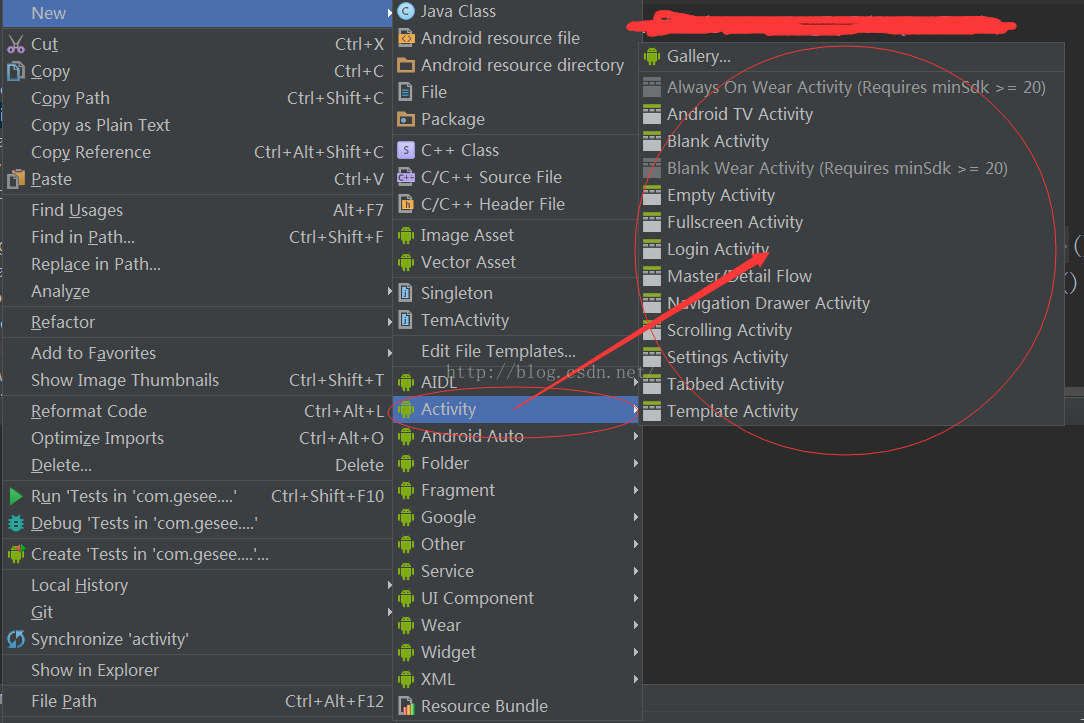 動手打造 Android Studio 自訂 Activity 模板
每次在 Android Studio(以下簡稱 AS)裡新增一個 Activity,只要選擇「Empty Activity」,IDE 就會自動幫你生成對應的 XML 佈局
 Android 4.4 WebView 硬件渲染:Chromium 内核中那几个"不一样"的类
Android 4.4 的 WebView 换成了 Chromium 内核,但它的硬件渲染路径和原生 Chromium 差别很大。原生 Chromium 依赖多进程 GP
 移動端 HTML5:去掉 input 日期輸入框的默認白底與邊框(兼容 Android 與 iOS)
前兩天做一個在微信內打開的 HTML5 頁面,其中有個訂單查詢需要選擇日期。一開始直接用了 <input type=date>,沒加任何樣式,結果渲染出來是白