

編輯:關於 Android 程式設計
在 Android 中加載網路圖片時,不能直接在主線程中執行網絡請求,否則可能引發 ANR 或網絡異常。常見做法是開啟子線程下載圖片,再透過 Handler 把結果傳回主線程,最後更新 ImageView。
首先需要在 AndroidManifest.xml 中聲明網絡權限。
<uses-permission android:name="android.permission.INTERNET" />布局中放置一個按鈕與一個 ImageView,用於觸發加載並展示圖片。
<LinearLayout xmlns:android="https://schemas.android.com/apk/res/android"
    android:orientation="vertical"
    android:layout_width="match_parent"
    android:layout_height="match_parent">

    <Button
        android:id="@+id/button1"
        android:layout_width="wrap_content"
        android:layout_height="wrap_content"
        android:text="加載圖片" />

    <ImageView
        android:id="@+id/image1"
        android:layout_width="match_parent"
        android:layout_height="500dp" />

</LinearLayout>點擊按鈕後開啟新線程,在線程中訪問圖片 URL,將輸入流轉換為 Bitmap,然後通過 Handler 發送消息給主線程。
public class MainActivity extends AppCompatActivity {
    private Button button;
    private ImageView imageView;
    private String imagePath = "https://pica.nipic.com/2007-11-09/200711912453162_2.jpg";
    private final int IS_FINISH = 1;

    private Handler handler = new Handler() {
        @Override
        public void handleMessage(Message msg) {
            Bitmap bitmap = (Bitmap) msg.obj;
            imageView.setImageBitmap(bitmap);
        }
    };

    @Override
    protected void onCreate(Bundle savedInstanceState) {
        super.onCreate(savedInstanceState);
        setContentView(R.layout.activity_main);

        button = findViewById(R.id.button1);
        imageView = findViewById(R.id.image1);

        button.setOnClickListener(v -> new Thread(new MyClass()).start());
    }

    public class MyClass implements Runnable {
        @Override
        public void run() {
            Bitmap bitmap = null;
            try {
                URL url = new URL(imagePath);
                HttpURLConnection connection = (HttpURLConnection) url.openConnection();
                connection.setDoInput(true);
                connection.connect();
                InputStream inputStream = connection.getInputStream();
                bitmap = BitmapFactory.decodeStream(inputStream);
            } catch (MalformedURLException e) {
                e.printStackTrace();
            } catch (IOException e) {
                e.printStackTrace();
            }

            Message message = Message.obtain();
            message.obj = bitmap;
            message.what = IS_FINISH;
            handler.sendMessage(message);
        }
    }
}
這種方式雖然簡單,但在實際項目中仍建議加入加載狀態、異常處理、緩存策略以及圖片壓縮,避免內存溢出。如果使用更現代的方式,也可以考慮使用 Glide、Picasso 或 Coil 等圖片加載庫。
 FragmentTabHost 的使用方式與布局重點
在需要底部切換多個 Fragment 的頁面中,FragmentTabHost 是一個很方便的容器。它能管理多個 Tab,並在切換時掛載對應的 Fragment,適合主頁
 Android Lint 使用指南:用靜態檢查做資源清理
做資源清理時,Android Lint 幾乎是必備工具。本文記錄 Lint 的用法,以及實戰中踩到的幾個坑。 Lint 是 SDK Tools 16(ADT 16)之後才
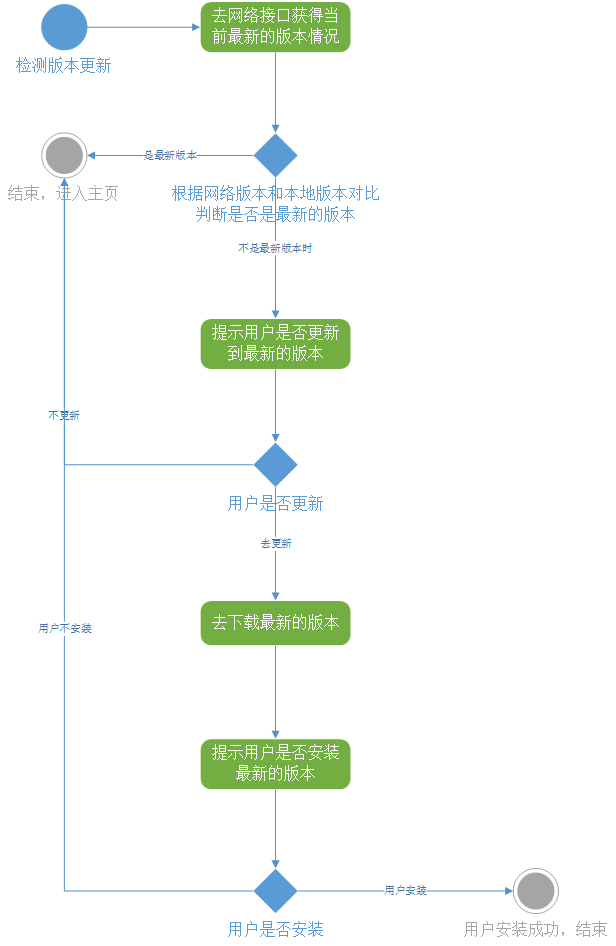 Android進階教學:Splash啟動頁的版本更新業務邏輯
本單元聚焦於Android進階開發中常見的Splash(啟動引導頁)設計,重點在於梳理啟動頁在「版本更新」情境下的業務判斷流程:應用啟動時,Splash頁會先確認目前的版
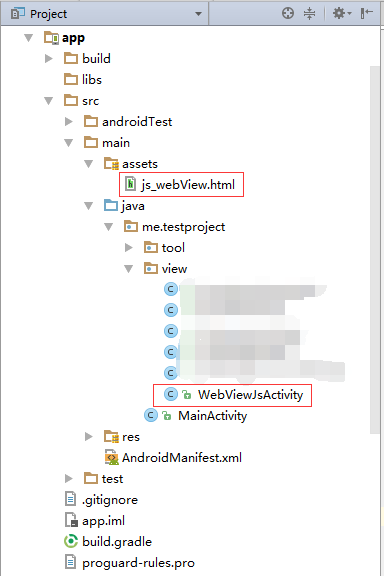 Android WebView 與 JavaScript 互相呼叫實作
WebView 與 JavaScript 互動 在混合式 App 中,Android 原生頁面常需要與 H5 頁面互動。例如 H5 要取得 App 的使用者資訊,或 Ap