

編輯:關於 Android 程式設計
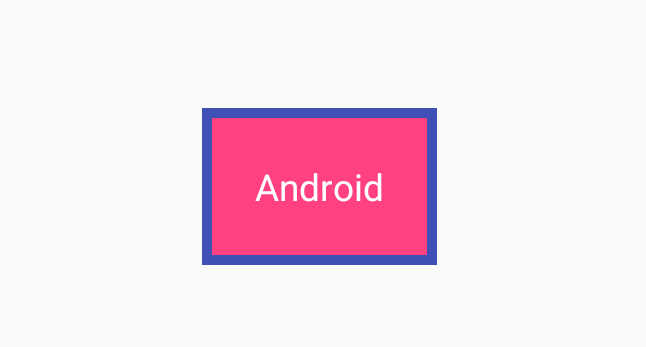
本文將示範如何透過繼承 TextView 並自訂 onDraw 方法,繪製出具有雙層邊框效果的背景,供需要的朋友參考。
效果預覽:
實作流程:
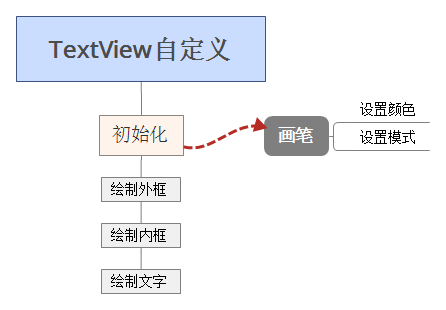
1. 初始化:設定畫筆
mPaintIn = new Paint(); mPaintIn.setAntiAlias(true); mPaintIn.setDither(true); mPaintIn.setStyle(Paint.Style.FILL); mPaintIn.setColor(getResources().getColor(R.color.colorPrimary)); mPaintOut = new Paint(); mPaintOut.setAntiAlias(true); mPaintOut.setDither(true); mPaintOut.setStyle(Paint.Style.FILL); mPaintOut.setColor(getResources().getColor(R.color.colorAccent));
2. 繪製外框、內框與文字
取得元件的寬高
int width = getMeasureWidth(); int height = getMeasureHeight();
進行繪製
@Override protected void onDraw(Canvas canvas) { //繪制背景,在繪制文字之前繪制 canvas.drawRect(new Rect(0, 0, getMeasuredWidth(), getMeasuredHeight()), mPaintIn); canvas.drawRect(new Rect(10, 10, getMeasuredWidth()-10, getMeasuredHeight()-10), mPaintOut); super.onDraw(canvas); }
以上就是本文的全部內容,希望對大家學習 Android 自訂元件有所幫助,也歡迎多多支持本站。
 Android 方向傳感器詳解與實作
前言 方向傳感器常用於指南針、地圖與水平儀等應用。Android 的傳感器可分為動作、環境與位置三類,也可分為硬體與軟體型。方向傳感器屬於軟體型,通常結合加速度計與地磁感
 Android Touch事件分發機制下篇:ViewGroup與View的傳遞細節
問題回顧上一篇已經說明Touch事件在Activity與DecorView中的傳遞規則。本篇重點分析事件進入ViewGroup後,如何在ViewGroup與子View之間
 Android BLE 基礎框架使用詳解(ViseBluetooth)
前言 研究了一段時間的藍牙開發後,我發現網上相關資料比較貧乏,不像其他 Android 資料那麼齊全,大部分內容都得從藍牙聯盟 SIG 官網(https://www.bl
 一個應用對接多家廣告平台:版本化打包與自動化編譯實踐
Android 的廣告平台多如牛毛,而各個應用市場對不同平台的接受度差別很大。開發者想接廣告,通常得先回答兩個問題: 接哪個平台才賺錢? 接哪個平台才不會被市場拒絕?