

編輯:關於 Android 程式設計
本文系統性地梳理 Android 藍牙開發的整體架構、核心類的使用,並透過完整實例演示藍牙客戶端與服務端的通信,最後深入探討設備的自動配對機制。
1、JAVA 層:frameworks/base/core/java/android/bluetooth/,包含 bluetooth 的 JAVA 類。
2、JNI 層:frameworks/base/core/jni/ 下以 android_bluetooth_ 開頭的文件,定義了 bluez 透過 JNI 到上層的接口;android_server_bluetoothservice.cpp 則調用硬件適配層的接口 system/bluetooth/bluedroid/bluetooth.c。
3、bluez 庫:external/bluez/,這是 bluez 用戶空間的開源庫,包含多種協議,最終生成 libbluetooth.so。
4、硬件適配層:system/bluetooth/bluedroid/bluetooth.c 包含對硬件操作的接口;system/bluetooth/data/ 下是一些配置文件,需複製到 /etc/bluetooth/。
1、BluetoothAdapter(藍牙適配器):可判斷藍牙設備是否可用。常用方法有 cancelDiscovery(取消搜索)、disable(關閉藍牙)、enable(打開藍牙但不彈提示)、getAddress(獲取本地地址)、getDefaultAdapter(獲取默認適配器)、getName(獲取本地名稱)、getRemoteDevice(依地址獲取遠程設備)、getState(獲取當前狀態)、isDiscovering(判斷是否正在查找)、isEnabled(判斷是否已開啟)、listenUsingRfcommWithServiceRecord(依名稱與 UUID 創建 BluetoothServerSocket,是服務端的第一步)、startDiscovery(開始搜索)等。若要讓系統彈出是否開啟藍牙的提示,可使用如下代碼:
Intent enabler = new Intent(BluetoothAdapter.ACTION_REQUEST_ENABLE);
startActivityForResult(enabler, reCode);
2、BluetoothDevice(描述一個藍牙設備):核心是 createRfcommSocketToServiceRecord(UUID),依 UUID 創建並返回 BluetoothSocket;getAddress、getName 用法同 BluetoothAdapter。此外還有 setPin、createBond、cancelPairingUserInput 等隱藏方法,涉及自動配對,需透過反射調用。
3、BluetoothServerSocket(服務端):主要方法是兩個重載的 accept()(會阻塞線程直到收到請求或超時,需放在新線程中執行,返回 BluetoothSocket)與 close()。
4、BluetoothSocket(客戶端):包含 close、connect、getInputStream、getOutputStream、getRemoteDevice 五個方法,是實際進行數據收發的載體。
基於安全性考慮,設置「可被搜索」後系統默認給出 120 秒窗口供其他設備發現。開啟可發現、搜索、關閉、創建客戶端與服務端的核心代碼要點如下:客戶端透過 createRfcommSocketToServiceRecord 建立 socket 並 connect;服務端透過 listenUsingRfcommWithServiceRecord 建立 serverSocket 並 accept 等待連接,之後即可透過輸入輸出流收發數據。注意:tcp_ip 相關通信需先在系統設定中完成藍牙配對,只有配對成功的設備才能進行 socket 通信。
AndridManifest.xml:
<manifest xmlns:android="https://schemas.android.com/apk/res/android" package="com.example.thecaseforbluetooth" android:versionCode="1" android:versionName="1.0" > <uses-sdk android:minSdkVersion="8" android:targetSdkVersion="15" /> <uses-permission android:name="android.permission.BLUETOOTH_ADMIN" /> <uses-permission android:name="android.permission.BLUETOOTH" /> <application android:icon="@drawable/ic_launcher" android:label="@string/app_name" android:theme="@style/AppTheme" > <activity android:name=".BluetoothActivity" android:label="@string/title_activity_bluetooth" > <intent-filter> <action android:name="android.intent.action.MAIN" /> <category android:name="android.intent.category.LAUNCHER" /> </intent-filter> </activity> </application> </manifest>
main.xml:
<LinearLayout xmlns:android="https://schemas.android.com/apk/res/android" xmlns:tools="https://schemas.android.com/tools" android:id="@+id/LinearLayout1" android:layout_width="match_parent" android:layout_height="match_parent" android:orientation="vertical" > <Button android:layout_width="wrap_content" android:layout_height="wrap_content" android:id="@+id/btnSearch" android:text="查找設備" /> <Button android:layout_width="wrap_content" android:layout_height="wrap_content" android:id="@+id/btnExit" android:text="退出應用" /> <Button android:layout_width="wrap_content" android:layout_height="wrap_content" android:id="@+id/btnDis" android:text="設置可被發現" /> <Button android:layout_width="wrap_content" android:layout_height="wrap_content" android:id="@+id/btnserver" android:text="啟動服務端" /> <ToggleButton android:layout_width="wrap_content" android:layout_height="wrap_content" android:id="@+id/tbtnSwitch" android:text="開/關 藍牙設備" /> <ListView android:layout_width="fill_parent" android:layout_height="wrap_content" android:id="@+id/lvDevices" /> </LinearLayout>
BluetoothActivity.java:
package com.example.thecaseforbluetooth; import java.util.ArrayList; import java.util.Set; import android.app.Activity; import android.bluetooth.BluetoothAdapter; import android.bluetooth.BluetoothDevice; import android.content.BroadcastReceiver; import android.content.Context; import android.content.Intent; import android.content.IntentFilter; import android.os.Bundle; import android.view.Menu; import android.view.View; import android.view.View.OnClickListener; import android.widget.AdapterView; import android.widget.AdapterView.OnItemClickListener; import android.widget.ArrayAdapter; import android.widget.Button; import android.widget.ListView; import android.widget.Toast; import android.widget.ToggleButton; public class BluetoothActivity extends Activity { public Button searchBtn;//搜索藍牙設備 public Button exitBtn;//退出應用 public Button discoverBtn;//設置可被發現 public ToggleButton openBtn;//開關藍牙設備 public Button serverbtn; public ListView listView;//藍牙設備清單 public ArrayAdapter<String> adapter; public ArrayList<String> list =new ArrayList<String>(); private BluetoothAdapter bluetoothAdapter = BluetoothAdapter.getDefaultAdapter(); Set<BluetoothDevice> bondDevices ; public Context context ; @Override public void onCreate(Bundle savedInstanceState) { super.onCreate(savedInstanceState); setContentView(R.layout.main); searchBtn = (Button)findViewById(R.id.btnSearch); exitBtn = (Button)findViewById(R.id.btnExit); discoverBtn = (Button)findViewById(R.id.btnDis); openBtn = (ToggleButton)findViewById(R.id.tbtnSwitch); serverbtn = (Button)findViewById(R.id.btnserver); listView = (ListView)findViewById(R.id.lvDevices); context = getApplicationContext(); adapter = new ArrayAdapter<String>(this, android.R.layout.simple_list_item_1,list); listView.setAdapter(adapter); openBtn.setChecked(false); //注冊廣播接收信號 IntentFilter intent = new IntentFilter(); intent.addAction(BluetoothDevice.ACTION_FOUND);// 用BroadcastReceiver來取得搜索結果 intent.addAction(BluetoothAdapter.ACTION_SCAN_MODE_CHANGED); //每當掃描模式變化的時候,應用程序可以為通過ACTION_SCAN_MODE_CHANGED值來監聽全局的消息通知。比如,當設備停止被搜尋以後,該消息可以被系統通知給應用程序。 intent.addAction(BluetoothAdapter.ACTION_STATE_CHANGED); //每當藍牙模塊被打開或者關閉,應用程序可以為通過ACTION_STATE_CHANGED值來監聽全局的消息通知。 registerReceiver(searchReceiver, intent); //顯示已配對設備以及搜索未配對設備 searchBtn.setOnClickListener(new OnClickListener() { @Override public void onClick(View v) { // TODO Auto-generated method stub if(bluetoothAdapter.isDiscovering()){ bluetoothAdapter.cancelDiscovery(); } list.clear(); bondDevices = bluetoothAdapter.getBondedDevices(); for(BluetoothDevice device : bondDevices) { String str = " 已配對完成 " + device.getName() +" " + device.getAddress(); list.add(str); adapter.notifyDataSetChanged(); } bluetoothAdapter.startDiscovery(); } }); //退出應用 exitBtn.setOnClickListener(new OnClickListener() { @Override public void onClick(View v) { // TODO Auto-generated method stub BluetoothActivity.this.finish(); } }); //設置藍牙設備可發現 discoverBtn.setOnClickListener(new OnClickListener() { @Override public void onClick(View v) { // TODO Auto-generated method stub Intent discoverIntent = new Intent(BluetoothAdapter.ACTION_REQUEST_DISCOVERABLE); discoverIntent.putExtra(BluetoothAdapter.EXTRA_DISCOVERABLE_DURATION, 300); startActivity(discoverIntent); } }); //開關藍牙設備 openBtn.setOnClickListener(new OnClickListener() { @Override public void onClick(View v) { // TODO Auto-generated method stub if(openBtn.isChecked() == true){ bluetoothAdapter.disable(); } else if(openBtn.isChecked() == false){ bluetoothAdapter.enable(); } } }); //作為服務端開啟 serverbtn.setOnClickListener(new OnClickListener() { @Override public void onClick(View v) { // TODO Auto-generated method stub ServerThread serverThread = new ServerThread(bluetoothAdapter, context); Toast.makeText(context, "server 端啟動", 5000).show(); serverThread.start(); } }); listView.setOnItemClickListener(new ItemClickListener()); } @Override public void onStart() { super.onStart(); // If BT is not on, request that it be enabled. if(bluetoothAdapter == null){ Toast.makeText(context, "藍牙設備不可用", 5000).show(); } if (!bluetoothAdapter.isEnabled()) { Intent enableIntent = new Intent( BluetoothAdapter.ACTION_REQUEST_ENABLE); startActivityForResult(enableIntent, 3); } } @Override public boolean onCreateOptionsMenu(Menu menu) { getMenuInflater().inflate(R.menu.main, menu); return true; } private final BroadcastReceiver searchReceiver = new BroadcastReceiver() { @Override public void onReceive(Context context, Intent intent) { // TODO Auto-generated method stub String action = intent.getAction(); BluetoothDevice device = null; if(BluetoothDevice.ACTION_FOUND.equals(action)){ device = intent.getParcelableExtra(BluetoothDevice.EXTRA_DEVICE); if (device.getBondState() == BluetoothDevice.BOND_NONE) { Toast.makeText(context, device.getName()+"", 5000).show(); String str = " 未配對完成 " + device.getName() +" " + device.getAddress(); if (list.indexOf(str) == -1)// 防止重復添加 list.add(str); } adapter.notifyDataSetChanged(); } } }; public class ItemClickListener implements OnItemClickListener { @Override public void onItemClick(AdapterView<?> arg0, View arg1, int arg2, long arg3) { // TODO Auto-generated method stub if(bluetoothAdapter.isDiscovering()) bluetoothAdapter.cancelDiscovery(); String str = list.get(arg2); String address = str.substring(str.length() - 17); BluetoothDevice btDev = bluetoothAdapter.getRemoteDevice(address); ClientThread clientThread = new ClientThread(btDev, context); clientThread.start(); }} }
Bluetoothprotocol.java:
package com.example.thecaseforbluetooth; public interface Bluetoothprotocol { public static final String PROTOCOL_SCHEME_L2CAP = "btl2cap"; public static final String PROTOCOL_SCHEME_RFCOMM = "btspp"; public static final String PROTOCOL_SCHEME_BT_OBEX = "btgoep"; public static final String PROTOCOL_SCHEME_TCP_OBEX = "tcpobex"; }
ServerThread.java:
package com.example.thecaseforbluetooth; import java.io.IOException; import java.io.InputStream; import java.io.OutputStream; import java.util.UUID; import android.bluetooth.BluetoothAdapter; import android.bluetooth.BluetoothServerSocket; import android.bluetooth.BluetoothSocket; import android.content.Context; import android.os.Message; import android.util.Log; import android.widget.Toast; public class ServerThread extends Thread { public BluetoothServerSocket mserverSocket; public BluetoothAdapter bluetoothAdapter; public BluetoothSocket socket; public Context context; public ServerThread(BluetoothAdapter bluetoothAdapter,Context context) { this.bluetoothAdapter = bluetoothAdapter; this.context = context; } public void run() { try { /* 創建一個藍牙服務器 * 參數分別:服務器名稱、UUID */ mserverSocket = bluetoothAdapter.listenUsingRfcommWithServiceRecord(Bluetoothprotocol.PROTOCOL_SCHEME_RFCOMM, UUID.fromString("00001101-0000-1000-8000-00805F9B34FB")); // /* 接受客戶端的連接請求 */ socket = mserverSocket.accept(); //下面代碼作者偷懶,讀寫另外起一個線程最好 //接收數據 byte[] buffer = new byte[1024]; int bytes; InputStream mmInStream = null; try { mmInStream = socket.getInputStream(); } catch (IOException e1) { // TODO Auto-generated catch block e1.printStackTrace(); } System.out.println("zhoulc server"); while(true){ if( (bytes = mmInStream.read(buffer)) > 0 ) { byte[] buf_data = new byte[bytes]; for(int i=0; i<bytes; i++) { buf_data[i] = buffer[i]; } String s = new String(buf_data); System.out.println(s+"zhoulc server is in"); } } } catch (Exception e) { // TODO Auto-generated catch block e.printStackTrace(); } } }
ClientThread.java:
package com.example.thecaseforbluetooth; import java.io.IOException; import java.io.OutputStream; import java.util.UUID; import android.bluetooth.BluetoothDevice; import android.bluetooth.BluetoothSocket; import android.content.Context; import android.widget.Toast; public class ClientThread extends Thread { public BluetoothSocket socket; public BluetoothDevice device; public Context context; public ClientThread(BluetoothDevice device,Context context){ this.device = device; this.context = context; } public void run() { try { //創建一個Socket連接:只需要服務器在注冊時的UUID號 socket = device.createRfcommSocketToServiceRecord(UUID.fromString("00001101-0000-1000-8000-00805F9B34FB")); //連接 socket.connect(); //下面代碼作者偷懶,讀寫另外起一個線程最好 //發送數據 if (socket == null) { Toast.makeText(context, "鏈接失敗", 5000).show(); return; } System.out.println("zhoulc client"); while(true){ try { System.out.println("zhoulc client is in"); String msg = "hello everybody I am client"; OutputStream os = socket.getOutputStream(); os.write(msg.getBytes()); } catch (IOException e) { // TODO Auto-generated catch block e.printStackTrace(); } } } catch (IOException e) { e.printStackTrace(); } } }
自動配對需要兩個設備都安裝相應的 apk。透過反射調用 BluetoothDevice 的 setPin、createBond、cancelPairingUserInput 等隱藏方法,可實現設置密鑰、創建配對請求、取消密鑰輸入等操作。其中 createBond 最終會調到源碼的 createBond 方法,寫入匹配密鑰並進入 jni 註冊回呼;setPin 用於設置密鑰;cancelPairingUserInput 則用於取消密鑰框,通常不建議與 setPin 一起使用,因為它們會互相移除同一 map 中的鍵值對,具有互斥性。
至於藍牙耳機、手柄等無法手動配置的設備,源碼中提供了一個自動配對方法,會把 pin 值自動設為「0000」。該方法在底層回呼到 java 層的 onRequestPinCode 時被調用,會先判斷是否為底座設備,再嘗試以 0000 進行自動配對。
由於配對相關方法多為 hide,因此需要透過反射調用。下面提供一個通用的工具類 ClsUtils.java:
package cn.bluetooth; import java.lang.reflect.Field; import java.lang.reflect.Method; import android.bluetooth.BluetoothAdapter; import android.bluetooth.BluetoothDevice; import android.util.Log; public class ClsUtils { public static BluetoothDevice remoteDevice=null; /** * 與設備配對 參考源碼:platform/packages/apps/Settings.git * /Settings/src/com/android/settings/bluetooth/CachedBluetoothDevice.java */ @SuppressWarnings("unchecked") static public boolean createBond(@SuppressWarnings("rawtypes") Class btClass, BluetoothDevice btDevice) throws Exception { Method createBondMethod = btClass.getMethod("createBond"); Boolean returnValue = (Boolean) createBondMethod.invoke(btDevice); return returnValue.booleanValue(); } /** * 與設備解除配對 參考源碼:platform/packages/apps/Settings.git * /Settings/src/com/android/settings/bluetooth/CachedBluetoothDevice.java */ @SuppressWarnings("unchecked") static public boolean removeBond(Class btClass, BluetoothDevice btDevice) throws Exception { Method removeBondMethod = btClass.getMethod("removeBond"); Boolean returnValue = (Boolean) removeBondMethod.invoke(btDevice); return returnValue.booleanValue(); } @SuppressWarnings("unchecked") static public boolean setPin(Class btClass, BluetoothDevice btDevice, String str) throws Exception { try { Method removeBondMethod = btClass.getDeclaredMethod("setPin", new Class[] {byte[].class}); Boolean returnValue = (Boolean) removeBondMethod.invoke(btDevice, new Object[] {str.getBytes()}); Log.d("returnValue", "setPin is success " +btDevice.getAddress()+ returnValue.booleanValue()); } catch (SecurityException e) { // throw new RuntimeException(e.getMessage()); e.printStackTrace(); } catch (IllegalArgumentException e) { // throw new RuntimeException(e.getMessage()); e.printStackTrace(); } catch (Exception e) { // TODO Auto-generated catch block e.printStackTrace(); } return true; } // 取消用戶輸入 @SuppressWarnings("unchecked") static public boolean cancelPairingUserInput(Class btClass, BluetoothDevice device) throws Exception { Method createBondMethod = btClass.getMethod("cancelPairingUserInput"); // cancelBondProcess() Boolean returnValue = (Boolean) createBondMethod.invoke(device); Log.d("returnValue", "cancelPairingUserInput is success " + returnValue.booleanValue()); return returnValue.booleanValue(); } // 取消配對 @SuppressWarnings("unchecked") static public boolean cancelBondProcess(Class btClass, BluetoothDevice device) throws Exception { Method createBondMethod = btClass.getMethod("cancelBondProcess"); Boolean returnValue = (Boolean) createBondMethod.invoke(device); return returnValue.booleanValue(); } /** * * @param clsShow */ @SuppressWarnings("unchecked") static public void printAllInform(Class clsShow) { try { // 取得所有方法 Method[] hideMethod = clsShow.getMethods(); int i = 0; for (; i < hideMethod.length; i++) { //Log.e("method name", hideMethod.getName() + ";and the i is:" // + i); } // 取得所有常量 Field[] allFields = clsShow.getFields(); for (i = 0; i < allFields.length; i++) { //Log.e("Field name", allFields.getName()); } } catch (SecurityException e) { // throw new RuntimeException(e.getMessage()); e.printStackTrace(); } catch (IllegalArgumentException e) { // throw new RuntimeException(e.getMessage()); e.printStackTrace(); } catch (Exception e) { // TODO Auto-generated catch block e.printStackTrace(); } } }
Bluetooth1.java 為主介面,負責所有界面操作:
package cn.bluetooth; import java.io.IOException; import java.util.ArrayList; import java.util.List; import android.app.Activity; import android.bluetooth.BluetoothAdapter; import android.bluetooth.BluetoothDevice; import android.bluetooth.BluetoothSocket; import android.content.BroadcastReceiver; import android.content.Context; import android.content.Intent; import android.content.IntentFilter; import android.os.Bundle; import android.util.Log; import android.view.Menu; import android.view.View; import android.widget.AdapterView; import android.widget.ArrayAdapter; import android.widget.Button; import android.widget.ListView; import android.widget.Toast; import android.widget.ToggleButton; public class Bluetooth1 extends Activity { /** Called when the activity is first created. */ Button btnSearch, btnDis, btnExit; ToggleButton tbtnSwitch; ListView lvBTDevices; ArrayAdapter<String> adtDevices; List<String> lstDevices = new ArrayList<String>(); BluetoothAdapter btAdapt; public static BluetoothSocket btSocket; @Override public void onCreate(Bundle savedInstanceState) { super.onCreate(savedInstanceState); setContentView(R.layout.main); // Button 設置 btnSearch = (Button) this.findViewById(R.id.btnSearch); btnSearch.setOnClickListener(new ClickEvent()); btnExit = (Button) this.findViewById(R.id.btnExit); btnExit.setOnClickListener(new ClickEvent()); btnDis = (Button) this.findViewById(R.id.btnDis); btnDis.setOnClickListener(new ClickEvent()); // ToogleButton設置 tbtnSwitch = (ToggleButton) this.findViewById(R.id.tbtnSwitch); tbtnSwitch.setOnClickListener(new ClickEvent()); // ListView及其數據源 適配器 lvBTDevices = (ListView) this.findViewById(R.id.lvDevices); adtDevices = new ArrayAdapter<String>(this, android.R.layout.simple_list_item_1, lstDevices); lvBTDevices.setAdapter(adtDevices); lvBTDevices.setOnItemClickListener(new ItemClickEvent()); btAdapt = BluetoothAdapter.getDefaultAdapter();// 初始化本機藍牙功能 // ======================================================== // modified by wiley /* * if (btAdapt.getState() == BluetoothAdapter.STATE_OFF)// 讀取藍牙狀態並顯示 * tbtnSwitch.setChecked(false); else if (btAdapt.getState() == * BluetoothAdapter.STATE_ON) tbtnSwitch.setChecked(true); */ if (btAdapt.isEnabled()) { tbtnSwitch.setChecked(false); } else { tbtnSwitch.setChecked(true); } // ============================================================ // 注冊Receiver來獲取藍牙設備相關的結果 IntentFilter intent = new IntentFilter(); intent.addAction(BluetoothDevice.ACTION_FOUND);// 用BroadcastReceiver來取得搜索結果 intent.addAction(BluetoothDevice.ACTION_BOND_STATE_CHANGED); intent.addAction(BluetoothAdapter.ACTION_SCAN_MODE_CHANGED); intent.addAction(BluetoothAdapter.ACTION_STATE_CHANGED); registerReceiver(searchDevices, intent); } private final BroadcastReceiver searchDevices = new BroadcastReceiver() { @Override public void onReceive(Context context, Intent intent) { String action = intent.getAction(); Bundle b = intent.getExtras(); Object[] lstName = b.keySet().toArray(); // 顯示所有收到的消息及其細節 for (int i = 0; i < lstName.length; i++) { String keyName = lstName.toString(); Log.e(keyName, String.valueOf(b.get(keyName))); } BluetoothDevice device = null; // 搜索設備時,取得設備的MAC地址 if (BluetoothDevice.ACTION_FOUND.equals(action)) { device = intent.getParcelableExtra(BluetoothDevice.EXTRA_DEVICE); if (device.getBondState() == BluetoothDevice.BOND_NONE) { String str = " 未配對|" + device.getName() + "|" + device.getAddress(); if (lstDevices.indexOf(str) == -1)// 防止重復添加 lstDevices.add(str); // 獲取設備名稱和mac地址 adtDevices.notifyDataSetChanged(); } }else if(BluetoothDevice.ACTION_BOND_STATE_CHANGED.equals(action)){ device = intent.getParcelableExtra(BluetoothDevice.EXTRA_DEVICE); switch (device.getBondState()) { case BluetoothDevice.BOND_BONDING: Log.d("BlueToothTestActivity", "正在配對......"); break; case BluetoothDevice.BOND_BONDED: Log.d("BlueToothTestActivity", "完成配對"); //connect(device);//連接設備 break; case BluetoothDevice.BOND_NONE: Log.d("BlueToothTestActivity", "取消配對"); default: break; } } } }; @Override protected void onDestroy() { this.unregisterReceiver(searchDevices); super.onDestroy(); android.os.Process.killProcess(android.os.Process.myPid()); } class ItemClickEvent implements AdapterView.OnItemClickListener { @Override public void onItemClick(AdapterView<?> arg0, View arg1, int arg2, long arg3) { if(btAdapt.isDiscovering())btAdapt.cancelDiscovery(); String str = lstDevices.get(arg2); String[] values = str.split("\\|"); String address = values[2]; Log.e("address", values[2]); BluetoothDevice btDev = btAdapt.getRemoteDevice(address); try { Boolean returnValue = false; if (btDev.getBondState() == BluetoothDevice.BOND_NONE) { Toast.makeText(Bluetooth1.this, "遠程設備發送藍牙配對請求", 5000).show(); //這裡只需要createBond就行了 ClsUtils.createBond(btDev.getClass(), btDev); }else if(btDev.getBondState() == BluetoothDevice.BOND_BONDED){ Toast.makeText(Bluetooth1.this, btDev.getBondState()+" ....正在連接..", 1000).show(); } } catch (Exception e) { e.printStackTrace(); } } } class ClickEvent implements View.OnClickListener { @Override public void onClick(View v) { if (v == btnSearch)// 搜索藍牙設備,在BroadcastReceiver顯示結果 { if (btAdapt.getState() == BluetoothAdapter.STATE_OFF) {// 如果藍牙還沒開啟 Toast.makeText(Bluetooth1.this, "請先打開藍牙", 1000) .show(); return; } if (btAdapt.isDiscovering()) btAdapt.cancelDiscovery(); lstDevices.clear(); Object[] lstDevice = btAdapt.getBondedDevices().toArray(); for (int i = 0; i < lstDevice.length; i++) { BluetoothDevice device = (BluetoothDevice) lstDevice[i]; String str = " 已配對|" + device.getName() + "|" + device.getAddress(); lstDevices.add(str); // 獲取設備名稱和mac地址 adtDevices.notifyDataSetChanged(); } setTitle("本機:" + btAdapt.getAddress()); btAdapt.startDiscovery(); } else if (v == tbtnSwitch) {// 本機藍牙啟動/關閉 if (tbtnSwitch.isChecked() == false) btAdapt.enable(); else if (tbtnSwitch.isChecked() == true) btAdapt.disable(); } else if (v == btnDis)// 本機可以被搜索 { Intent discoverableIntent = new Intent( BluetoothAdapter.ACTION_REQUEST_DISCOVERABLE); discoverableIntent.putExtra( BluetoothAdapter.EXTRA_DISCOVERABLE_DURATION, 300); startActivity(discoverableIntent); } else if (v == btnExit) { try { if (btSocket != null) btSocket.close(); } catch (IOException e) { e.printStackTrace(); } Bluetooth1.this.finish(); } } } @Override public boolean onCreateOptionsMenu(Menu menu) { getMenuInflater().inflate(R.menu.main, menu); return true; } }
PairingRequest.java(自動配對的核心部分,activity 只負責創建配對請求):
package cn.bluetooth; import android.bluetooth.BluetoothDevice; import android.content.BroadcastReceiver; import android.content.Context; import android.content.Intent; import android.widget.Toast; public class PairingRequest extends BroadcastReceiver { String strPsw = "0000"; final String ACTION_PAIRING_REQUEST = "android.bluetooth.device.action.PAIRING_REQUEST"; static BluetoothDevice remoteDevice = null; @Override public void onReceive(Context context, Intent intent) { if (intent.getAction().equals(ACTION_PAIRING_REQUEST)) { BluetoothDevice device = intent .getParcelableExtra(BluetoothDevice.EXTRA_DEVICE); if (device.getBondState() != BluetoothDevice.BOND_BONDED) { try { ClsUtils.setPin(device.getClass(), device, strPsw); // 手機和藍牙采集器配對 // ClsUtils.cancelPairingUserInput(device.getClass(), // device); //一般調用不成功,前言裡面講解過了 Toast.makeText(context, "配對信息" + device.getName(), 5000) .show(); } catch (Exception e) { // TODO Auto-generated catch block Toast.makeText(context, "請求連接錯誤...", 1000).show(); } } // */ // pair(device.getAddress(),strPsw); } } }
AndroidManifest.xml(啟動 activity 並註冊接收配對請求的廣播):
<manifest xmlns:android="https://schemas.android.com/apk/res/android" package="cn.bluetooth" android:versionCode="1" android:versionName="1.0" > <uses-sdk android:minSdkVersion="8" android:targetSdkVersion="15" /> <uses-permission android:name="android.permission.BLUETOOTH_ADMIN" /> <uses-permission android:name="android.permission.BLUETOOTH" /> <application android:icon="@drawable/ic_launcher" android:label="@string/app_name" android:theme="@style/AppTheme" > <activity android:name=".Bluetooth1" android:label="@string/title_activity_bluetooth1" > <intent-filter> <action android:name="android.intent.action.MAIN" /> <category android:name="android.intent.category.LAUNCHER" /> </intent-filter> </activity> <receiver android:name=".PairingRequest"> <intent-filter> <action android:name="android.bluetooth.device.action.PAIRING_REQUEST" /> </intent-filter> </receiver> </application> </manifest>
main.xml 布局:
<LinearLayout xmlns:android="https://schemas.android.com/apk/res/android" xmlns:tools="https://schemas.android.com/tools" android:id="@+id/LinearLayout1" android:layout_width="match_parent" android:layout_height="match_parent" android:orientation="vertical" > <Button android:layout_width="wrap_content" android:layout_height="wrap_content" android:id="@+id/btnSearch" android:text="btnSearch" /> <Button android:layout_width="wrap_content" android:layout_height="wrap_content" android:id="@+id/btnExit" android:text="btnExit" /> <Button android:layout_width="wrap_content" android:layout_height="wrap_content" android:id="@+id/btnDis" android:text="btnDis" /> <ToggleButton android:layout_width="wrap_content" android:layout_height="wrap_content" android:id="@+id/tbtnSwitch" android:text="tbtnSwitch" /> <ListView android:layout_width="fill_parent" android:layout_height="wrap_content" android:id="@+id/lvDevices" /> </LinearLayout>
透過以上完整代碼,即可實現藍牙設備的搜索、配對、連接與數據收發。自動配對部分透過 PairingRequest 廣播接收器攔截配對請求並以反射設定 pin 為「0000」完成,是理解藍牙底層機制的重要環節。
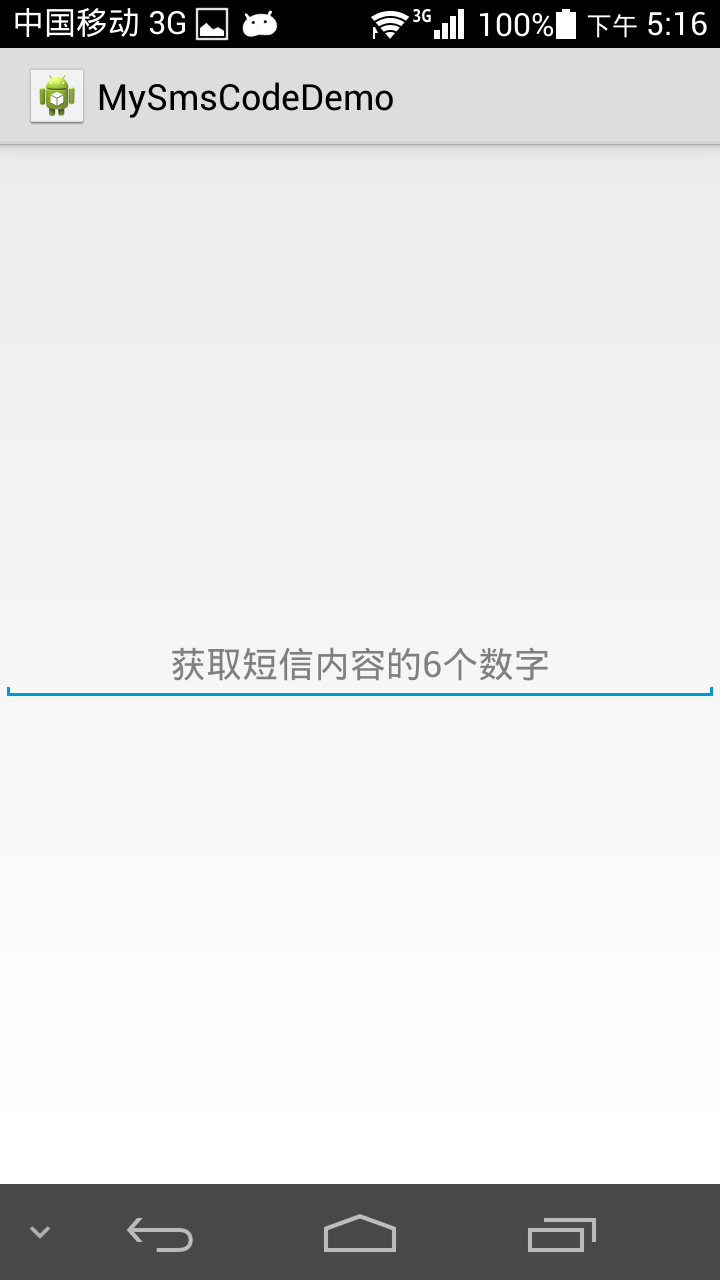 自動填入簡訊驗證碼:監聽廣播、解析內容到回填輸入框
「輸入驗證碼」這個環節,如果每次都要跳出簡訊 App 記下六個數字再切回來,體驗相當糟。Android 可以監聽簡訊接收廣播,從內容中擷取數字後直接回填。以下拆解四個步驟
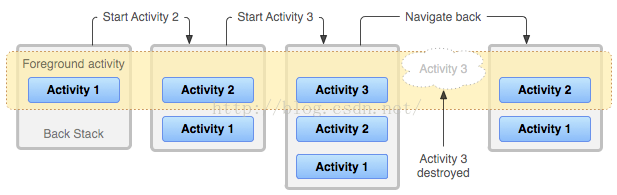 深入解析 Android Activity 的啟動模式與任務棧運作機制
先前的文章裡,筆者已經談過 LaunchMode 的作用,並盡量避開抽象的棧概念,用 GIF 動圖把四種啟動模式講得通俗易懂。這一篇則要更進一步,把「啟動模式」與「任務棧
 用 ViewPager 打造自動輪播 Banner:指示點、無限循環一次搞定
輪播圖幾乎是每個 App 的門面擔當。本文用原生 ViewPager 從零做一個完整的 Banner:支援手動左右滑動、底部圓點指示器同步、兩秒自動輪播,而且首尾相連可以
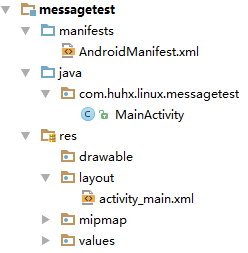 Android 簡訊收发實作:BroadcastReceiver 收信與 SmsManager 發信完整流程
本文示範一個最小可用的簡訊收发範例,分為「接收」與「發送」兩大部分,適合當作理解 Android 簡訊 API 的起點。 一、接收簡訊 專案結構如下: 1. 建立接