

編輯:關於 Android 程式設計
真機上排查問題時,USB 不一定插著,logcat 也不一定抓得到——尤其是用戶反饋「用了一陣子就閃退」這類問題。把運行日誌落到外部存儲,事後取回來分析,往往是最有效的辦法。本文給出一個可直接複用的 LogcatHelper 實現。
做法並不複雜:啟動一個後台線程,用 Runtime.exec() 執行 logcat 命令並過濾出本應用的進程,逐行讀取後寫入文件。幾個關鍵點:
logcat *:e *:i | grep "(PID)" 只保留 Error、Info、Warn 三個級別,並按進程號過濾,避免把整個系統的日誌都寫進文件。context.getFilesDir(),保證至少能寫進內部私有目錄。Process、BufferedReader、FileOutputStream,否則 logcat 進程會殘留。 package com.sdmc.hotel.util; import java.io.BufferedReader; import java.io.File; import java.io.FileNotFoundException; import java.io.FileOutputStream; import java.io.IOException; import java.io.InputStreamReader; import android.content.Context; import android.os.Environment; import android.util.Log; /** * log日志統計保存 * 會打印i,e,w,不會打印d * 每次開啟應用,就會把上次的log信息覆蓋 * @author way * */ public class LogcatHelper { private static LogcatHelper INSTANCE = null; private static String PATH_LOGCAT; private LogDumper mLogDumper = null; private int mPId; /** * * 初始化目錄 * * */ public void init(Context context) { if (Environment.getExternalStorageState().equals( Environment.MEDIA_MOUNTED)) {// 優先保存到SD卡中 PATH_LOGCAT = Environment.getExternalStorageDirectory() .getAbsolutePath() + File.separator + "miniGPS"; } else {// 如果SD卡不存在,就保存到本應用的目錄下 PATH_LOGCAT = context.getFilesDir().getAbsolutePath() + File.separator + "miniGPS"; } File file = new File(PATH_LOGCAT); if (!file.exists()) { file.mkdirs(); } } public static LogcatHelper getInstance(Context context) { if (INSTANCE == null) { INSTANCE = new LogcatHelper(context); } return INSTANCE; } private LogcatHelper(Context context) { init(context); mPId = android.os.Process.myPid(); } public void start() { if (mLogDumper == null){ mLogDumper = new LogDumper(String.valueOf(mPId), PATH_LOGCAT); } Log.i("path", PATH_LOGCAT);///storage/sdcard0/miniGPS mLogDumper.start(); } public void stop() { if (mLogDumper != null) { mLogDumper.stopLogs(); mLogDumper = null; } } private class LogDumper extends Thread { private Process logcatProc; private BufferedReader mReader = null; private boolean mRunning = true; String cmds = null; private String mPID; private FileOutputStream out = null; public LogDumper(String pid, String dir) { mPID = pid; try { out = new FileOutputStream(new File(dir, "GPS-" + MyDate.getFileName() + ".log")); } catch (FileNotFoundException e) { // TODO Auto-generated catch block e.printStackTrace(); } /** * * 日志等級:*:v , *:d , *:w , *:e , *:f , *:s * * 顯示當前mPID程序的 E和W等級的日志. * * */ // cmds = "logcat *:e *:w | grep \"(" + mPID + ")\""; // cmds = "logcat | grep \"(" + mPID + ")\"";//打印所有日志信息 // cmds = "logcat -s way";//打印標簽過濾信息 cmds = "logcat *:e *:i | grep \"(" + mPID + ")\"";//會打印i,e,w,不會打印d } public void stopLogs() { mRunning = false; } @Override public void run() { try { logcatProc = Runtime.getRuntime().exec(cmds); mReader = new BufferedReader(new InputStreamReader( logcatProc.getInputStream()), 1024); String line = null; while (mRunning && (line = mReader.readLine()) != null) { if (!mRunning) { break; } if (line.length() == 0) { continue; } if (out != null && line.contains(mPID)) { out.write((MyDate.getDateEN() + " " + line + "\n") .getBytes()); } } } catch (IOException e) { e.printStackTrace(); } finally { if (logcatProc != null) { logcatProc.destroy(); logcatProc = null; } if (mReader != null) { try { mReader.close(); mReader = null; } catch (IOException e) { e.printStackTrace(); } } if (out != null) { try { out.close(); } catch (IOException e) { e.printStackTrace(); } out = null; } } } } }
 <uses-permission android:name="android.permission.WRITE_EXTERNAL_STORAGE" />
 <uses-permission android:name="android.permission.READ_LOGS" />
READ_LOGS 屬於 signature 級權限,普通應用即使聲明也拿不到,只能讀取本進程的日誌——示例中用 grep "(PID)" 過濾,正好與這個限制相容。若在 Android 6.0 及以上運行,WRITE_EXTERNAL_STORAGE 還必須走 requestPermissions() 動態申請,僅在 manifest 中聲明是不夠的。
package com.sdmc.hotel.util; import java.text.SimpleDateFormat; import java.util.Date; public class MyDate { public static String getFileName() { SimpleDateFormat format = new SimpleDateFormat("yyyy-MM-dd"); String date = format.format(new Date(System.currentTimeMillis())); return date;// 2012年10月03日 23:41:31 } public static String getDateEN() { SimpleDateFormat format1 = new SimpleDateFormat("yyyy-MM-dd HH:mm:ss"); String date1 = format1.format(new Date(System.currentTimeMillis())); return date1;// 2012-10-03 23:41:31 } }
public class MyApplication extends Application { @Override public void onCreate() { LogcatHelper.getInstance(this).start(); } }
放在 Application 而不是某個 Activity 裡啟動,才能覆蓋整個進程的生命週期;否則用戶只在某個頁面操作時才有日誌,恰好漏掉最需要記錄的場景。
示例代碼是個不錯的起點,若要長期在生產環境運行,建議再補上幾點:
logcat 過濾了級別與進程,但更可靠的做法是額外實現 Thread.UncaughtExceptionHandler,把 Throwable 完整堆棧單獨落盤,這比事后翻日誌精準得多。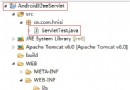 Android 客戶端以 HTTP POST 協議與伺服器進行數據交互的完整實踐
本篇文章以 Servlet 為例,完整示範 Android 端如何透過 HTTP 協議與伺服器後台進行數據通信。 在 Android 開發中,客戶端與伺服器的通信主要分為
 在 Android 上打造類 iOS 相機模式的 3D 滑動切換效果
相較於 Android,iOS 在動畫細節上的打磨一直是其優勢之一。以相機模式切換為例,那種帶有景深的 3D 滑動過渡既自然又流暢。開發者同樣可以借助 android.g
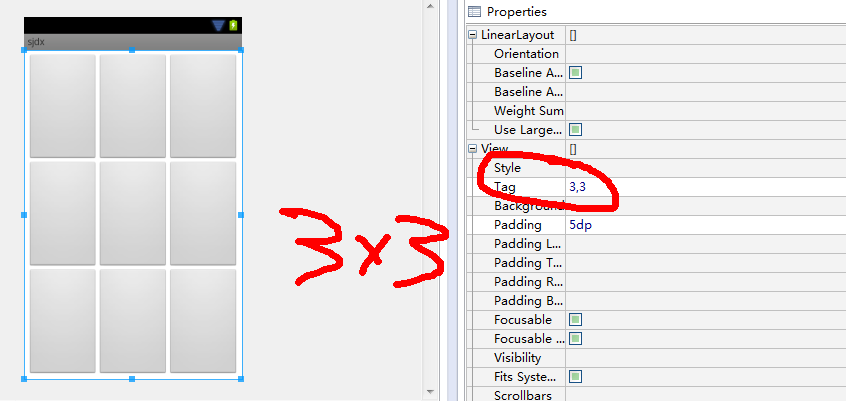 自製可自動平分空間的 Android 宮格檢視 AdvancedGridView
專案裡常會需要九宮格,而且不只九宮格——四宮格、十六宮格、4×3 宮格都可能出現。與其每次重寫,不如封裝一個能依分配到的空間自動調整每一格尺寸的元件。 設計思路 這個
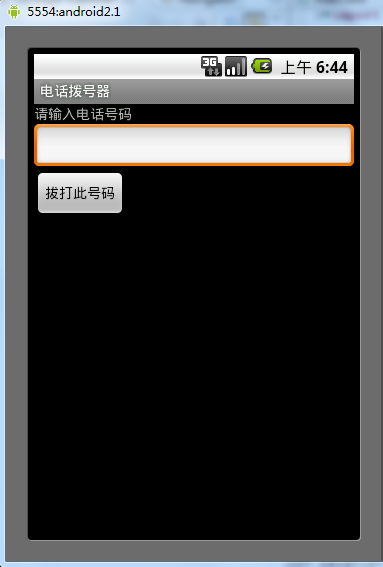 Android 電話撥號器的實作方法
實作概念 本範例模擬 Android 電話撥號器。使用者輸入電話號碼後,點擊按鈕即可透過 Intent 啟動撥號功能。 新增撥號權限 若要直接撥打電話,需要在 Andro