

編輯:關於 Android 程式設計
先說名詞。序列化(serialization)不只是把物件存到儲存媒體,更重要的是讓物件能在串流中傳輸,像基本型別一樣被四處傳遞。Android 內建的 XmlSerializer 就是針對 XML 這件事的輕量工具,它屬於 org.xmlpull 家族,跟解析用的 XmlPullParser 是一組的。
1. 取得序列化器
XmlSerializer = Xml.newSerializer();
2. 設定輸出去向與編碼
FileOutputStream = new FileOutputStream(new File(Environment.getExternalStorageDirectory(),"文件名.xml")); XmlSerializer.setOutput(FileOutputStream, "編碼");
3. 寫入 XML 宣告頭
serializer.startDocument("xml聲明的編碼", 文檔是否獨立);
4. 開啟子節點
Serializer.startTag(nameSpace, String "節點名");
5. 寫入節點屬性
Serializer.attribute(命名空間, 屬性名, 屬性值);
6. 寫入文字節點
Serializer.text(文本值);
7. 關閉節點
Serializer.endTag(命名空間, "節點名");
8. 結束文件
Serializer.endDocument();
9. 釋放資源
FileOutputStream.close();
把這九步驟串起來,就能把任何物件結構寫成 XML。順序有嚴格要求:startTag 與 endTag 必須成對且正確巢狀,否則會在執行期拋例外。
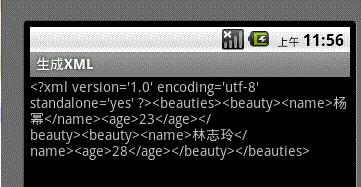
main.xml:
<?xml version="1.0" encoding="utf-8"?> <LinearLayout xmlns:android="https://schemas.android.com/apk/res/android" android:orientation="vertical" android:layout_width="fill_parent" android:layout_height="fill_parent" > <TextView android:layout_width="fill_parent" android:layout_height="wrap_content" android:id="@+id/textView" /> </LinearLayout>
Activity 程式碼:
package cn.com.xmlseriliazer; import java.io.StringWriter; import java.util.ArrayList; import org.xmlpull.v1.XmlPullParserFactory; import org.xmlpull.v1.XmlSerializer; import android.app.Activity; import android.os.Bundle; import android.widget.TextView; /** * * @author chenzheng_java * @description 測試通過XmlSerilizer生成xml文件 * @since 2011/03/03 * */ public class XmlSerializerActivity extends Activity { @Override public void onCreate(Bundle savedInstanceState) { super.onCreate(savedInstanceState); setContentView(R.layout.main); String result = produceXml(); TextView textView = (TextView)this.findViewById(R.id.textView); textView.setText(result); } /** * * @return 生成的xml文件的字符串表示 */ private String produceXml(){ StringWriter stringWriter = new StringWriter(); ArrayList<Beauty> beautyList = getData(); try { // 獲取XmlSerializer對象 XmlPullParserFactory factory = XmlPullParserFactory.newInstance(); XmlSerializer xmlSerializer = factory.newSerializer(); // 設置輸出流對象 xmlSerializer.setOutput(stringWriter); /* * startDocument(String encoding, Boolean standalone)encoding代表編碼方式 * standalone 用來表示該文件是否呼叫其它外部的文件。 * 若值是 ”yes” 表示沒有呼叫外部規則文件,若值是 ”no” 則表示有呼叫外部規則文件。默認值是 “yes”。 */ xmlSerializer.startDocument("utf-8", true); xmlSerializer.startTag(null, "beauties"); for(Beauty beauty:beautyList){ /* * startTag (String namespace, String name)這裡的namespace用於唯一標識xml標簽 *XML 命名空間屬性被放置於某個元素的開始標簽之中,並使用以下的語法: xmlns:namespace-prefix="namespaceURI" 當一個命名空間被定義在某個元素的開始標簽中時,所有帶有相同前綴的子元素都會與同一個命名空間相關聯。 注釋:用於標示命名空間的地址不會被解析器用於查找信息。其惟一的作用是賦予命名空間一個惟一的名稱。不過,很多公司常常會作為指針來使用命名空間指向某個實存的網頁,這個網頁包含著有關命名空間的信息。 */ xmlSerializer.startTag(null, "beauty"); xmlSerializer.startTag(null, "name"); xmlSerializer.text(beauty.getName()); xmlSerializer.endTag(null, "name"); xmlSerializer.startTag(null, "age"); xmlSerializer.text(beauty.getAge()); xmlSerializer.endTag(null, "age"); xmlSerializer.endTag(null, "beauty"); } xmlSerializer.endTag(null, "beauties"); xmlSerializer.endDocument(); } catch (Exception e) { e.printStackTrace(); } return stringWriter.toString(); } /** * * @return 包含了眾多美女信息的集合 */ private ArrayList<Beauty> getData(){ ArrayList<Beauty> beautyList = new ArrayList<Beauty>(); Beauty yangmi = new Beauty("楊冪", "23"); Beauty linzhiling = new Beauty("林志玲", "28"); beautyList.add(yangmi); beautyList.add(linzhiling); return beautyList; } /** * * @author chenzheng_java * 美人實體類 */ private class Beauty{ String name; String age ; public String getName() { return name; } public void setName(String name) { this.name = name; } public String getAge() { return age; } public void setAge(String age) { this.age = age; } @Override public String toString() { return "Beauty [age=" + age + ", name=" + name + "]"; } public Beauty(String name, String age) { this.name = name; this.age = age; } public Beauty(){ } } }
範例中把輸出設為 StringWriter,因此可以直接把結果字串塞進 TextView 觀察,這是除錯時很好用的技巧;若要落地成檔案,把 setOutput() 換成 FileOutputStream 即可,並記得補上寫檔權限。
namespace 參數在這裡一律傳 null,代表不使用命名空間。若輸出的 XML 需要被其他系統依特定結構解析,命名空間與根節點名稱通常不能任意省略,這類互通情境建議先確認對方的規格。
最後提醒兩點:一是 XmlSerializer 不會自動幫你跳脫特殊字元以外的錯誤,但 text() 已會處理 &、< 等轉義,寫屬性值時用 attribute() 也一樣安全;二是記得把 endDocument() 與 close() 放在 finally 或 try-with-resources 中,避免中途出錯導致檔案不完整。
整體而言,用 XmlSerializer 產生 XML 並不難,步驟與解析時幾乎是一一對應的鏡像關係。
 Ubuntu 下安裝 Android Studio 並建立桌面啟動器
近來我把電腦系統換成了 Ubuntu。對不習慣 Windows 8/10 的人來說,Ubuntu 是個相當不錯的選擇:基本軟件都齊全,QQ 這類需求可以找 Wine 版本
 Android 內存洩漏排查全流程:LeakCanary、DDMS 與 MAT 實戰
先說清楚什麼是內存洩漏 一句話概括:生命周期長的對象,持有了一個生命周期短的對象的引用。結果就是短命對象在該被回收的時候回收不掉。JVM 雖然有自動垃圾回收,但洩漏依然層
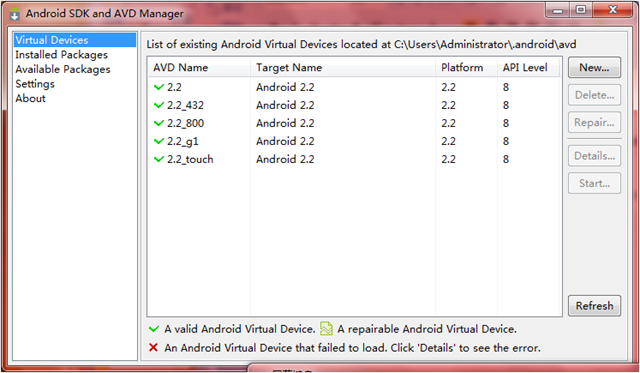 Android 模擬器的使用詳解
一起來學習模擬器的使用。 本文內容如下: 模擬器與真機的比較 建立 Android 模擬器(emulator) 運行 Android 模擬器 設定簡體中文語言介面 模擬
 Android 網絡編程:用 GET 把數據送到伺服器(一)
Android 應用常需要與伺服器通訊,這就必須有伺服器端的配合。本文先談最基礎的 GET 方式。 GET 上傳數據適用於資料量不超過 2KB、對安全性要求不高的場景。