

編輯:關於 Android 程式設計
樣式如下所示:
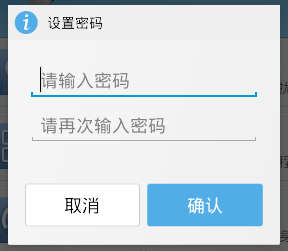
布局:
layout
dialog_set_pwd.xml
<?xml version="." encoding="utf-"?> <LinearLayout xmlns:android="https://schemas.android.com/apk/res/android" android:layout_width="match_parent" android:layout_height="match_parent" android:orientation="vertical" > <LinearLayout android:layout_width="match_parent" android:layout_height="wrap_content" android:background="#EFEFEF" android:orientation="horizontal" android:padding="dp" > <ImageView android:layout_width="wrap_content" android:layout_height="wrap_content" android:src="@drawable/dialog_title_default_icon" /> <TextView android:id="@+id/textView" android:layout_width="wrap_content" android:layout_height="wrap_content" android:layout_marginLeft="dp" android:text="設置密碼" android:textColor="@color/black" android:textSize="sp" /> </LinearLayout> <EditText android:id="@+id/et_pwd" android:layout_width="match_parent" android:layout_height="wrap_content" android:layout_margin="dp" android:hint="請輸入密碼" android:inputType="textPassword" > </EditText> <EditText android:id="@+id/et_pwd_confirm" android:layout_width="match_parent" android:layout_height="wrap_content" android:layout_margin="dp" android:hint="請再次輸入密碼" android:inputType="textPassword" /> <LinearLayout android:layout_width="match_parent" android:layout_height="wrap_content" android:orientation="horizontal" android:padding="dp" > <Button android:id="@+id/btn_ok" android:layout_width="dp" android:layout_height="wrap_content" android:layout_weight="" android:background="@drawable/btn_blue_selector" android:text="確定" android:layout_marginRight="dp" android:textColor="@color/white" /> <Button android:id="@+id/btn_cancel" android:layout_width="dp" android:layout_height="wrap_content" android:layout_weight="" android:background="@drawable/btn_white_selector" android:text="取消" android:textColor="@color/black" /> </LinearLayout> </LinearLayout>
狀態選擇器:
drawable
btn_blue_selector.xml
<?xml version="." encoding="utf-"?> <selector xmlns:android="https://schemas.android.com/apk/res/android"> <item android:drawable="@drawable/dg_btn_confirm_select" android:state_pressed="true"></item> <item android:drawable="@drawable/dg_btn_confirm_normal"></item> </selector>
btn_white_selector.xml
<?xml version="." encoding="utf-"?> <selector xmlns:android="https://schemas.android.com/apk/res/android"> <item android:drawable="@drawable/dg_button_cancel_select" android:state_pressed="true"></item> <item android:drawable="@drawable/dg_button_cancel_normal"></item> </selector>
引用值
values
colors.xml
<?xml version="." encoding="utf-"?> <resources> <color name="black">#</color> <color name="gray">#a</color> <color name="white">#fff</color> <color name="red">#f</color> <color name="shape_setting_normal">#BDEE</color> <color name="shape_setting_pressed">#CAD</color> <color name="blue">#FD</color> <color name="light_green">#f</color> </resources>
程式碼:
private void showSetPwdDialog() { AlertDialog.Builder builder = new AlertDialog.Builder(this); View view = View.inflate(this, R.layout.dialog_set_pwd, null); Button btnOk = (Button) view.findViewById(R.id.btn_ok); Button btnCancel = (Button) view.findViewById(R.id.btn_cancel); final EditText etPwd = (EditText) view.findViewById(R.id.et_pwd); final EditText etPwdConfirm = (EditText) view .findViewById(R.id.et_pwd_confirm); builder.setView(view);//將當前布局對象設置給dialog final AlertDialog dialog = builder.create(); btnOk.setOnClickListener(new OnClickListener() { @Override public void onClick(View v) { String pwd = etPwd.getText().toString().trim(); String pwdConfirm = etPwdConfirm.getText().toString().trim(); if (TextUtils.isEmpty(pwd) || TextUtils.isEmpty(pwdConfirm)) { ToastUtils.showToast(getApplicationContext(), "輸入內容不能為空!"); } else { if (pwd.equals(pwdConfirm)) { System.out.println("登錄成功!"); //將密碼保存在本地sp PrefUtils.putString(getApplicationContext(), GlobalConstants.PREF_PASSWORD, MDUtils.getMd(pwd)); dialog.dismiss(); enterLostAndFindPage(); } else { ToastUtils.showToast(getApplicationContext(), "兩次密碼不一致!"); } } } }); btnCancel.setOnClickListener(new OnClickListener() { @Override public void onClick(View v) { dialog.dismiss(); } }); dialog.show(); }
關於 Android 自定義對話框 showSetPwdDialog,就為大家介紹到這裡,希望對大家有所幫助!
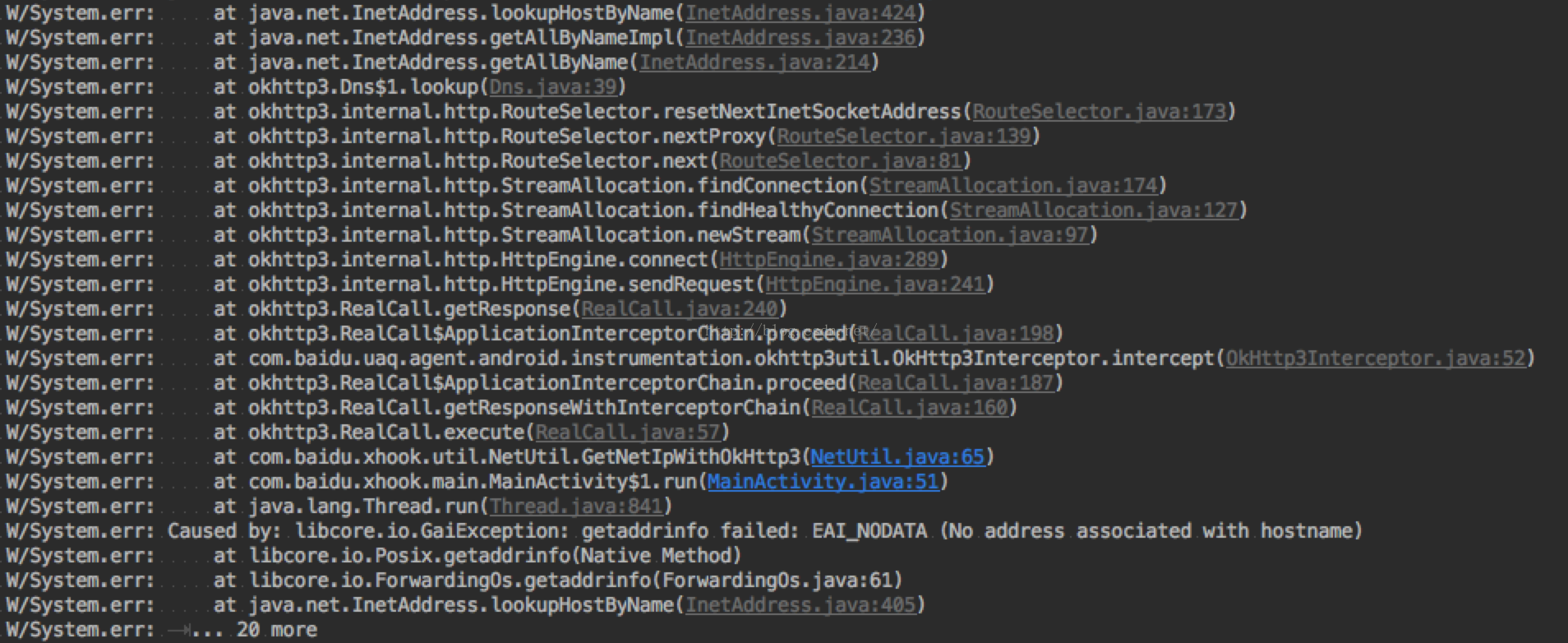 追蹤 okhttp3 的 DNS 底層實作:從 Java 層一路走到 Bionic getaddrinfo
目標很明確:在 Android 4.4 以上、okhttp 3.2 的環境下,不依賴 root,純粹在應用層取得 DNS 維度的底層數據。 思路則是:以 JNI 搭配 h
 Android 實用工具介紹:emulator 模擬器怎麼開
在 android-sdk\tools 目錄下有一個名為 emulator.exe 的可執行檔。望文生義,它就是 Android 的模擬器本體。但不少人會遇到一個奇怪的現
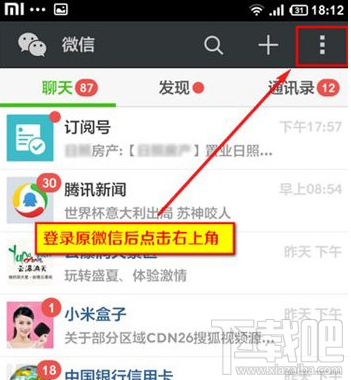 一個手機號能註冊兩個微信嗎 解法圖解
一個手機號可以註冊兩個微信嗎?很多人還不知道具體做法,小編下面就分享完整思路。 一個手機號怎麼註冊兩個微信 登入你(已綁定手機號)的微信,點擊右上角的「┇」圖標。 在彈
 Android 控件開發之 Gallery3D 酷炫效果(帶源碼)
前言為了讓使用者選擇自己的開機畫面,應用層需要提供圖片瀏覽與選擇功能。本文以 Gallery 為基礎,加入 3D 翻轉、縮放與倒影效果,讓圖片瀏覽更有視覺層次。效果展示主