

編輯:關於 Android 程式設計
這次和大家分享如何實現 Android 檔案下載時的進度顯示,希望對初學者有所幫助。先看效果圖:

上方的藍色進度條會依下載百分比遞增,中間的文字控制項顯示下載百分比,最下方的 ImageView 用來展示下載完成的檔案,整個專案的目的就是動態地把下載進度回饋給使用者。
先看版面配置:
<RelativeLayout xmlns:android="https://schemas.android.com/apk/res/android" xmlns:tools="https://schemas.android.com/tools" android:layout_width="match_parent" android:layout_height="match_parent" tools:context="${relativePackage}.${activityClass}" > <ProgressBar android:id="@+id/progressBar" android:layout_width="match_parent" android:layout_height="wrap_content" android:max="100" /> <TextView android:id="@+id/textView" android:layout_width="wrap_content" android:layout_height="wrap_content" android:layout_below="@+id/progressBar" android:layout_centerHorizontal="true" android:layout_marginTop="24dp" android:text="TextView" /> <ImageView android:id="@+id/imageView" android:layout_marginTop="24dp" android:layout_width="match_parent" android:layout_height="wrap_content" android:layout_alignParentBottom="true" android:layout_below="@+id/textView" android:contentDescription="@string/app_name" android:src="@drawable/ic_launcher" /> </RelativeLayout>
主要 Activity 的程式碼:核心是用一個 Handler 接收下載執行緒發來的下載量,再更新 UI;下載則在子執行緒中進行,透過 URLConnection 讀取串流並寫入本機檔案。
public class MainActivity extends Activity { ProgressBar pb; TextView tv; ImageView imageView; int fileSize; int downLoadFileSize; String fileEx,fileNa,filename; private Handler handler = new Handler(){ @Override public void handleMessage(Message msg){ if (!Thread.currentThread().isInterrupted()) { switch (msg.what) { case 0: pb.setMax(fileSize); case 1: pb.setProgress(downLoadFileSize); int result = downLoadFileSize * 100 / fileSize; tv.setText(result + "%"); break; case 2: Toast.makeText(MainActivity.this, "文件下載完成", Toast.LENGTH_SHORT).show(); FileInputStream fis = null; try { fis = new FileInputStream(Environment.getExternalStorageDirectory() + File.separator + "/ceshi/" + filename); } catch (FileNotFoundException e) { e.printStackTrace(); } Bitmap bitmap = BitmapFactory.decodeStream(fis); imageView.setImageBitmap(bitmap); break; case -1: String error = msg.getData().getString("error"); Toast.makeText(MainActivity.this, error, Toast.LENGTH_SHORT).show(); break; } } super.handleMessage(msg); } }; @Override protected void onCreate(Bundle savedInstanceState) { super.onCreate(savedInstanceState); setContentView(R.layout.activity_main); pb=(ProgressBar)findViewById(R.id.progressBar); tv=(TextView)findViewById(R.id.textView); imageView = (ImageView) findViewById(R.id.imageView); tv.setText("0%"); new Thread(){ public void run(){ try { down_file("https://cdnq.duitang.com/uploads/item/201406/15/20140615203435_ABQMa.jpeg", Environment.getExternalStorageDirectory() + File.separator + "/ceshi/"); } catch (Exception e) { e.printStackTrace(); } } }.start(); } public void down_file(String url,String path) throws IOException{ filename=url.substring(url.lastIndexOf("/") + 1); URL myURL = new URL(url); URLConnection conn = myURL.openConnection(); conn.connect(); InputStream is = conn.getInputStream(); this.fileSize = conn.getContentLength(); if (this.fileSize <= 0) throw new RuntimeException("無法獲知文件大小 "); if (is == null) throw new RuntimeException("stream is null"); File file1 = new File(path); File file2 = new File(path+filename); if(!file1.exists()){ file1.mkdirs(); } if(!file2.exists()){ file2.createNewFile(); } FileOutputStream fos = new FileOutputStream(path+filename); byte buf[] = new byte[1024]; downLoadFileSize = 0; sendMsg(0); do{ int numread = is.read(buf); if (numread == -1) { break; } fos.write(buf, 0, numread); downLoadFileSize += numread; sendMsg(1); } while (true); sendMsg(2); try{ is.close(); } catch (Exception ex) { Log.e("tag", "error: " + ex.getMessage(), ex); } } private void sendMsg(int flag) { Message msg = new Message(); msg.what = flag; handler.sendMessage(msg); } }
最後千萬別忘了在 AndroidManifest.xml 加上網路權限:
<uses-permission android:name="android.permission.INTERNET"/>
以上便是 Android 檔案下載並動態顯示進度的完整分享,希望對大家的學習有所幫助。
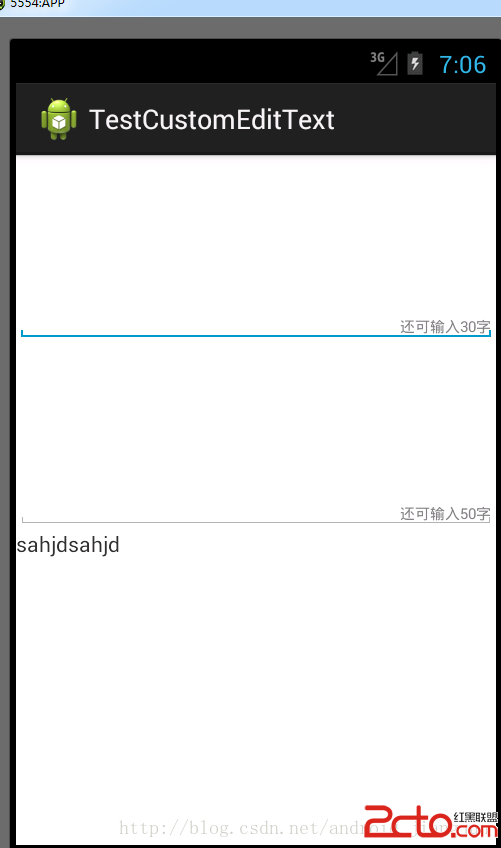 自定義一個會提示剩餘字數的 EditText
最近專案有個需求:即時提示使用者還能打幾個字,也就是要監聽 EditText 的文字變化。功能本身不難,但每次都用組合方式重寫一遍實在麻煩,於是就把它包成一個自定義控件,
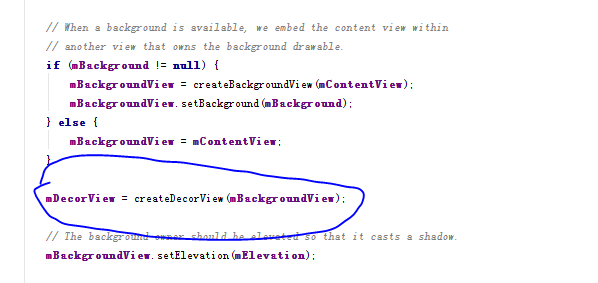 Android PopupWindow 使用詳解與 6.0 源碼差異
本文參考〈Android PopupWindow 用法解析〉一文進行學習,透過實例與源碼分析掌握了 PopupWindow 的使用方式。原文最後「補充案例:彈窗不消失,但
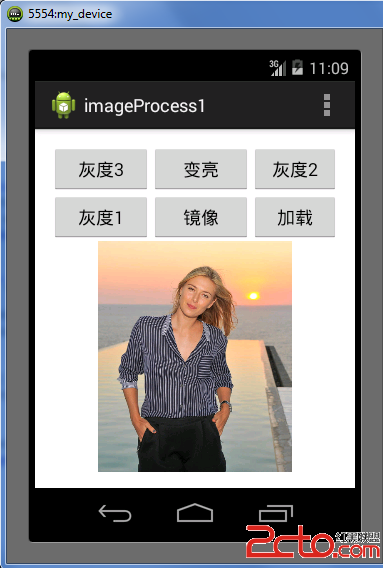 Android Bitmap 加載優化與逐像素加工實戰
一、載入與像素讀寫 Android SDK 提供了 getPixel 與 setPixel 兩個 API 讓我們直接操作像素。讀取的寫法如下: int pixel = b
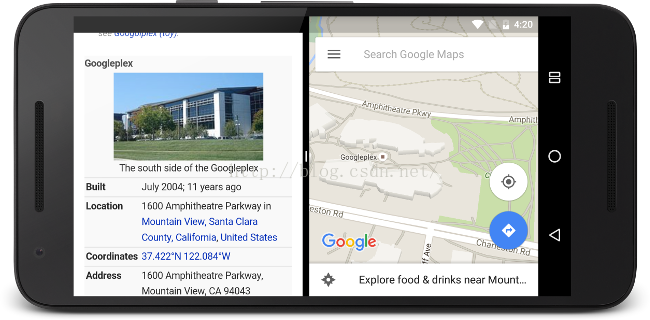 Android 7.0 N 開發者指南:十大新特性與 API 完整整理
Android N(7.0)是一次以「大屏、多工、省電、企業」為主軸的更新。對開發者而言,最值得關注的是多窗口模式、通知體系重寫、Data Saver、網路安全設定檔,以