

編輯:關於 Android 程式設計
直接上程式碼。先在版面中把背景與文字顏色設為 @null,拿掉系統預設的邊框:
<span ><?xml version="1.0" encoding="utf-8"?> </span> <LinearLayout xmlns:android="https://schemas.android.com/apk/res/android" android:layout_width="fill_parent" android:layout_height="fill_parent" > <!--注意名稱 --> <com.marine.study.LineEditText android:id="@+id/myEdit" android:layout_width="fill_parent" android:layout_height="wrap_content" android:background="@null" android:textColor="@null" /> </LinearLayout>
兩點補充:background 也可以換成自訂的 drawable 或顏色;textColor 未必要設為 null,可依設計需求指定字色。注意標籤名稱要寫成完整的類別路徑,因為這是我們自訂的控制項。
接著覆寫 onDraw,用 Paint 逐行畫出底線:
public class LineEditText extends EditText { // 畫筆 用來畫下劃線 private Paint paint; public LineEditText(Context context, AttributeSet attrs) { super(context, attrs); paint = new Paint(); paint.setStyle(Paint.Style.STROKE); paint.setColor(Color.RED); // 開啟抗鋸齒 較耗內存 paint.setAntiAlias(true); } @Override protected void onDraw(Canvas canvas) { super.onDraw(canvas); // 得到總行數 int lineCount = getLineCount(); // 得到每行的高度 int lineHeight = getLineHeight(); // 根據行數循環畫線 for (int i = 0; i < lineCount; i++) { int lineY = (i + 1) * lineHeight; canvas.drawLine(0, lineY, this.getWidth(), lineY, paint); } } }
關鍵是 getLineCount() 與 getLineHeight():前者取得實際行數,後者取得單行高度,兩者相乘即可算出每行底線的 y 座標。這樣即使內容換行成多行,每一行都會有對應的底線,而不會只畫一條。
若想讓線條更精緻,可以再調整 paint 的 strokeWidth,或改用 drawable 搭配 selector 實作聚焦時變色。
 Universal Image Loader 使用全攻略:功能解析與示例代碼
相關地址介紹: -- Universal Image Loader 項目 GitHub 官方地址:https://github.com/nostra13/Android-
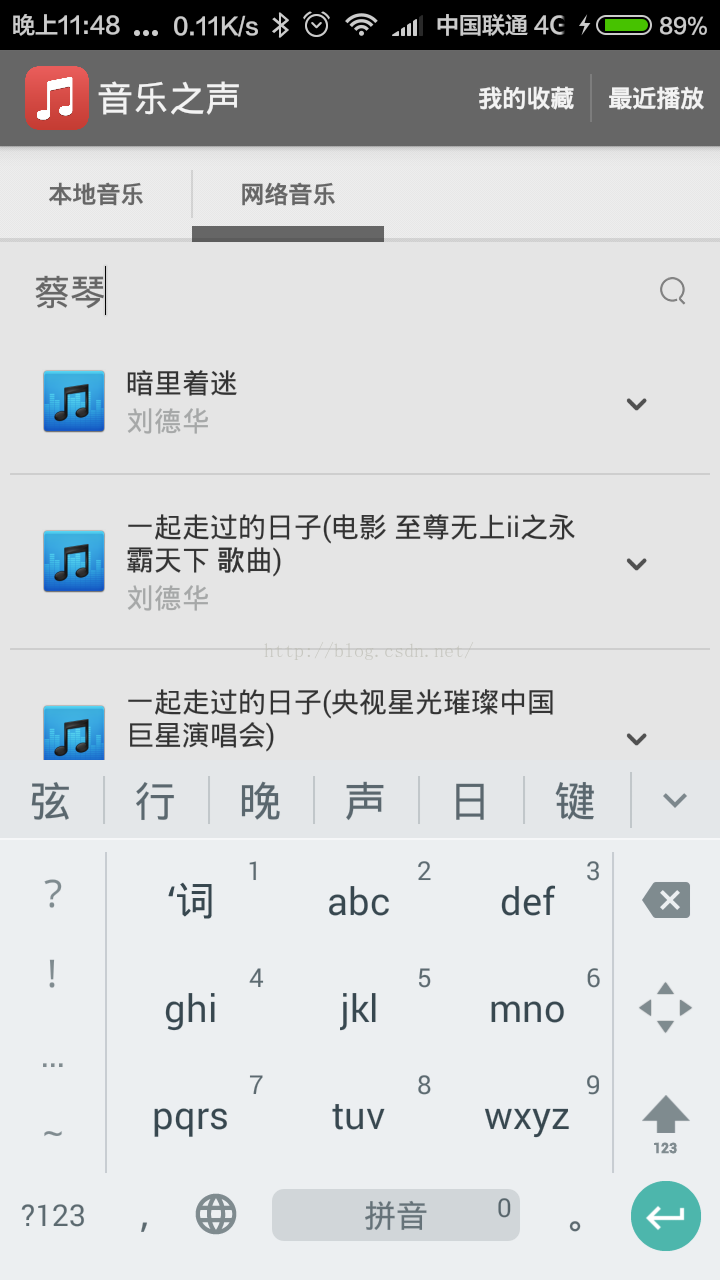 Android 本地及網路 MP3 播放器(十四):網路音樂下載功能實作
本篇要實現的功能: 實現網路音樂搜尋、實現網路音樂下載。下載好的音樂目前不在播放器內,可透過檔案瀏覽器查看。後續文章將實現歌詞顯示與下載音樂掃描功能。 經過將近四天,才發
 深入分析 PMS 服務(一):從 PackageParser 看 APK 如何變成 Package
要理解 PackageManagerService(PMS),不妨先把它周邊的工具類看透。本文不直接切入 PMS 源碼,而是從 PackageParser 說起——它的職
 Android 啟動頁優化:消除黑屏與應用秒開技巧
啟動時的黑屏,通常出現在第一幀畫面之前。若想消除黑屏,可以自訂啟動頁主題,把 windowBackground 設為品牌圖,或使用透明主題延後顯示。 自訂啟動背景 sty