

編輯:關於 Android 程式設計
ImageManager2 這支類別同時具備幾項能力:從網路非同步下載、從 SD 卡讀取本機圖、記憶體快取、磁碟快取,以及載入完成時的淡入動畫。它已經在一個圖片量相當大的正式應用裡跑了一年多,期間沒有再出現 OOM。
Android 應用被記憶體不足 ISSUE 反覆折磨,網路上流傳的招數不少:軟引用、手動呼叫 recycle、onTrimMemory 等等。但我們實測下來效果都不理想,OOM 一樣照樣發生,特別是圖片密集的頁面。
原因在 Android 3.0 之後就明朗了:虛擬機對 SoftReference 的處理變得極為激進,幾乎一碰到就回收,等於完全失去快取意義,也帶不來任何效能收益。真正可靠的做法必須靠你自己控制容量。
所以這裡採用的是:HandlerThread(非同步載入)+ LruCache(記憶體快取)+ DiskLruCache(磁碟快取)。光圈不說廢話,直接上程式碼。
package com.example.util; import java.io.File; import java.util.Iterator; import java.util.LinkedList; import java.util.Queue; import java.util.Stack; import org.apache.http.HttpEntity; import org.apache.http.HttpResponse; import org.apache.http.client.methods.HttpGet; import org.apache.http.util.EntityUtils; import android.app.ActivityManager; import android.content.Context; import android.graphics.Bitmap; import android.graphics.BitmapFactory; import android.graphics.drawable.BitmapDrawable; import android.graphics.drawable.ColorDrawable; import android.graphics.drawable.Drawable; import android.graphics.drawable.TransitionDrawable; import android.media.ThumbnailUtils; import android.os.Handler; import android.os.HandlerThread; import android.os.Looper; import android.os.Message; import android.support.v4.util.LruCache; import android.widget.ImageView; import com.example.MyApplication; /** * 圖片載入類 * * @author 月月鳥 */ public class ImageManager2 { private static ImageManager2 imageManager; public LruCache<String, Bitmap> mMemoryCache; private static final int DISK_CACHE_SIZE = 1024 * 1024 * 20; // 10MB private static final String DISK_CACHE_SUBDIR = "thumbnails"; public DiskLruCache mDiskCache; private static MyApplication myapp; /** 圖片載入隊列,後進先出 */ private Stack<ImageRef> mImageQueue = new Stack<ImageRef>(); /** 圖片請求隊列,先進先出,用於存放已發送的請求。 */ private Queue<ImageRef> mRequestQueue = new LinkedList<ImageRef>(); /** 圖片載入執行緒消息處理器 */ private Handler mImageLoaderHandler; /** 圖片載入執行緒是否就緒 */ private boolean mImageLoaderIdle = true; /** 請求圖片 */ private static final int MSG_REQUEST = 1; /** 圖片載入完成 */ private static final int MSG_REPLY = 2; /** 中止圖片載入執行緒 */ private static final int MSG_STOP = 3; /** 如果圖片是從網路載入,則應用漸顯動畫,如果從快取讀出則不應用動畫 */ private boolean isFromNet = true; /** * 獲取單例,只能在UI執行緒中使用。 * * @param context * @return */ public static ImageManager2 from(Context context) { // 如果不inui執行緒中,則拋出異常 if (Looper.myLooper() != Looper.getMainLooper()) { throw new RuntimeException("Cannot instantiate outside UI thread."); } if (myapp == null) { myapp = (MyApplication) context.getApplicationContext(); } if (imageManager == null) { imageManager = new ImageManager2(myapp); } return imageManager; } /** * 私有構造函數,保證單例模式 * * @param context */ private ImageManager2(Context context) { int memClass = ((ActivityManager) context .getSystemService(Context.ACTIVITY_SERVICE)).getMemoryClass(); memClass = memClass > 32 ? 32 : memClass; // 使用可用記憶體的1/8作為圖片快取 final int cacheSize = 1024 * 1024 * memClass / 8; mMemoryCache = new LruCache<String, Bitmap>(cacheSize) { protected int sizeOf(String key, Bitmap bitmap) { return bitmap.getRowBytes() * bitmap.getHeight(); } }; File cacheDir = DiskLruCache .getDiskCacheDir(context, DISK_CACHE_SUBDIR); mDiskCache = DiskLruCache.openCache(context, cacheDir, DISK_CACHE_SIZE); } /** * 存放圖片信息 */ class ImageRef { /** 圖片對應ImageView控件 */ ImageView imageView; /** 圖片URL地址 */ String url; /** 圖片快取路徑 */ String filePath; /** 默認圖資源ID */ int resId; int width = 0; int height = 0; /** * 構造函數 * * @param imageView * @param url * @param resId * @param filePath */ ImageRef(ImageView imageView, String url, String filePath, int resId) { this.imageView = imageView; this.url = url; this.filePath = filePath; this.resId = resId; } ImageRef(ImageView imageView, String url, String filePath, int resId, int width, int height) { this.imageView = imageView; this.url = url; this.filePath = filePath; this.resId = resId; this.width = width; this.height = height; } } /** * 顯示圖片 * * @param imageView * @param url * @param resId */ public void displayImage(ImageView imageView, String url, int resId) { if (imageView == null) { return; } if (imageView.getTag() != null && imageView.getTag().toString().equals(url)) { return; } if (resId >= 0) { if (imageView.getBackground() == null) { imageView.setBackgroundResource(resId); } imageView.setImageDrawable(null); } if (url == null || url.equals("")) { return; } // 添加url tag imageView.setTag(url); // 讀取map快取 Bitmap bitmap = mMemoryCache.get(url); if (bitmap != null) { setImageBitmap(imageView, bitmap, false); return; } // 生成文件名 String filePath = urlToFilePath(url); if (filePath == null) { return; } queueImage(new ImageRef(imageView, url, filePath, resId)); } /** * 顯示圖片固定大小圖片的縮略圖,一般用於顯示列表的圖片,可以大大減小記憶體使用 * * @param imageView 載入圖片的控件 * @param url 載入地址 * @param resId 默認圖片 * @param width 指定寬度 * @param height 指定高度 */ public void displayImage(ImageView imageView, String url, int resId, int width, int height) { if (imageView == null) { return; } if (resId >= 0) { if (imageView.getBackground() == null) { imageView.setBackgroundResource(resId); } imageView.setImageDrawable(null); } if (url == null || url.equals("")) { return; } // 添加url tag imageView.setTag(url); // 讀取map快取 Bitmap bitmap = mMemoryCache.get(url + width + height); if (bitmap != null) { setImageBitmap(imageView, bitmap, false); return; } // 生成文件名 String filePath = urlToFilePath(url); if (filePath == null) { return; } queueImage(new ImageRef(imageView, url, filePath, resId, width, height)); } /** * 入隊,後進先出 * * @param imageRef */ public void queueImage(ImageRef imageRef) { // 刪除已有ImageView Iterator<ImageRef> iterator = mImageQueue.iterator(); while (iterator.hasNext()) { if (iterator.next().imageView == imageRef.imageView) { iterator.remove(); } } // 添加請求 mImageQueue.push(imageRef); sendRequest(); } /** * 發送請求 */ private void sendRequest() { // 開啟圖片載入執行緒 if (mImageLoaderHandler == null) { HandlerThread imageLoader = new HandlerThread("image_loader"); imageLoader.start(); mImageLoaderHandler = new ImageLoaderHandler( imageLoader.getLooper()); } // 發送請求 if (mImageLoaderIdle && mImageQueue.size() > 0) { ImageRef imageRef = mImageQueue.pop(); Message message = mImageLoaderHandler.obtainMessage(MSG_REQUEST, imageRef); mImageLoaderHandler.sendMessage(message); mImageLoaderIdle = false; mRequestQueue.add(imageRef); } } /** * 圖片載入執行緒 */ class ImageLoaderHandler extends Handler { public ImageLoaderHandler(Looper looper) { super(looper); } public void handleMessage(Message msg) { if (msg == null) return; switch (msg.what) { case MSG_REQUEST: // 收到請求 Bitmap bitmap = null; Bitmap tBitmap = null; if (msg.obj != null && msg.obj instanceof ImageRef) { ImageRef imageRef = (ImageRef) msg.obj; String url = imageRef.url; if (url == null) return; // 如果本機url即讀取sd相冊圖片,則直接讀取,不用經過DiskCache if (url.toLowerCase().contains("dcim")) { tBitmap = null; BitmapFactory.Options opt = new BitmapFactory.Options(); opt.inSampleSize = 1; opt.inJustDecodeBounds = true; BitmapFactory.decodeFile(url, opt); int bitmapSize = opt.outHeight * opt.outWidth * 4; opt.inSampleSize = bitmapSize / (1000 * 2000); opt.inJustDecodeBounds = false; tBitmap = BitmapFactory.decodeFile(url, opt); if (imageRef.width != 0 && imageRef.height != 0) { bitmap = ThumbnailUtils.extractThumbnail(tBitmap, imageRef.width, imageRef.height, ThumbnailUtils.OPTIONS_RECYCLE_INPUT); isFromNet = true; } else { bitmap = tBitmap; tBitmap = null; } } else bitmap = mDiskCache.get(url); if (bitmap != null) { // ToolUtil.log("從disk快取讀取"); // 寫入map快取 if (imageRef.width != 0 && imageRef.height != 0) { if (mMemoryCache.get(url + imageRef.width + imageRef.height) == null) mMemoryCache.put(url + imageRef.width + imageRef.height, bitmap); } else { if (mMemoryCache.get(url) == null) mMemoryCache.put(url, bitmap); } } else { try { byte[] data = loadByteArrayFromNetwork(url); if (data != null) { BitmapFactory.Options opt = new BitmapFactory.Options(); opt.inSampleSize = 1; opt.inJustDecodeBounds = true; BitmapFactory.decodeByteArray(data, 0, data.length, opt); int bitmapSize = opt.outHeight * opt.outWidth * 4;// pixels*3 if it's RGB and pixels*4 // if it's ARGB if (bitmapSize > 1000 * 1200) opt.inSampleSize = 2; opt.inJustDecodeBounds = false; tBitmap = BitmapFactory.decodeByteArray(data, 0, data.length, opt); if (imageRef.width != 0 && imageRef.height != 0) { bitmap = ThumbnailUtils .extractThumbnail( tBitmap, imageRef.width, imageRef.height, ThumbnailUtils.OPTIONS_RECYCLE_INPUT); } else { bitmap = tBitmap; tBitmap = null; } if (bitmap != null && url != null) { // 寫入SD卡 if (imageRef.width != 0 && imageRef.height != 0) { mDiskCache.put(url + imageRef.width + imageRef.height, bitmap); mMemoryCache.put(url + imageRef.width + imageRef.height, bitmap); } else { mDiskCache.put(url, bitmap); mMemoryCache.put(url, bitmap); } isFromNet = true; } } } catch (OutOfMemoryError e) { } } } if (mImageManagerHandler != null) { Message message = mImageManagerHandler.obtainMessage( MSG_REPLY, bitmap); mImageManagerHandler.sendMessage(message); } break; case MSG_STOP: // 收到終止指令 Looper.myLooper().quit(); break; } } } /** UI執行緒消息處理器 */ private Handler mImageManagerHandler = new Handler() { @Override public void handleMessage(Message msg) { if (msg != null) { switch (msg.what) { case MSG_REPLY: // 收到應答 do { ImageRef imageRef = mRequestQueue.remove(); if (imageRef == null) break; if (imageRef.imageView == null || imageRef.imageView.getTag() == null || imageRef.url == null) break; if (!(msg.obj instanceof Bitmap) || msg.obj == null) { break; } Bitmap bitmap = (Bitmap) msg.obj; // 非同一ImageView if (!(imageRef.url).equals((String) imageRef.imageView .getTag())) { break; } setImageBitmap(imageRef.imageView, bitmap, isFromNet); isFromNet = false; } while (false); break; } } // 設置閒置標志 mImageLoaderIdle = true; // 若服務未關閉,則發送下一個請求。 if (mImageLoaderHandler != null) { sendRequest(); } } }; /** * 添加圖片顯示漸顯動畫 * */ private void setImageBitmap(ImageView imageView, Bitmap bitmap, boolean isTran) { if (isTran) { final TransitionDrawable td = new TransitionDrawable( new Drawable[] { new ColorDrawable(android.R.color.transparent), new BitmapDrawable(bitmap) }); td.setCrossFadeEnabled(true); imageView.setImageDrawable(td); td.startTransition(300); } else { imageView.setImageBitmap(bitmap); } } /** * 從網路獲取圖片字節數組 * * @param url * @return */ private byte[] loadByteArrayFromNetwork(String url) { try { HttpGet method = new HttpGet(url); HttpResponse response = myapp.getHttpClient().execute(method); HttpEntity entity = response.getEntity(); return EntityUtils.toByteArray(entity); } catch (Exception e) { return null; } } /** * 根據url生成快取文件完整路徑名 * * @param url * @return */ public String urlToFilePath(String url) { // 擴展名位置 int index = url.lastIndexOf('.'); if (index == -1) { return null; } StringBuilder filePath = new StringBuilder(); // 圖片存取路徑 filePath.append(myapp.getCacheDir().toString()).append('/'); // 圖片文件名 filePath.append(MD5.Md5(url)).append(url.substring(index)); return filePath.toString(); } /** * Activity#onStop後,ListView不會有殘余請求。 */ public void stop() { // 清空請求隊列 mImageQueue.clear(); } }
快取容量綁定裝置等級。用 ActivityManager 的 memoryClass 取得裝置的 heap 上限,取 1/8 作為圖片快取,且以 32MB 為天花板。這樣低階機不會被撐爆,高階機也不會浪費。
縮圖在解碼階段就完成。先用 inJustDecodeBounds 讀出尺寸估算記憶體佔用,超過門檻就把 inSampleSize 調大,再用 ThumbnailUtils 裁出指定尺寸。列表永遠不載入原圖,這是省記憶體最有效的一招。
用 tag 防止圖片錯位。每個 ImageView 都記著自己對應的 url,回呼時比對一次,不一致就丟棄。ListView 回收重用時,這一步是必須的。
串行化請求。HandlerThread 加上 idle 旗標,一次只跑一張,避免同時開幾十個連線把網路和記憶體打爆。新的請求進 Stack,同一個 ImageView 重複請求會先被移除。
以上即是異步載入、記憶體快取與磁碟快取的完整組合,希望能對你的專案有所幫助。
 Android 手把手打造精美的用戶登入介面
這篇要帶大家一步一步打造一個類似下圖那樣的登入 UI 介面:一、準備圖片資源先把需要用到的圖示(如 Facebook、LinkedIn 的連線按鈕)放進 drawable
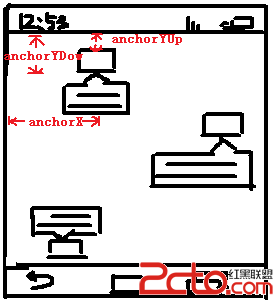 用 android.graphics.Path 手繪帶箭頭的 PopupWindow 背景
先認識 PopupWindow PopupWindow 是一個懸浮於當前 Activity 之上的容器,能承載任意內容。與定位相關的 API 主要有這幾個: showAs
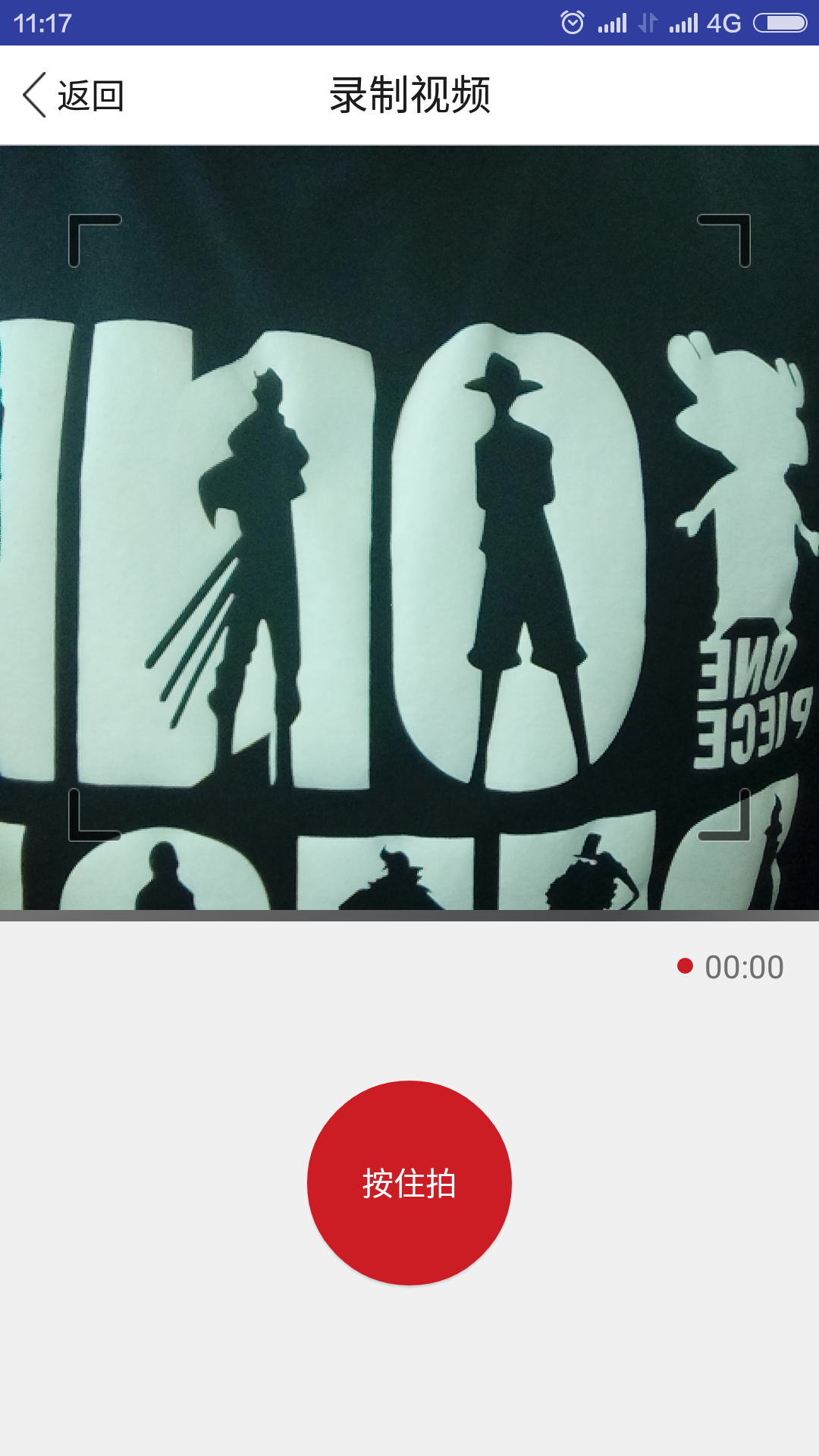 Android 短視頻錄制實作:仿微信小視頻(下)
簡述 上一篇我們已經完成了視頻錄制控件的相關封裝,這一篇則聚焦在控件的具体使用。其實只要讀一遍控件源碼就會發現用法相當直觀,各位可以依自身需求調整參數,以下代碼僅供參考。
 動手實現一個 Android JsBridge:原理與實踐全解析
什麼是 JsBridge Android JsBridge 是一個在原生 Java 代碼與 JavaScript 代碼之間架設通信橋梁的輔助工具,讓 WebView 中的