

編輯:關於 Android 程式設計
PopupWindow 是一個懸浮於當前 Activity 之上的容器,能承載任意內容。與定位相關的 API 主要有這幾個:
showAsDropDown(View anchor, int xoff, int yoff, int gravity)——顯示在 anchor 的左下角,透過 xoff、yoff 微調距離,gravity 決定 popup 相對於 anchor 的對齊方式。若 popup 超出螢幕,且展示內容的根容器是可捲動控制項,會以捲動方式呈現;若根容器不可捲動,超出螢幕的部分就看不到。
showAsDropDown(View anchor, int xoff, int yoff) 與 showAsDropDown(View anchor)——上述方法的簡化多載。
showAtLocation(View parent, int gravity, int x, int y)——顯示在螢幕的特定位置,內容若超出螢幕會被裁切。gravity 設為 NO_GRAVITY 等同於 Gravity.LEFT | Gravity.TOP。
該選哪一個?有 anchor 就用 showAsDropDown,沒有就用 showAtLocation。要特別注意:使用 showAtLocation 時,popup 內容超出螢幕即使包在 ScrollView 裡也不會捲動。
帶箭頭指向的氣泡狀提示框,是引導頁與說明 Tips 的常見需求。若用 9-patch 圖片來做,箭頭位置就被鎖死在圖片裡,無法依錨點實際位置動態對齊。改用 Path 即時繪製,箭頭便能精準落在錨點上方或下方。
繪製規則如下圖:
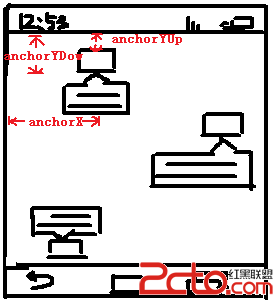
給定 Popup 錨點的 x 座標 anchorX、下方 y 座標 anchorYDown、上方 y 座標 anchorYUp,再依 popup 自身的寬高與箭頭寬度、高度,計算出八個關鍵轉折點,串成一條封閉路徑。同時要判斷空間是否足夠——若下方放不下就翻到上方顯示。
package com.xxx;

import android.annotation.SuppressLint;
import android.content.Context;
import android.graphics.Canvas;
import android.graphics.Path;
import android.graphics.Point;
import android.graphics.PointF;
import android.graphics.drawable.BitmapDrawable;
import android.graphics.drawable.ShapeDrawable;
import android.graphics.drawable.shapes.PathShape;
import android.util.AttributeSet;
import android.util.DisplayMetrics;
import android.view.Gravity;
import android.view.MotionEvent;
import android.view.View;
import android.widget.LinearLayout.LayoutParams;
import android.widget.PopupWindow;
import android.widget.TextView;

/**
 * 帶 popup 樣式背景(頂部或底部有三角形)的 TextView。
 * 箭頭會精準顯示在 anchor 位置的下方或上方。
 */
@SuppressLint("DrawAllocation")
public class PopupTextView extends TextView {

    private static final String TAG = PopupTextView;
    private static final boolean IS_DEBUG = false;

    /** 箭頭在 popup 內的 x 座標 */
    private float mTriangleX;
    private int mBorderColor = 0xff1fc38f;
    private int mBorderWidth = 2;
    private int mBgColor = 0xffffffff;
    private int mBgColorDark = 0xff999999;
    /** 箭頭高度與寬度 */
    private float mAnchorHeight = 20;
    private float mAnchorWidth = 30;
    /** 內容是否顯示在 anchor 下方 */
    private boolean mShowDown = true;

    private ShapeDrawable mBorderDrawable;
    private Path mBorderPath;
    private ShapeDrawable mBgDrawable;
    private Path mBgPath;

    private int mWidth;
    private int mHeight;
    /** 保留原始的 bottom padding */
    private int mPadding;
    private boolean mIsNightMode;

    /** anchor 在螢幕中的座標 */
    private int mAnchorYUp;
    private int mAnchorYDown;
    private int mAnchorX;

    private int mScreenHeight;
    private int mScreenWidth;
    private float mDensity;

    private PopupWindow mPopupWindow;
    private Context mCtx;

    private OnTouchListener mOnTouchListener;
    private boolean mDismissAfterTouch = true;

    /** 距離左右邊界的最小間距 */
    private int TRIANGLE_MINIMUM_MARGIN = 10;

    public PopupTextView(Context context) {
        super(context);
        setFocusable(true);
        init(context);
    }

    public PopupTextView(Context context, AttributeSet attrs, int defStyle) {
        super(context, attrs, defStyle);
        init(context);
    }

    public PopupTextView(Context context, AttributeSet attrs) {
        super(context, attrs);
        init(context);
    }

    private void init(Context c) {
        mCtx = c;
        mPadding = getPaddingBottom();
        DisplayMetrics dm = c.getResources().getDisplayMetrics();
        mScreenHeight = dm.heightPixels;
        mScreenWidth = dm.widthPixels;
        mDensity = dm.scaledDensity;
    }

    /** 以 popup window 的形式顯示 */
    public void show() {
        if (mPopupWindow != null) {
            mPopupWindow.dismiss();
        }
        if (IS_DEBUG) {
            Log.d(TAG, "mAnchorX=" + mAnchorX + " mWidth=" + mWidth + " mHeight=" + mHeight);
        }

        mPopupWindow = new PopupWindow(this,
                LayoutParams.WRAP_CONTENT, LayoutParams.WRAP_CONTENT);

        if (mOnTouchListener != null) {
            mPopupWindow.setTouchInterceptor(new OnTouchListener() {
                @Override
                public boolean onTouch(View arg0, MotionEvent arg1) {
                    mOnTouchListener.onTouch(arg0, arg1);
                    if (mDismissAfterTouch && arg1.getAction() == MotionEvent.ACTION_UP) {
                        mPopupWindow.dismiss();
                    }
                    return false;
                }
            });
        }

        mPopupWindow.setFocusable(true);
        mPopupWindow.setTouchable(true);
        mPopupWindow.setBackgroundDrawable(new BitmapDrawable());

        int popX = 0, popY = 0;
        if (mWidth <= 0 || mHeight <= 0) {
            // 第一次先把 popup 擺到螢幕外,目的是量出它自身的尺寸
            popX = mScreenWidth;
            popY = mScreenHeight;
        } else {
            // 第二次才依實測尺寸算出正確位置
            Point pos = getLayoutValue();
            popX = pos.x;
            popY = pos.y;
            mTriangleX = mAnchorX - pos.x;
            mTriangleX = Math.max(mTriangleX, TRIANGLE_MINIMUM_MARGIN);
            mTriangleX = Math.min(mTriangleX,
                    mWidth - TRIANGLE_MINIMUM_MARGIN - mAnchorWidth);
        }

        mPopupWindow.showAtLocation(this, Gravity.LEFT | Gravity.TOP, popX, popY);
    }

    /** 計算 popup 的正確位置 */
    private Point getLayoutValue() {
        int x = mAnchorX - mWidth / 2;
        if (x < 10 * mDensity) {
            x = (int) (10 * mDensity);
        } else if (x + mWidth > mScreenWidth - 10 * mDensity) {
            x = (int) (mScreenWidth - mWidth - 10 * mDensity);
        }

        boolean showDown = mAnchorYDown + mHeight < mScreenHeight
                || mAnchorYDown <= mScreenHeight / 2;
        setShowDown(showDown);

        int y = showDown ? mAnchorYDown : mAnchorYUp - mHeight;
        return new Point(x, y);
    }

    /** 建立邊框與背景的 Path */
    private void initPath(int width, int height) {
        mBorderPath = new Path();
        mBgPath = new Path();

        if (mShowDown) {
            /**
             * ....|<-------------width------------>|
             * ....|<--archorX----->|
             * ....................2
             * .................../ (anchor)
             * ....0/7------------1 3----------4...........----
             * ....|..............................|.............|
             * ....|..............................|............height
             * ....|..............................|.............|
             * ....6------------------------------5............---
             */
            PointF[] borderPoints = new PointF[] {
                new PointF(0, mAnchorHeight),
                new PointF(mTriangleX - mAnchorWidth / 2, mAnchorHeight),
                new PointF(mTriangleX, 0),
                new PointF(mTriangleX + mAnchorWidth / 2, mAnchorHeight),
                new PointF(width, mAnchorHeight),
                new PointF(width, height),
                new PointF(0, height),
                new PointF(0, mAnchorHeight),
            };
            mBorderPath = createLIneToPath(borderPoints);

            PointF[] bgPoints = new PointF[] {
                new PointF(borderPoints[0].x + mBorderWidth, borderPoints[0].y + mBorderWidth),
                new PointF(borderPoints[1].x + mBorderWidth, borderPoints[1].y + mBorderWidth),
                new PointF(borderPoints[2].x, borderPoints[2].y + mBorderWidth),
                new PointF(borderPoints[3].x - mBorderWidth, borderPoints[3].y + mBorderWidth),
                new PointF(borderPoints[4].x - mBorderWidth, borderPoints[4].y + mBorderWidth),
                new PointF(borderPoints[5].x - mBorderWidth, borderPoints[5].y - mBorderWidth),
                new PointF(borderPoints[6].x + mBorderWidth, borderPoints[6].y - mBorderWidth),
                new PointF(borderPoints[7].x + mBorderWidth, borderPoints[7].y + mBorderWidth),
            };
            mBgPath = createLIneToPath(bgPoints);
        } else {
            /**
             * 0/7-----------------------------1
             * |...............................|
             * |...............................|
             * 6------------------5..3---------2
             * .................../
             * ..................4
             */
            PointF[] borderPoints = new PointF[] {
                new PointF(0, 0),
                new PointF(width, 0),
                new PointF(width, height - mAnchorHeight),
                new PointF(mTriangleX + mAnchorWidth / 2, height - mAnchorHeight),
                new PointF(mTriangleX, height),
                new PointF(mTriangleX - mAnchorWidth / 2, height - mAnchorHeight),
                new PointF(0, height - mAnchorHeight),
                new PointF(0, 0),
            };
            mBorderPath = createLIneToPath(borderPoints);

            PointF[] bgPoints = new PointF[] {
                new PointF(borderPoints[0].x + mBorderWidth, borderPoints[0].y + mBorderWidth),
                new PointF(borderPoints[1].x - mBorderWidth, borderPoints[1].y + mBorderWidth),
                new PointF(borderPoints[2].x - mBorderWidth, borderPoints[2].y - mBorderWidth),
                new PointF(borderPoints[3].x - mBorderWidth, borderPoints[3].y - mBorderWidth),
                new PointF(borderPoints[4].x, borderPoints[4].y - mBorderWidth),
                new PointF(borderPoints[5].x + mBorderWidth, borderPoints[5].y - mBorderWidth),
                new PointF(borderPoints[6].x + mBorderWidth, borderPoints[6].y - mBorderWidth),
                new PointF(borderPoints[7].x + mBorderWidth, borderPoints[7].y + mBorderWidth),
            };
            mBgPath = createLIneToPath(bgPoints);
        }
    }

    private Path createLIneToPath(PointF[] points) {
        Path path = new Path();
        if (points != null && points.length > 1) {
            path.moveTo(points[0].x, points[0].y);
            for (int i = 1; i < points.length; i++) {
                path.lineTo(points[i].x, points[i].y);
            }
        }
        path.close();
        return path;
    }

    public void setShowDown(boolean showDown) {
        mShowDown = showDown;
        if (mShowDown) {
            setPadding(getPaddingLeft(), (int) mAnchorHeight + mPadding,
                    getPaddingRight(), mPadding);
        } else {
            setPadding(getPaddingLeft(), mPadding,
                    getPaddingRight(), (int) mAnchorHeight + mPadding);
        }
    }

    public void setNightMode(boolean isNightMode) {
        mIsNightMode = isNightMode;
    }

    @Override
    protected void onSizeChanged(int w, int h, int oldw, int oldh) {
        super.onSizeChanged(w, h, oldw, oldh);
        mWidth = w;
        mHeight = h;
        show();
    }

    @Override
    protected void onDraw(Canvas canvas) {
        initPath(mWidth, mHeight);

        // 先畫外框(描邊色),再畫內縮一層的背景,兩者疊出邊框效果
        mBorderDrawable = new ShapeDrawable(new PathShape(mBorderPath, mWidth, mHeight));
        mBorderDrawable.getPaint().setColor(mBorderColor);

        mBgDrawable = new ShapeDrawable(new PathShape(mBgPath, mWidth, mHeight));
        mBgDrawable.getPaint().setColor(mIsNightMode ? mBgColorDark : mBgColor);

        mBorderDrawable.setBounds(0, 0, mWidth, mHeight);
        mBorderDrawable.draw(canvas);
        mBgDrawable.setBounds(0, 0, mWidth, mHeight);
        mBgDrawable.draw(canvas);

        super.onDraw(canvas);
    }
}「先量後放」的兩段式顯示。PopupWindow 第一次 show 時,我們其實還不知道自己的尺寸,於是刻意把它擺到螢幕外(popX = mScreenWidth),目的就是讓它完成一次 measure/layout,把 mWidth、mHeight 填進來;接著 onSizeChanged 觸發第二次 show(),這回才依實測尺寸算出正確座標。這是一個實用的小技巧,凡是需要「依自身尺寸決定位置」的浮層都能套用。
箭頭的邊界約束。mTriangleX 被夾在 TRIANGLE_MINIMUM_MARGIN 與 mWidth - TRIANGLE_MINIMUM_MARGIN - mAnchorWidth 之間,確保箭頭不會貼死邊角或超出容器。若省略這一步,當錨點貼近螢幕邊緣時箭頭就會跑出框外。
padding 的動態補償。因為箭頭實質佔據了 popup 的上緣或下緣,若不為文字預留空間,內容就會被三角形壓到。setShowDown() 便是依箭頭方向把對應側的 padding 加上 mAnchorHeight。
邊框的疊畫法。並未真的去畫線條,而是畫兩個形狀——外層填滿邊框色,內層所有頂點依 mBorderWidth 往內縮一圈再填背景色,兩者相疊便留下一圈均勻的描邊。這招在對話框、卡片等需要細邊框的場合都很好用。
 Android 圖像處理:黑白濾鏡實作
黑白濾鏡是最經典的圖像效果之一。它會去除色彩資訊,只保留明暗層次,使照片呈現出紀錄片、街拍或復古影像般的氛圍。在 Android 中,這類效果同樣可以透過 Bitmap
 Unity3d 接入 Android SDK(二):SDK 設計與兩種接入方式實作
前言 上一篇把 Unity 與 Android 互調的方式說清楚了,但實際接入的細節還沒講透。本篇就來把兩種接入路徑完整走一遍,並示範如何設計一個方便 Unity 使用
 Android 開發實戰小技巧彙編
本文收錄十幾條在實際項目中積累的 Android 開發技巧,涵蓋抽象封裝、解耦、佈局、列表更新、離線上傳等方面,多數都是踩過坑之後的總結。 1. 用抽象父類統一多個界面的
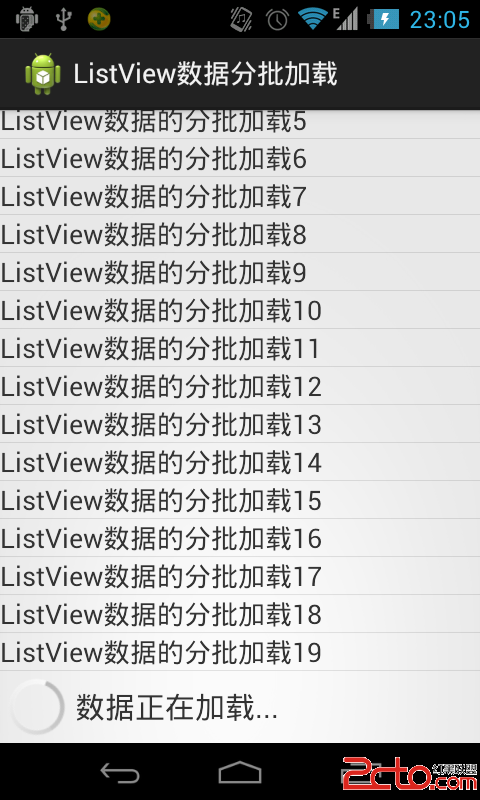 Android 列表滑到底部自動分批載入資料
Android 數據分批加載-滑動到底部自動加載列表 在應用開發中經常會用到 ListView,點擊「更多」載入資料是最簡單的做法,但為了提升使用者體驗,更常見的是當使用