

編輯:關於 Android 程式設計
把網路圖片存到外部儲存空間後再次讀取,是相當常見的需求——既能離線檢視,也能省下重複下載的流量。本文示範一個最小可用版本:先判斷有沒有本地快取,有就直接顯示,沒有才發網路請求,下載完畢後寫入檔案系統。
前提:先在清單檔補上網路權限。若要在 Android 6.0 以上寫入外部儲存,還需要 READ/WRITE_EXTERNAL_STORAGE 的執行期授權(Android 10 以後建議改用 app 專用目錄或 MediaStore)。
<LinearLayout xmlns:android="https://schemas.android.com/apk/res/android" xmlns:tools="https://schemas.android.com/tools" android:layout_width="match_parent" android:layout_height="match_parent" android:orientation="vertical" > <ImageView android:id="@+id/imageview" android:layout_width="wrap_content" android:layout_height="wrap_content" /> <Button android:id="@+id/bt_download" android:layout_width="wrap_content" android:layout_height="wrap_content" android:text="圖片下載" android:onClick="Image_Download" /> </LinearLayout>
把檔案操作獨立出來,好處是與 UI 邏輯解耦,日後換成 Room 或 OkHttp 快取時只需替換這一層。
// 操作 SDCARD 的檔案工具類 public class FileUtil { private static final String CACHE_DIR = Environment.getExternalStorageDirectory() + "/my_caches/images"; private static int COMP_JPG = 0; private static int COMP_PNG = 1; // 判斷 sdcard 是否掛載 public static boolean isMounted(){ String state = Environment.getExternalStorageState(); return state.equals(Environment.MEDIA_MOUNTED); } // 取得 sdcard 根路徑的絕對路徑 public static String getSDCARD(){ return Environment.getExternalStorageDirectory().getAbsolutePath(); } // 從網址擷取檔名 public static String getFilename(String url){ return url.substring(url.lastIndexOf('/') + 1); } // 儲存檔案:寫入位元組陣列 public static void sava1(String url, byte[] data){ if(!isMounted()){ return; } File dir = new File(CACHE_DIR); if(!dir.exists()){ dir.mkdirs(); } File file = new File(dir, getFilename(url)); try { FileOutputStream fos = new FileOutputStream(file); fos.write(data); fos.close(); } catch (Exception e) { e.printStackTrace(); } } // 儲存檔案:壓縮 Bitmap 後寫入 public static void sava2(String url, Bitmap bitmap, int format){ if(!isMounted()){ return; } File dir = new File(CACHE_DIR); if(!dir.exists()){ dir.mkdirs(); } File file = new File(dir, getFilename(url)); try { FileOutputStream fos = new FileOutputStream(file); bitmap.compress((format == COMP_JPG ? CompressFormat.JPEG : CompressFormat.PNG), 100, fos); fos.close(); } catch (Exception e) { e.printStackTrace(); } } // 讀取圖片 public static Bitmap readImage(String url){ if(!isMounted()){ return null; } File file = new File(CACHE_DIR, getFilename(url)); if(file.exists()){ return BitmapFactory.decodeFile(file.getAbsolutePath()); } return null; } // 清空快取目錄 public void clearCaches(){ File dir = new File(CACHE_DIR); File[] file_datas = dir.listFiles(); for(File file : file_datas){ file.delete(); } } }
public class MainActivity extends Activity { private ImageView imageview; private String url = "https://b.hiphotos.baidu.com/image/pic/item/d1160924ab18972bf5f68cc8e0cd7b899f510ae7.jpg"; @Override protected void onCreate(Bundle savedInstanceState) { super.onCreate(savedInstanceState); setContentView(R.layout.activity_main); this.imageview = (ImageView) this.findViewById(R.id.imageview); // 設定預設圖片 imageview.setImageResource(R.drawable.ic_launcher); } // 下載按鈕的點擊事件 public void Image_Download(View view){ // 先檢查本地是否已有快取 Bitmap bitmap = FileUtil.readImage(url); if(bitmap != null){ imageview.setImageBitmap(bitmap); }else{ // 沒有快取則發送網路請求 new MyAsyncTask().execute(url); } } // 非同步下載 public class MyAsyncTask extends AsyncTask<String, Void, byte[]>{ @Override protected byte[] doInBackground(String... params) { HttpGet get = new HttpGet(params[0]); HttpClient client = new DefaultHttpClient(); try { HttpResponse response = client.execute(get); if(response.getStatusLine().getStatusCode() == 200){ byte[] data = EntityUtils.toByteArray(response.getEntity()); FileUtil.sava1(params[0], data); return data; } } catch (Exception e) { e.printStackTrace(); } return null; } @Override protected void onPostExecute(byte[] result) { super.onPostExecute(result); if(result != null){ Bitmap bitmap = BitmapFactory.decodeByteArray(result, 0, result.length); imageview.setImageBitmap(bitmap); } } } }
這個範例寫於 Android 5 前後,直接搬進新專案會遇到幾個問題,逐項說明並給出現行做法。
HttpClient 與 AndroidHttpClient 已被移除。自 API 23 起 Apache HttpClient 不再隨系統提供,宣告 uses-library 也只是暫時解法。現行標準是 HttpURLConnection,或直接用 OkHttp:
OkHttpClient client = new OkHttpClient(); Request request = new Request.Builder().url(url).build(); try (Response response = client.newCall(request).execute()) { if (response.isSuccessful()) { byte[] data = response.body().bytes(); FileUtil.sava1(url, data); } }
AsyncTask 已於 API 30 被棄用。它對生命週期不敏感,稍不注意就會在 Activity 銷毀後回呼已釋放的 View 而崩潰。改用 Kotlin 協程、LiveData 或 enqueue 式的非同步回呼,並記得綁定生命週期。
外部儲存路徑的權限模型變了三次。Android 6.0 起需要執行期請求 WRITE_EXTERNAL_STORAGE;Android 10 引入 Scoped Storage;Android 11 起 WRITE_EXTERNAL_STORAGE 對多數 App 已不再授予寫入任意目錄的能力。實務建議:如果只是 App 自己的快取,改用 getCacheDir() 或 getExternalFilesDir(),完全不需要任何權限。
快取策略應該更完整。目前的實作沒有任何失效機制——圖片存下去就永遠是舊的。至少要加上三件事:以 URL 的 hash 作為檔名而非直接取網址尾段(避免同名覆蓋與特殊字元問題);記錄寫入時間並設定過期天數;在儲存空間不足時依 LRU 淘汰舊檔。
解碼時記得降採樣。decodeByteArray() 直接解全尺寸圖片,遇到大圖同樣會 OOM。加上 inSampleSize 是低成本高收益的做法:
BitmapFactory.Options opts = new BitmapFactory.Options(); opts.inJustDecodeBounds = true; BitmapFactory.decodeByteArray(data, 0, data.length, opts); opts.inSampleSize = calculateSampleSize(opts, reqWidth, reqHeight); opts.inJustDecodeBounds = false; Bitmap bitmap = BitmapFactory.decodeByteArray(data, 0, data.length, opts);
上述所有事情——非同步下載、磁碟快取、記憶體快取、降採樣、生命週期管理——Glide、Coil、Fresco 這些套件都已經做好了,而且做得比自行實作更完整。除非有特殊客製需求,直接用它們會省下大量時間與錯誤。
但理解這篇文章裡的每個環節仍然值得:當快取命中率不如預期、圖片顯示模糊、或記憶體出現異常時,知道底下發生了什麼,才能判斷問題出在網路層、檔案層還是解碼層。
 自訂 View 實作:用 ViewPager 打造可縮放的封面畫廊
基本介紹 畫廊效果在許多 App 裡都看得到——滑到中央的圖片會放大,離開中央的會縮小,營造出封面瀏覽的層次感: 這是我閒暇時寫的小專案,完整源碼在 https:
 自定義 ClearEditText:為輸入框加上一鍵清空按鈕
公司產品陸續在升級,這輪任務是優化程式碼結構與專案架構,於是開始全專案找冗餘。 先說需求場景。基本上每個 App 都有登入頁,登入頁少不了輸入框。當使用者發現內容打錯或想
 如何用字體管家為 QQ 換字型
字體管家是一款不錯的字型工具,提供下載、備份、預覽與修復功能,永久免費。以下示範怎麼用它替 QQ 換上新的字型。 &nbs
 Android 消息機制源碼簡析:Handler、Looper、MessageQueue
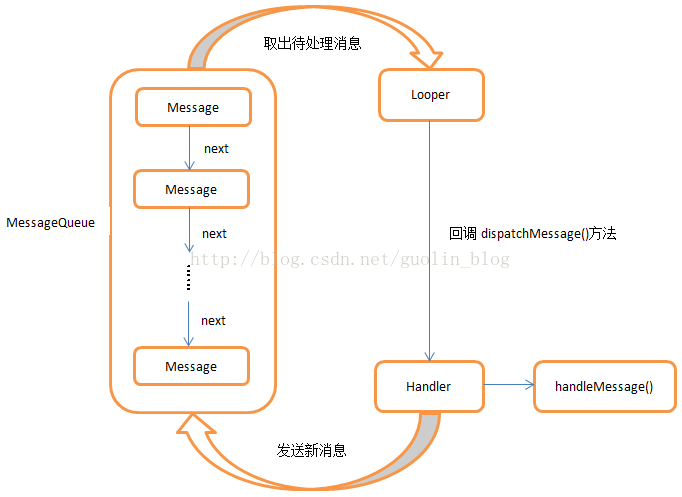
為何需要消息機制 Android 以消息驅動的方式進行互動。當子執行緒完成檔案讀寫或網路請求後,常需要回到主執行緒更新 UI。由於 Android 的 UI 元件不是執行