

編輯:關於 Android 程式設計
本文透過一個完整實例,說明如何在 Android 中結合 Service 與短信廣播,實現收到特定短信後自動在後台觸發發送郵件的功能。
主程式 A05Activity 負責接收短信內容並調起郵件發送:
import android.app.Activity; import android.content.Intent; import android.content.res.Resources.NotFoundException; import android.os.Bundle; import android.widget.TextView; public class A05Activity extends Activity { private TextView tv; private String[] receiver; private String subject; private String body; /** Called when the activity is first created. */ @Override public void onCreate(Bundle savedInstanceState) { super.onCreate(savedInstanceState); setContentView(R.layout.main); tv=(TextView)findViewById(R.id.tv); tv.setText("等待接收郵件中···"); try { //取得短信傳來的Bundle Bundle b=this.getIntent().getExtras(); if(b!=null){ //將Bundle中的字符串取出 String s=b.getString("input"); receiver=new String[]{"1650967185@163.com"}; subject="郵箱發送"; body=s.toString(); //自定義一個Intent業執行發送E-mail的工作 Intent i=new Intent(android.content.Intent.ACTION_SEND); i.setType("plain/text");//設置郵件格式為“plain/text” i.putExtra(android.content.Intent.EXTRA_EMAIL,receiver);//傳入收件人地址 i.putExtra(android.content.Intent.EXTRA_SUBJECT, subject);//傳入郵件主題 i.putExtra(android.content.Intent.EXTRA_TEXT, body);//傳入郵件內容 startActivity(Intent.createChooser(i, getResources().getString(R.string.message))); } else{ finish(); } } catch (NotFoundException e) { // TODO Auto-generated catch block e.printStackTrace(); } } }
ServiceA05 繼承自 BroadcastReceiver,負責攔截短信廣播、解析短信內容,再把資料透過 Bundle 傳回主 Activity:
import android.content.BroadcastReceiver; import android.content.Context; import android.content.Intent; import android.os.Bundle; import android.telephony.gsm.SmsMessage;//用來收取短信 import android.widget.Toast;//告知用戶收到短信 @SuppressWarnings("deprecation") public class ServiceA05 extends BroadcastReceiver{ public static final String mAction="android.provider.Telephony.SMS_RECEIVED"; private String str_receiver="收到短信"; @Override public void onReceive(Context arg0, Intent arg1) { // TODO Auto-generated method stub Toast.makeText(arg0, str_receiver.toString(), Toast.LENGTH_LONG).show(); if(arg1.getAction().equals(mAction)){ //建構一字符串集合變量sb StringBuilder sb=new StringBuilder(); //接收數據 Bundle b=arg1.getExtras(); //判斷intent傳送數據是否為空 if(b!=null){ //pdus為android內置的短信參數indentifier /* * 通過bundle.get("")返回一個包含pdus的對象*/ Object[] myOBJpuds=(Object[])b.get("pdus"); //構造短信對象數組,並根據短信內容大小來確定數組的大小 SmsMessage[] sm=new SmsMessage[myOBJpuds.length]; for(int i=0;i<myOBJpuds.length;i++){ sm[i]=SmsMessage.createFromPdu((byte[])myOBJpuds[i]); } //將短信合並自定義信息於StringBuilder當中 for(SmsMessage sm01:sm){ sb.append("接收到來自:\n"); //收信人的電話號碼 sb.append(sm01.getDisplayOriginatingAddress()); sb.append("\n--------傳來的短信---------\n"); //取得傳來短信的內容 sb.append(sm01.getDisplayMessageBody()); //用Toast來顯示來電信息 Toast.makeText(arg0, sb.toString(), Toast.LENGTH_LONG).show(); } } Toast.makeText(arg0, sb.toString(), Toast.LENGTH_LONG).show(); //返回主Activity Intent i=new Intent(arg0,A05Activity.class); //定義一個Bundle Bundle b01=new Bundle(); //將短信以putString()方法存入Bundle中 b01.putString("input", sb.toString()); //將Bundle放入Intent中 i.putExtras(b01); //設置Intent的Flag以一個全新的task來運行 i.setFlags(Intent.FLAG_ACTIVITY_NEW_TASK); arg0.startActivity(i); } } }
最後在 AndroidManifest.xml 中註冊這個廣播接收器,並加上接收短信的權限:
<?xml version="1.0" encoding="utf-8"?> <manifest xmlns:android="https://schemas.android.com/apk/res/android" package="com.my.a05" android:versionCode="1" android:versionName="1.0" > <uses-sdk android:minSdkVersion="10" /> <application android:icon="@drawable/ic_launcher" android:label="@string/app_name" > <activity android:name=".A05Activity" android:label="@string/app_name" > <intent-filter> <action android:name="android.intent.action.MAIN" /> <category android:name="android.intent.category.LAUNCHER" /> </intent-filter> </activity> <receiver android:name="ServiceA05"> <intent-filter> <action android:name="android.provider.Telephony.SMS_RECEIVED"/> </intent-filter> </receiver> </application> <uses-permission android:name="android.permission.RECEIVE_SMS"/> </manifest>
整體思路是:註冊一個 BroadcastReceiver 並把它的 intent-filter 設為 SMS_RECEIVED,讓它針對短信事件做出反應,同時記得加上 android.permission.RECEIVE_SMS 權限。希望這個例子對你的開發有所幫助。
 Android AIDL IPC 機制詳解
AIDL 是 Android 提供的介面定義語言,主要用於不同進程之間的通訊。當一個應用需要呼叫另一個應用或服務中的方法,且希望以接近本地物件的方式操作時,AIDL 能簡
 用自定義 View 打造帶阻尼彈性效果的 Android 加載動畫
先來看看最終呈現的動態效果: 動手之前需要具備的基礎知識: 1. 二次貝塞爾曲線 2. 動畫相關知識 3. 自定義 View 的基本用法 什麼是阻尼運動? 阻尼振動指的
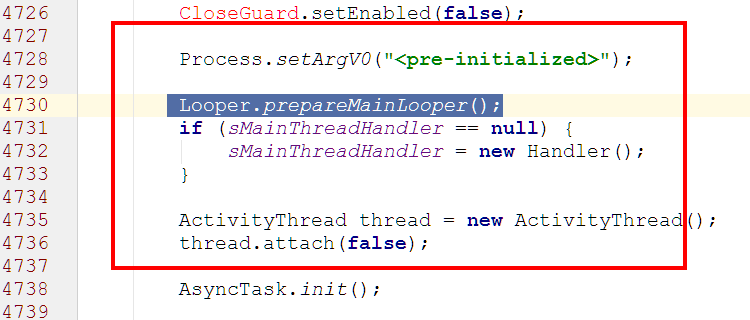 Android 消息機制源碼解析:Handler、Looper 與 MessageQueue 如何協作
Android 消息機制概覽Android 的訊息處理由 Handler、Message、MessageQueue 與 Looper 共同完成。Handler 負責發送與
 Android 自定義左右菜單:滑動動畫與蒙版效果
先上截圖……哎,因為 1080P 在 Windows 10 上雖然適配了,但不少軟件並沒跟上(比如某款錄製 GIF 的工具),導致畫面有一定偏移、顯示不完整,不過效果大概