

編輯:關於 Android 程式設計
在 Android 中,可以透過 PhoneStateListener 來監聽手機的電話狀態,例如待機、通話中、響鈴等。本例便是利用它來監聽來電狀態,並在手機來電時透過郵件把來電號碼發送到指定信箱。
具體程式碼如下:
import android.app.Activity; import android.content.Intent; import android.os.Bundle; import android.telephony.PhoneStateListener; import android.telephony.TelephonyManager; import android.widget.TextView; public class A07Activity extends Activity { private TextView tv;//用來顯示電話狀態 private String emailReceiver="16*****85@qq.com"; //郵箱地址 private String emailSubject="你有來電信息,請查收!"; //作為郵件主題 /** Called when the activity is first created. */ @SuppressWarnings("static-access") @Override public void onCreate(Bundle savedInstanceState) { super.onCreate(savedInstanceState); setContentView(R.layout.main); tv=(TextView)findViewById(R.id.tv); PhoneCallListener pcl=new PhoneCallListener(); TelephonyManager tm=(TelephonyManager)getSystemService(TELEPHONY_SERVICE); tm.listen(pcl, pcl.LISTEN_CALL_STATE); } public class PhoneCallListener extends PhoneStateListener{ public void onCallStateChanged(int state,String incomingNumber){ //需要重寫onCallStateChanged方法 switch(state){ case TelephonyManager.CALL_STATE_IDLE: tv.setText("CALL_STATE_IDLE"); break; case TelephonyManager.CALL_STATE_OFFHOOK: tv.setText("CALL_STATE_OFFHOOK"); break; case TelephonyManager.CALL_STATE_RINGING: tv.setText("來電號碼"+incomingNumber); //如果有人打來電話,就會自動發送郵件到郵箱通知用戶來電號碼 //設置來電時發送郵件 Intent i=new Intent(android.content.Intent.ACTION_SEND); i.setType("plain/text"); i.putExtra(android.content.Intent.EXTRA_EMAIL, new String[]{emailReceiver.toString()}); i.putExtra(android.content.Intent.EXTRA_SUBJECT, emailSubject.toString()); i.putExtra(android.content.Intent.EXTRA_TEXT, "來電電話"+incomingNumber); startActivity(Intent.createChooser(i, "來電信息")); break; default: break; } super.onCallStateChanged(state, incomingNumber); } } }
別忘了在 AndroidManifest.xml 中加入相應權限:
<?xml version="1.0" encoding="utf-8"?> <manifest xmlns:android="https://schemas.android.com/apk/res/android" package="com.my.a07" android:versionCode="1" android:versionName="1.0" > <uses-sdk android:minSdkVersion="10" /> <application android:icon="@drawable/ic_launcher" android:label="@string/app_name" > <activity android:name=".A07Activity" android:label="@string/app_name" > <intent-filter> <action android:name="android.intent.action.MAIN" /> <category android:name="android.intent.category.LAUNCHER" /> </intent-filter> </activity> </application> <uses-permission android:name="android.permission.SEND_SMS"></uses-permission> <uses-permission android:name="android.permission.READ_CONTACTS"></uses-permission> <uses-permission android:name="android.permission.READ_PHONE_STATE"></uses-permission> </manifest>
透過重寫 onCallStateChanged 方法,我們可以在不同通話狀態下執行不同邏輯,其中 CALL_STATE_RINGING 對應來電響鈴,此時即可取出 incomingNumber 並觸發郵件通知。希望本文對你的 Android 開發有所幫助。
 Android 4.0 USB Camera 实战(三):通用 UVC 设备的接入
前两篇讲了 zc301 的具体实现,这一篇把通用的 UVC 设备补上。两者的差别在于数据格式:zc301 直接给出 JPEG,拿到就能显示;标准 UVC 输出的是 YUV
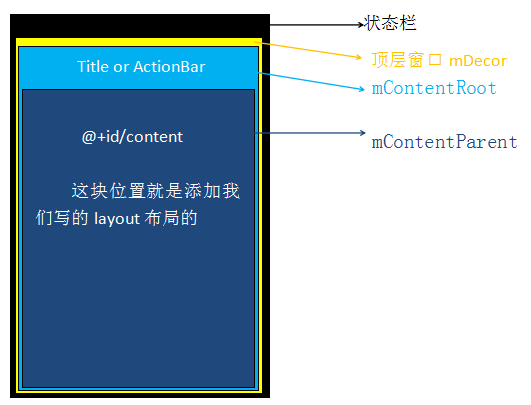 Activity 完全解析(二):setContentView 與 layout 的 inflate 過程
上一篇我們探討了 Activity 的啟動,從 startActivity() 到進程創建,再到 Activity 的創建,最後調用 onCreate() 方法。本篇我們
 Android 逆向工程常用工具入門指南(apktool 與 dex2jar)
寫在前面 整理這份筆記時,我偶爾也會自嘲是不是太無聊了,但既然項目告一段落,趁著手邊的鏈接還新鮮,乾脆一口氣寫完,省得日後再翻箱倒櫃。於是就有了這篇 Android 逆向
 Android 實作分享與第三方登入——以新浪微博為例
分享與第三方登入幾乎是現在 App 的標配。分享能把有意思的內容傳出去,帶來自然流量;第三方登入則可以借用 QQ、新浪微博這類已有龐大用戶基礎的平台帳號,讓使用者免去註冊