

編輯:關於 Android 程式設計
Service 一旦啟動就會 independent 於頁面而存在,因此停止它的動作也必須由外部主動發出。最簡單的方式是從 Activity 呼叫 stopService(),並搭配 Action 字串定位到目標服務。
<service android:name=".service.SensorService">
    <intent-filter>
        <action android:name="ITOP.MOBILE.SIMPLE.SERVICE.SENSORSERVICE"/>
    </intent-filter>
</service>
final Intent intent = new Intent();
intent.setAction("ITOP.MOBILE.SIMPLE.SERVICE.SENSORSERVICE");
stopService(intent);
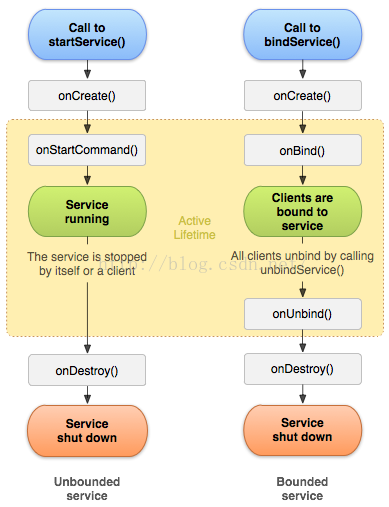
用 Action 字串比直接寫死類別名稱更有彈性,特別是同一支 Service 可能被多個模組共用時。但要留意:如果這個 Service 是以 bindService() 綁定的,單靠 stopService() 並不會真正終止它,還必須呼叫 unbindService() 解除綁定,否則服務會持續存活直到所有連線都斷開為止。
另外,Android 8.0 之後對背景服務有較嚴格的限制,長時間的常駐工作建議改用 Foreground Service 並顯示常駐通知,或改用 WorkManager 排程,這樣才能穩定通過系統的資源回收機制。
 Android 7.0 語音信箱(一):Voicemail 下載流程源碼全解析
這個主題來自一個真實的線上問題:同事在美國測試 Voicemail 功能時遇到下載失敗。由於國內運營商幾乎沒有啟用可視語音信箱,相關資料相當稀少,平時也很少有機會碰到這塊
 Android 自訂滾輪刻度尺控制項的完整實作
接到一個需求,要實現如下圖的滾輪刻度尺效果: 本想找原作者「傲慢的上校」交流,但時間實在緊,源碼都拿到了還去麻煩人家不太好意思。大致瀏覽後判斷涉及以下幾塊: 1、背景:
 Android 四大組件之 Service:啟動、綁定與數據互通的完整入門
Service 是四大組件中最容易被誤解的一個。很多人以為它開了執行緒、能默默在背景跑重活,實際上它預設就跑在 App 的主執行緒上——它最大的特色是沒有介面、生命周期獨
 Android 中 ToggleButton 和 Switch 的用法
ToggleButton 與 Switch 都是帶有開關效果的按鈕控件,它們都通過監聽 CheckedChangeListener 來響應狀態的變化。toggle_lay