

編輯:關於 Android 程式設計
本文分享一個實現 TextView 跑馬燈(文字滾動)效果的實例,供感興趣的讀者參考。
核心思路是通過自定義一個 TextView 子類,重寫 isFocused() 方法並恆返回 true,讓控件始終處於「獲得焦點」的狀態,從而觸發跑馬燈滾動:
public class MyTextView extends TextView{ public MyTextView(Context context, AttributeSet attrs) { super(context, attrs); // TODO Auto-generated constructor stub } public MyTextView(Context context, AttributeSet attrs, int defStyle) { super(context, attrs, defStyle); // TODO Auto-generated constructor stub } public MyTextView(Context context) { super(context); // TODO Auto-generated constructor stub } @Override public boolean isFocused() { // TODO Auto-generated method stub return true; //must be return true; } }
然後在 XML 佈局中使用這個自定義控件,並配置相關屬性:
<packagename.MyTextView android:id="@+id/my_textview" android:layout_width="400px" android:layout_height="35px" android:singleLine="true" android:ellipsize="marquee" android:marqueeRepeatLimit="marquee_forever" android:textSize="22sp"/>
其中 android:ellipsize="marquee" 設置為跑馬燈模式,android:marqueeRepeatLimit="marquee_forever" 表示無限次循環滾動,android:singleLine="true" 則保證文字單行顯示。這樣配置之後,文字便能實現持續滾動的效果。
希望本文所述對大家的 Android 開發有所幫助。
 Android 短信收发實作:BroadcastReceiver 攔截簡訊與發送狀態回呼
短信的接收處理已有不少成熟應用,最典型的就是驗證碼自動填寫——手機收到驗證碼簡訊後,App 直接攔下內容並跳過輸入步驟。至於發送,API 本身很直白,難點反而在於「怎麼知
 Android 常見 UI 元件之 ListView(二):客製化清單與多選、篩選功能
Android 常見 UI 元件之 ListView(二)——客製化 ListView這一篇承接上一篇,示範如何在 ListView 中一次選取多個項目,並實作搜尋篩選的
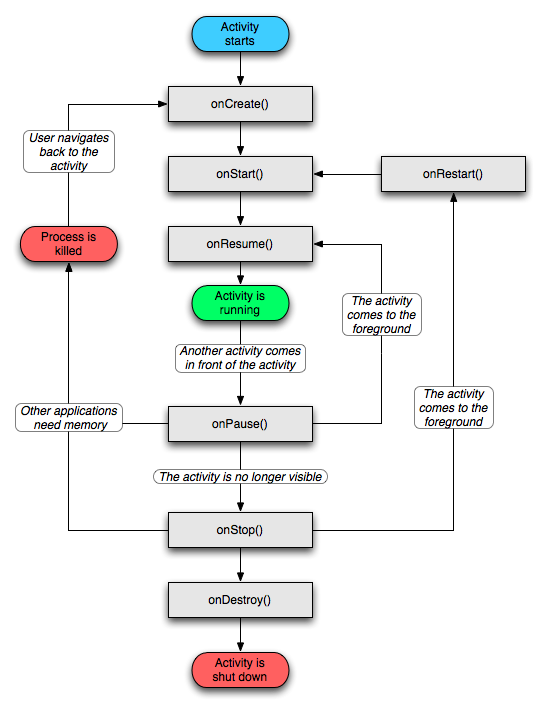 Android 面試題整理:四大組件與 Activity、Intent 核心知識(一)
四大組件速覽 Q:請簡述 Android 的四大組件。 Android 由四種組件撐起整個應用框架,彼此靠 Intent 串連: Activity 負責畫面。一個應用通常
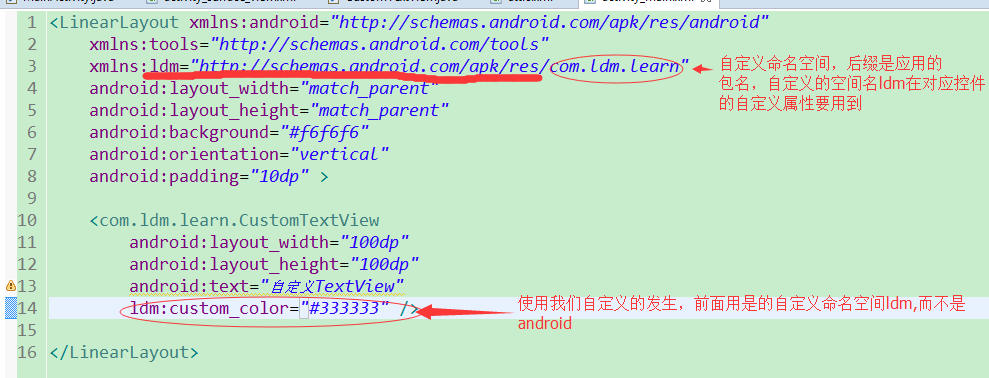 Android 自定義屬性完整攻略:從 attrs.xml 到 TypedArray 取值
做 Android 開發久了,你一定會遇到這種情況:系統提供的控制項怎麼調都達不到設計稿的效果,於是只能自己動手寫一個自定義 View。而一旦開始自定義,下一個問題就跟著