

編輯:關於 Android 程式設計
Intent 除了用來啟動 Activity、發送廣播、啟動服務,也能夾帶資料。最常見的寫法是 putExtra:
Intent intent = new Intent(this,SecondActivity.class); intent.putExtra("info", "I am fine"); startActivity(intent);
但 putExtra 支援的型別有限,那要怎麼傳一整個物件?Android 提供了兩種做法:Serializable 與 Parcelable。
序列化的意思是把物件轉成可儲存、可傳輸的形式,序列化後的物件能丟上網路,也能寫入檔案。實作上只要讓類別 implements Serializable:
package com.example.testapplication; import java.io.Serializable; /** * 對象序列化 * @author yy * */ public class Emp implements Serializable { private String name; private int age; public String getName() { return name; } public void setName(String name) { this.name = name; } public int getAge() { return age; } public void setAge(int age) { this.age = age; } }
Intent 有對應的重載方法 intent.putExtra(String name, Serializable value),所以傳遞很直接:
Intent intent = new Intent(this,SecondActivity.class); intent.putExtra("obj", new Emp()); startActivity(intent);
接收端用 getSerializableExtra 取回並轉型:
Emp emp = (Emp) getIntent().getSerializableExtra("obj");
實務上建議明確宣告 serialVersionUID。少了它,一旦類別結構變動,反序列化時就會因為 UID 不符而丟 InvalidClassException。
Parcelable 的原理是把物件拆解,讓每一部分都變成 Intent 支援的型別,再依序寫入與讀出:
package com.example.testapplication; import android.os.Parcel; import android.os.Parcelable; /** * Parcelable方式 * @author yy * */ public class Emp2 implements Parcelable{ private String name; private int age; public String getName() { return name; } public void setName(String name) { this.name = name; } public int getAge() { return age; } public void setAge(int age) { this.age = age; } @Override public int describeContents() { return 0; } @Override public void writeToParcel(Parcel dest, int flag) { //寫出name dest.writeString(name); //寫出age dest.writeInt(age); } public static final Parcelable.Creator<Emp2> creator = new Creator<Emp2>() { @Override public Emp2[] newArray(int size) { return new Emp2[size]; } @Override public Emp2 createFromParcel(Parcel source) { Emp2 emp2 = new Emp2(); //讀取的順序要和上面寫出的順序一致 //讀取name emp2.name = source.readString(); emp2.age = source.readInt(); return emp2; } }; }
傳遞方式與 Serializable 相同:
Intent intent = new Intent(this,SecondActivity.class); intent.putExtra("obj", new Emp2()); startActivity(intent);
取回時換成 getParcelableExtra:
Emp2 emp2 = getIntent().getParcelableExtra("obj");
實作 Parcelable 最容易犯的錯是「寫入與讀出的順序不一致」。Parcel 是純位置導向的串流,沒有欄位名稱可比對,順序錯了不會編譯失敗,只會在執行期讀出亂掉的值。欄位一多,強烈建議用 Android Studio 的 Parcelable 外掛自動產生。
Serializable 在序列化過程中會產生大量暫存物件,容易觸發頻繁的 GC;Parcelable 以二進位方式直接寫入記憶體區塊,效能明顯更好。因此在 Activity 之間傳遞物件,優先用 Parcelable。
不過 Parcelable 有個限制:它依賴 Parcel 這個記憶體結構,並不適合把資料長期存到磁碟。因為一旦 App 版本更新、欄位增減,舊資料你很難保證還能正確還原。這種需要持久化的場合,還是該用 Serializable(或改用 JSON、資料庫等更穩定的格式)。
一句話總結:記憶體中傳遞用 Parcelable,要落地存檔用 Serializable。
 Android 圖示陰影與邊框處理:仿小米風格
在開發桌面啟動器或圖示美化功能時,常需要為應用程式圖示加上邊框與陰影。本文分享一種以 Android 自繪方式處理圖示的思路。 核心概念 邊框的顏色可以取自原圖的主要色
 安卓弧形 ListView 開發手記解析
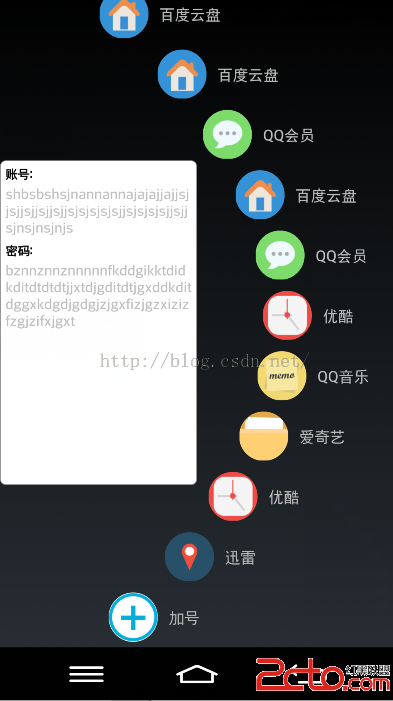
需求 項目中需要將 ListView 做成向右彎曲的弧形效果,並在左側空白區域顯示資訊。 核心原理 弧形列表的關鍵是計算每個 item 相對於原點的 Y 軸位置,再利用
 1080P手機變卡又耗電?手動降低解析度與密度
1080P手機若跑遊戲或模擬器吃緊,可手動降低解析度。Root後編輯build.prop,把ro.sf.lcd_density從480改為320,再用終端模擬器調整顯示尺
 Android 自訂 View:仿微信雷達掃描動畫實作
雷達掃描是個很經典的動畫效果:幾圈同心圓加上一道旋轉的漸層扇形,視覺上就有「正在搜尋」的暗示。實作難度其實不高,關鍵在於 SweepGradient 與 Matrix 的