

編輯:關於 Android 程式設計
問題背景
專案裡的網路模組寫得有點亂:模擬器一套、真機一套,維護起來很痛苦。
解法
讓程式自動偵測當前處於哪種網路環境,再決定要走哪種連線方式。查了一下模擬器預設的接入點,是「行動網路」且 APN 為 internet。
// 獲取Mobile網絡下的cmwap、cmnet private int getCurrentApnInUse() { int type = NONET; Cursor cursor = context.getContentResolver().query(PREFERRED_APN_URI, new String[] { "_id", "apn", "type" }, null, null, null); cursor.moveToFirst(); int counts = cursor.getCount(); if(counts != 0){//適配平板外掛3G模塊情況 if (!cursor.isAfterLast()) { String apn = cursor.getString(1); //#777、ctnet 都是中國電信定制機接入點名稱,中國電信的接入點:Net、Wap都采用Net即非代理方式聯網即可 //internet 是模擬器上模擬接入點名稱 if (apn.equalsIgnoreCase("cmnet") || apn.equalsIgnoreCase("3gnet") || apn.equalsIgnoreCase("uninet") || apn.equalsIgnoreCase("#777") || apn.equalsIgnoreCase("ctnet") || apn.equalsIgnoreCase("internet")) { type = WIFIAndCMNET; } else if (apn.equalsIgnoreCase("cmwap") || apn.equalsIgnoreCase("3gwap") || apn.equalsIgnoreCase("uniwap")) { type = CMWAP; } }else{ //適配中國電信定制機,如海信EG968,上面方式獲取的cursor為空,所以換種方式 Cursor c = context.getContentResolver().query(PREFERRED_APN_URI,null, null, null, null); c.moveToFirst(); String user=c.getString(c.getColumnIndex("user")); if(user.equalsIgnoreCase("ctnet")){ type = WIFIAndCMNET; } c.close(); } }else{ type = WIFIAndCMNET;//平板外掛3G,采用非代理方式上網 } cursor.close(); return type; }
這段程式背後的邏輯是:cmwap、3gwap、uniwap 這類需要透過代理伺服器上網,而 cmnet、ctnet、uninet 則是直連。兩者的連線寫法不同,所以必須先分辨清楚。程式中還額外處理了兩種特殊情況:某些電信客製機(如海信 EG968)用上述方式取到的 cursor 是空的,得改從 user 欄位判斷;平板外接 3G 模組時 cursor 也可能為空,此時預設當作直連處理。
其實不必硬記各家 APN 名稱,直接查 proxy 欄位有沒有值更乾脆:
/** * MOBILE方式下獲取當前的網絡連接方式,代理或非代理 * */ public static String getCurrentApnInUse(Context context) { Cursor cursor = context.getContentResolver().query(PREFERRED_APN_URI, new String[] { "_id", "apn", "type", "proxy" }, null, null, null); cursor.moveToFirst(); if (cursor.isAfterLast()) { String apn = cursor.getString(3); if (apn == null) { apn = ""; } } return apn; }
這種做法的好处是不必隨電信商新增 APN 名稱而維護清單。不過要留意原範例有個邏輯瑕疵:判斷條件寫成 if (cursor.isAfterLast()),但 cursor 指到最後一筆之後時,getString() 反而會出錯;正確應為 if (!cursor.isAfterLast()),同時別忘了關閉 cursor。
/** * 獲取手機卡類型,移動、聯通、電信 * */ private static int getMobileType(Context context) { int type = 0; TelephonyManager iPhoneManager = (TelephonyManager) context.getSystemService(Context.TELEPHONY_SERVICE); String iNumeric = iPhoneManager.getSimOperator(); if (iNumeric.length() > 0) { if (iNumeric.equals("46000") || iNumeric.equals("46002")) { // 中國移動 } else if (iNumeric.equals("46001")) { // 中國聯通 } else if (iNumeric.equals("46003")) { // 中國電信 } } }
getSimOperator() 回傳的是 MCC+MNC 組成的五碼數字,前三位是國家碼(460 為中國),後兩位才是電信商。上面只列了少數幾組,實際上各家電信還有多個號段(例如聯通的 46001、46006、46009,電信的 46003、46005、46011),正式專案建議改用 TelephonyManager.getSimOperatorName() 直接取得電信商名稱,省下維護清單的麻煩。
讀取 APN 需要 android.permission.READ_APN_STATE,查 SIM 資訊需要 android.permission.READ_PHONE_STATE。後者屬於危險權限,在 Android 6.0 以上必須執行期動態請求,否则 getSimOperator() 會拿到空字串。
另外要提醒的是,APN 資料庫屬於系統級資訊,各家廠牌與 Android 版本的實作差異不小,加上近年 SubscriptionManager(雙卡)與 ConnectivityManager.NetworkCapabilities 的問世,上述以 APN 為核心的判斷方式已逐漸被取代。新專案建議優先用 NetworkCapabilities.TRANSPORT_CELLULAR 判斷連線類型,只有需要區分代理/直連這類細節時,才需要回頭查 APN。
 Android 多點觸控實作:手把手打造多指示點互動
智慧型裝置的多點觸控為我們帶來許多炫酷體驗,也因此讓不少 Android 開發者對多點觸控程式充滿興趣。事實上,它的實作並不像想像中那麼遙不可及。本文就透過一個完整實例,
 Android Studio 導入 GitHub 開源專案常見問題排查
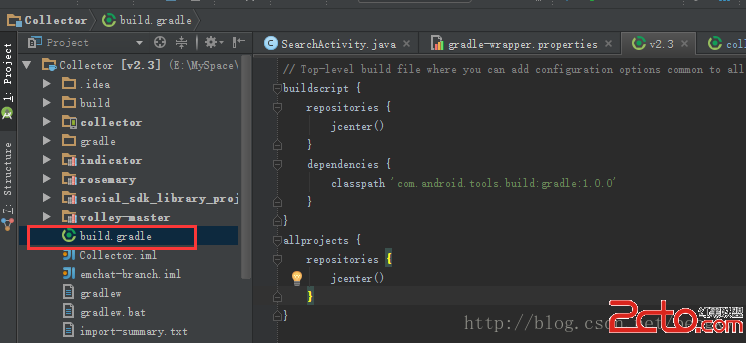
下載與匯入專案 GitHub 上有許多好用的開源專案,但直接匯入 Android Studio 時,常會遇到 Gradle 版本、SDK 設定或專案結構問題。本文以圖片輪
 Android HTTP 請求實作:發送 GET、接收回應並在畫面上呈現
所有需要跟後端打交道的 App,第一步都是「送出請求、拿到回應」。這個範例用最經典的 Apache HttpClient 走一遍,把結果直接顯示在 WebView 上,方
 Android 拍照、相冊選圖與 6.0 權限管理
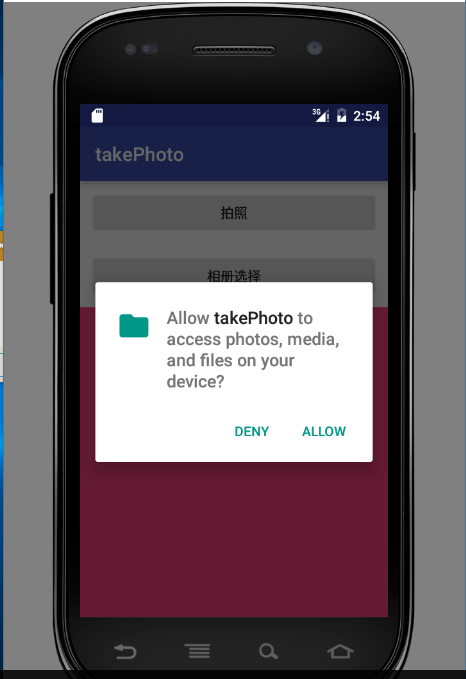
拍照與相冊選圖 在 Android 中,拍照與從相冊選圖都是常見需求。實作時通常會建立一個資料夾存放照片,透過 Uri 指定輸出路徑,再以隱式 Intent 啟動相機或相