

編輯:關於 Android 程式設計
本文整理 Android 中呼叫瀏覽器的幾種常見情境:交給系統預設、指定特定 App,以及開啟本機 HTML 檔。
Intent intent = new Intent();
intent.setAction("android.intent.action.VIEW");
Uri content_url = Uri.parse("https://www.jb51.net");
intent.setData(content_url);
startActivity(intent);
這樣 Android 就會挑出手機預設的瀏覽器來開啟網址。
關鍵在 setClassName(),需要同時給出套件名稱與啟動 Activity。
1. 指定 Android 自帶瀏覽器:
Intent intent = new Intent();
intent.setAction("android.intent.action.VIEW");
Uri content_url = Uri.parse("https://www.jb51.net");
intent.setData(content_url);
intent.setClassName("com.android.browser", "com.android.browser.BrowserActivity");
startActivity(intent);
2. 啟動其他瀏覽器(前提是該 App 已安裝在裝置上)。只要替換對應的套件名與主 Activity 即可:
intent.setClassName("com.android.browser", "com.android.browser.BrowserActivity");
常見的對應關係:
com.uc.browser,Activity com.uc.browser.ActivityUpdatecom.opera.mini.android,Activity com.opera.mini.android.Browsercom.tencent.mtt,Activity com.tencent.mtt.MainActivity實務上建議先透過 PackageManager 查詢目標元件是否存在,再決定是否指定,否則會直接拋出 ActivityNotFoundException。
這裡有個容易踩的坑:開啟本機檔案時必須明確指定瀏覽器,不能沿用方式一。示例如下:
Intent intent = new Intent();
intent.setAction("android.intent.action.VIEW");
Uri content_url = Uri.parse(
        "content://com.android.htmlfileprovider/sdcard/help.html");
intent.setData(content_url);
intent.setClassName("com.android.browser", "com.android.browser.BrowserActivity");
startActivity(intent);
關鍵是這裡走的是 content 這個 scheme,而不是 file。
有 Win32 開發經驗的人可能會想:直接寫 file://sdcard/help.html 不就行了?很遺憾,預設瀏覽器並未針對 file scheme 做解析。若一定要讓預設瀏覽器支援,就得自行改動原始碼。
大致步驟是開啟 packages/apps/Browser/AndroidManifest.xml,在既有的 intent-filter 之後補上一段:
<intent-filter>
    <action android:name="android.intent.action.VIEW" />
    <category android:name="android.intent.category.DEFAULT" />
    <category android:name="android.intent.category.BROWSABLE" />
    <data android:scheme="file" />
</intent-filter>
接著重新編譯打包、安裝,新的瀏覽器就會認得 file 形式。
上述做法屬於早期寫法。目前若要在自己的 App 內開啟網頁,較好的選擇是改用 Custom Tabs 或 WebView,能保留視覺一致性並避免過度依賴第三方 App 的內部元件名稱——畢竟這些 class 名稱並非公開 API,一旦對方改版就會失效。若只是想開啟外部連結,加上 Intent.createChooser() 讓使用者自行挑選,體驗通常更好。
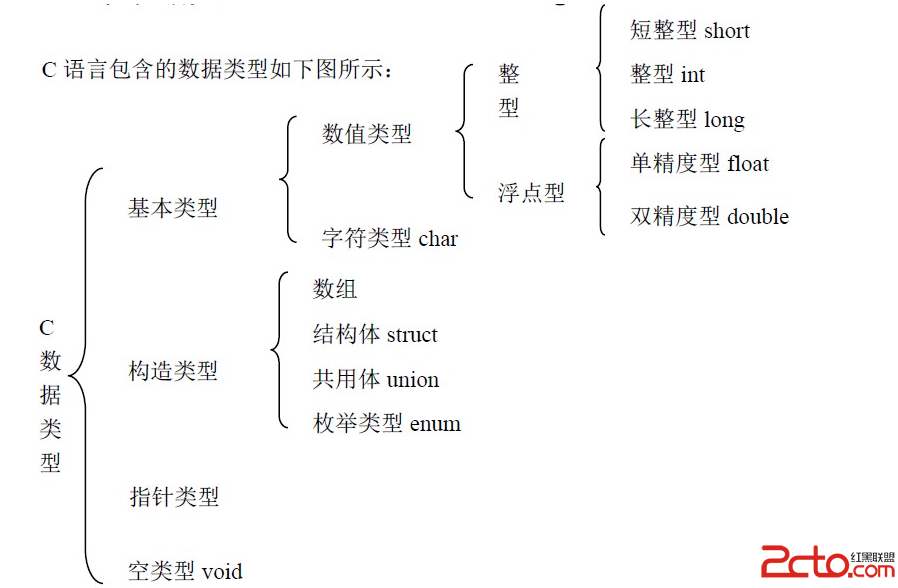 Android For JNI(二)——C 語言基礎:數據類型、輸入輸出、內存地址與內存修改器原理
 把 Hello World 跑通之後,就可以正式邁進 C 語言的大門
 Android 自定義輪播圖控件:ViewPager 自動滾動加圓點指示器
說到製作輪播圖,多數人第一反應就是用 ViewPager。它自帶滑動能力,我們只要讓它定時自動翻頁,再補上一排小圓點作為位置指示,一個典型的 Banner 輪播就成型了。
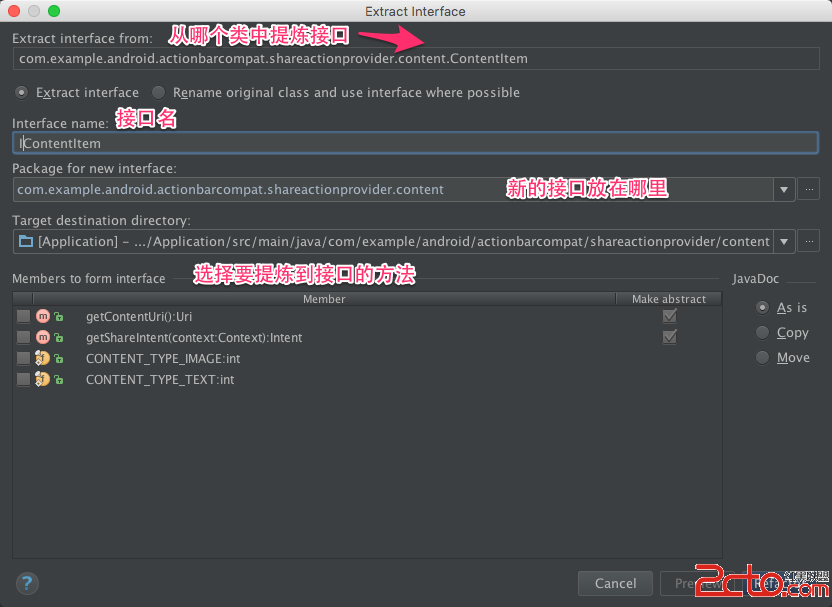 《Android Studio 實用指南》8.20 提煉接口
提煉接口(Extract Interface)是一項重構手法:從一個已存在的類中挑選若干方法,把它們提取到一個獨立的接口里,讓這個類去實現該接口。對於需要抽出統一契約、方
 Android IPC 之 AIDL 調用解析:從 Stub、Proxy 到系統 API 實戰
AIDL 是 Android 跨進程通信的重要方式之一。本文從 Service 中的 IBinder 出發,說明 Stub、Proxy、transact 與 onTran