

編輯:關於 Android 程式設計
本文將通過一個完整實例,講解如何在 Android 中使用 Criteria 來挑選最合適的地理位置服務,從而實現定位並監聽位置變化,供大家參考。
通過構造一個 Criteria 對象,設定對精度、海拔、方向、耗電等的需求,再調用 getBestProvider 讓系統自動為我們挑選最合適的 provider,然後結合 LocationListener 實時監聽位置的變化。
/* LocationActivity.java
 * 利用 Criteria 選擇最優的位置服務,演示定位用戶位置並監聽位置變化的代碼
 */
package uni.location;

import android.app.Activity;
import android.content.Context;
import android.location.Criteria;
import android.location.Location;
import android.location.LocationListener;
import android.location.LocationManager;
import android.os.Bundle;
import android.util.Log;

public class LocationActivity extends Activity {
    private LocationManager manager;
    private static final String TAG = "LOCATION DEMO";

    @Override
    public void onCreate(Bundle savedInstanceState) {
        super.onCreate(savedInstanceState);
        setContentView(R.layout.main);

        // 獲取系統的的定位服務
        manager = (LocationManager) getSystemService(Context.LOCATION_SERVICE);

        // 創建 Criteria 對象
        Criteria criteria = new Criteria();
        criteria.setAccuracy(Criteria.ACCURACY_COARSE);   // 只需要粗略精度
        criteria.setAltitudeRequired(false);            // 不需要海拔
        criteria.setBearingRequired(false);             // 不需要方向
        criteria.setCostAllowed(true);                  // 允許產生資費
        criteria.setPowerRequirement(Criteria.POWER_LOW); // 要求低耗電

        // 挑選最佳 provider
        String provider = manager.getBestProvider(criteria, false);
        Log.i(TAG, "we choose " + provider);

        // 第一次獲得設備的位置
        Location location = manager.getLastKnownLocation(provider);
        updateLocation(location);

        // 重要:監聽位置變化(每 6000 毫秒、位移 10 米更新一次)
        manager.requestLocationUpdates(provider, 6000, 10, locationListener);
    }

    // 事件監聽器
    private final LocationListener locationListener = new LocationListener() {
        public void onLocationChanged(Location location) {
            updateLocation(location);
        }

        public void onProviderDisabled(String provider) {
            updateLocation(null);
            Log.i(TAG, "Provider now is disabled..");
        }

        public void onProviderEnabled(String provider) {
            Log.i(TAG, "Provider now is enabled..");
        }

        public void onStatusChanged(String provider, int status, Bundle extras) { }
    };

    // 獲取並顯示用戶位置
    private void updateLocation(Location location) {
        String latLng;
        if (location != null) {
            double lat = location.getLatitude();
            double lng = location.getLongitude();
            latLng = "Latitude:" + lat + " Longitude:" + lng;
        } else {
            latLng = "Can't access your location";
        }
        Log.i(TAG, "The location has changed..");
        Log.i(TAG, "Your Location:" + latLng);
    }
}
同時需要在 manifest 中聲明定位權限:
<?xml version="1.0" encoding="utf-8"?>
<manifest xmlns:android="https://schemas.android.com/apk/res/android"
    package="uni.location"
    android:versionCode="1"
    android:versionName="1.0">
    <uses-sdk android:minSdkVersion="8" />
    <application
        android:icon="@drawable/icon"
        android:label="@string/app_name">
        <activity android:name=".LocationActivity" android:label="@string/app_name">
            <intent-filter>
                <action android:name="android.intent.action.MAIN" />
                <category android:name="android.intent.category.LAUNCHER" />
            </intent-filter>
        </activity>
    </application>
    <uses-permission android:name="android.permission.ACCESS_FINE_LOCATION" />
</manifest>
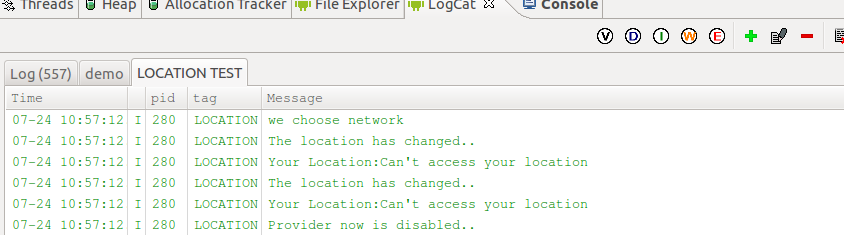
可以看到,我們只要求較低的精度和最低的電量消耗,從最後一行輸出可以看到虛擬機的網絡服務並沒有打開,但在選擇最佳 provider 時因為參數傳了 false,所以同樣能夠選中。
希望本文所述對大家進行 Android 程序設計有所幫助。
 Android 小技巧:Activity 如何接收 Fragment 的回呼
看到這個標題,你可能以為是什麼高深的技巧,其實就是自訂回呼函數而已。但這個模式在實際專案裡非常常用,值得寫下來。 先回顧 Activity 之間的資料傳遞 方式一:用
 Android 自訂控制項實作底部選單(下)
在 App 開發中,底部選單是相當常見的控制項,每次都要重寫一堆程式碼著實麻煩。今天我們就沿用前幾篇教學中介紹的控制項,進一步封裝出一個可複用的底部選單。先來看效果圖:
 Android 開發環境配置的常見坑與解法整理
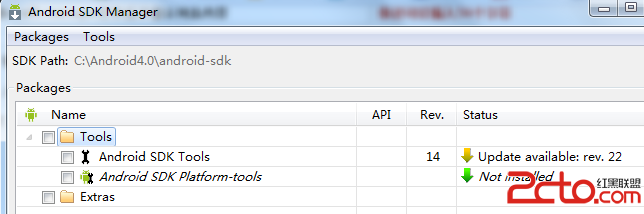
剛踏入 Android 開發這條路,第一件事就是自己動手把開發環境搭起來。可別小看這一步,從 JDK、SDK 到 ADT,一路走下來幾乎步步是坑,解決完一個又冒出一個,折
 Android 4.0 Launcher 源碼解析(一):從 Launcher.xml 看整個桌面的組成結構
從這一篇開始,我們要做一個系列,把 Android 4.0 原生的桌面程式 Launcher 攤開來看。目標不是逐行翻譯程式碼,而是理解它「為什麼這樣設計」:桌面由哪些容