

編輯:關於 Android 程式設計
出於某些需求,我們常會想把數據庫存到外部儲存或 SD 卡中(這類情況可以透過加密數據來降低被破解的風險)。舉例來說,當一個應用需要支援多組數據、每組都要有各自的數據庫,而且數據量相當龐大時,把數據庫放在外部儲存會是更合適的選擇,畢竟 RAM 的空間有限;此外,撰寫某些測試程式時,把數據庫存在 SD 卡也更方便查看內容。
Android 透過 SQLiteOpenHelper 建立數據庫時,預設會存到「/data/data/應用程序名/databases」目錄下,只要在繼承 SQLiteOpenHelper 類的建構子中傳入數據庫名稱即可。但若想存到指定路徑,就需要設法改寫。閱讀 SQLiteOpenHelper.java 原始碼會發現:建立數據庫都是透過 Context 的 openOrCreateDatabase 方法完成的。因此,若要在自訂路徑下建立數據庫,我們需要寫一個類繼承 Context 並改寫其 openOrCreateDatabase 方法,在其中指定存放路徑即可。下面先附上 SQLiteOpenHelper 中 getWritableDatabase 與 getReadableDatabase 兩個方法的原始碼,SQLiteOpenHelper 正是透過這兩個方法來建立數據庫。
/** * Create and/or open a database that will be used for reading and writing. * The first time this is called, the database will be opened and * {@link #onCreate}, {@link #onUpgrade} and/or {@link #onOpen} will be * called. * * <p>Once opened successfully, the database is cached, so you can * call this method every time you need to write to the database. * (Make sure to call {@link #close} when you no longer need the database.) * Errors such as bad permissions or a full disk may cause this method * to fail, but future attempts may succeed if the problem is fixed.</p> * * <p class="caution">Database upgrade may take a long time, you * should not call this method from the application main thread, including * from {@link android.content.ContentProvider#onCreate ContentProvider.onCreate()}. * * @throws SQLiteException if the database cannot be opened for writing * @return a read/write database object valid until {@link #close} is called */ public synchronized SQLiteDatabase getWritableDatabase() { if (mDatabase != null) { if (!mDatabase.isOpen()) { // darn! the user closed the database by calling mDatabase.close() mDatabase = null; } else if (!mDatabase.isReadOnly()) { return mDatabase; // The database is already open for business } } if (mIsInitializing) { throw new IllegalStateException("getWritableDatabase called recursively"); } // If we have a read-only database open, someone could be using it // (though they shouldn't), which would cause a lock to be held on // the file, and our attempts to open the database read-write would // fail waiting for the file lock. To prevent that, we acquire the // lock on the read-only database, which shuts out other users. boolean success = false; SQLiteDatabase db = null; if (mDatabase != null) mDatabase.lock(); try { mIsInitializing = true; if (mName == null) { db = SQLiteDatabase.create(null); } else { db = mContext.openOrCreateDatabase(mName, 0, mFactory, mErrorHandler); } int version = db.getVersion(); if (version != mNewVersion) { db.beginTransaction(); try { if (version == 0) { onCreate(db); } else { if (version > mNewVersion) { onDowngrade(db, version, mNewVersion); } else { onUpgrade(db, version, mNewVersion); } } db.setVersion(mNewVersion); db.setTransactionSuccessful(); } finally { db.endTransaction(); } } onOpen(db); success = true; return db; } finally { mIsInitializing = false; if (success) { if (mDatabase != null) { try { mDatabase.close(); } catch (Exception e) { } mDatabase.unlock(); } mDatabase = db; } else { if (mDatabase != null) mDatabase.unlock(); if (db != null) db.close(); } } } /** * Create and/or open a database. This will be the same object returned by * {@link #getWritableDatabase} unless some problem, such as a full disk, * requires the database to be opened read-only. In that case, a read-only * database object will be returned. If the problem is fixed, a future call * to {@link #getWritableDatabase} may succeed, in which case the read-only * database object will be closed and the read/write object will be returned * in the future. * * <p class="caution">Like {@link #getWritableDatabase}, this method may * take a long time to return, so you should not call it from the * application main thread, including from * {@link android.content.ContentProvider#onCreate ContentProvider.onCreate()}. * * @throws SQLiteException if the database cannot be opened * @return a database object valid until {@link #getWritableDatabase} * or {@link #close} is called. */ public synchronized SQLiteDatabase getReadableDatabase() { if (mDatabase != null) { if (!mDatabase.isOpen()) { // darn! the user closed the database by calling mDatabase.close() mDatabase = null; } else { return mDatabase; // The database is already open for business } } if (mIsInitializing) { throw new IllegalStateException("getReadableDatabase called recursively"); } try { return getWritableDatabase(); } catch (SQLiteException e) { if (mName == null) throw e; // Can't open a temp database read-only! Log.e(TAG, "Couldn't open " + mName + " for writing (will try read-only):", e); } SQLiteDatabase db = null; try { mIsInitializing = true; String path = mContext.getDatabasePath(mName).getPath(); db = SQLiteDatabase.openDatabase(path, mFactory, SQLiteDatabase.OPEN_READONLY, mErrorHandler); if (db.getVersion() != mNewVersion) { throw new SQLiteException("Can't upgrade read-only database from version " + db.getVersion() + " to " + mNewVersion + ": " + path); } onOpen(db); Log.w(TAG, "Opened " + mName + " in read-only mode"); mDatabase = db; return mDatabase; } finally { mIsInitializing = false; if (db != null && db != mDatabase) db.close(); } }透過上面的分析,我們可以寫出一個自訂的 Context 類。由於 Context 中除了 openOrCreateDatabase 之外還有其他抽象函式,直接繼承並不容易,因此建議改用非抽象類 ContextWrapper(它同樣繼承自 Context)。自訂的 DatabaseContext 類原始碼如下:
public class DatabaseContext extends ContextWrapper { public DatabaseContext(Context context){ super( context ); } /** * 獲得數據庫路徑,如果不存在,則創建對象對象 * @param name * @param mode * @param factory */ @Override public File getDatabasePath(String name) { //判斷是否存在sd卡 boolean sdExist = android.os.Environment.MEDIA_MOUNTED.equals(android.os.Environment.getExternalStorageState()); if(!sdExist){//如果不存在, return null; }else{//如果存在 //獲取sd卡路徑 String dbDir= FileUtils.getFlashBPath(); dbDir += "DB";//數據庫所在目錄 String dbPath = dbDir+"/"+name;//數據庫路徑 //判斷目錄是否存在,不存在則創建該目錄 File dirFile = new File(dbDir); if(!dirFile.exists()){ dirFile.mkdirs(); } //數據庫文件是否創建成功 boolean isFileCreateSuccess = false; //判斷文件是否存在,不存在則創建該文件 File dbFile = new File(dbPath); if(!dbFile.exists()){ try { isFileCreateSuccess = dbFile.createNewFile();//創建文件 } catch (IOException e) { e.printStackTrace(); } }else{ isFileCreateSuccess = true; } //返回數據庫文件對象 if(isFileCreateSuccess){ return dbFile; }else{ return null; } } } /** * 重載這個方法,是用來打開SD卡上的數據庫的,android 2.3及以下會調用這個方法。 * * @param name * @param mode * @param factory */ @Override public SQLiteDatabase openOrCreateDatabase(String name, int mode, SQLiteDatabase.CursorFactory factory) { SQLiteDatabase result = SQLiteDatabase.openOrCreateDatabase(getDatabasePath(name), null); return result; } /** * Android 4.0會調用此方法獲取數據庫。 * * @see android.content.ContextWrapper#openOrCreateDatabase(java.lang.String, int, * android.database.sqlite.SQLiteDatabase.CursorFactory, * android.database.DatabaseErrorHandler) * @param name * @param mode * @param factory * @param errorHandler */ @Override public SQLiteDatabase openOrCreateDatabase(String name, int mode, CursorFactory factory, DatabaseErrorHandler errorHandler) { SQLiteDatabase result = SQLiteDatabase.openOrCreateDatabase(getDatabasePath(name), null); return result; } }最後,在繼承 SQLiteOpenHelper 的子類建構子中,用 DatabaseContext 的實例取代原本的 context 即可:
DatabaseContext dbContext = new DatabaseContext(context); super(dbContext, mDatabaseName, null, VERSION);
關於「如何把數據庫保存到 SD 卡」的實作就介紹到這裡,希望能給需要這個功能的開發者一點參考。
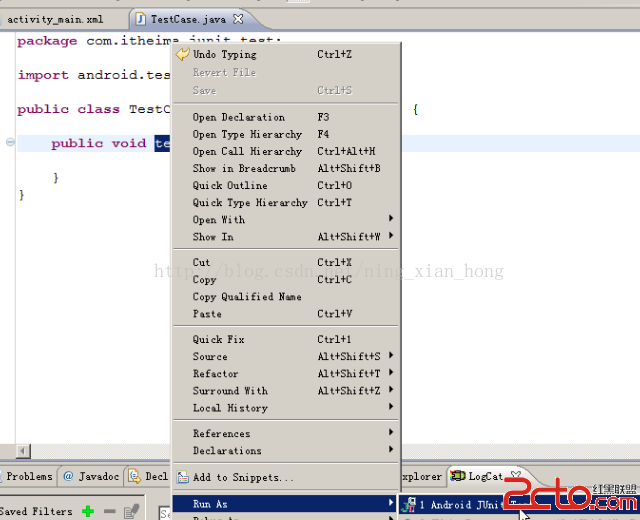 Android 中測試框架使用簡介
有一句老話:好的程序是測出來的。測試的目的,就是盡可能多地發現程序中的 bug。要系統地掌握測試,我們先從幾個常見的分類維度說起。 按是否關注內部實現分類 黑盒測試:關注
 BlueStacks 安卓模擬器視窗大小的調整方法
用過 BlueStacks 的人都知道它相當好用、佔用資源也少,但有個缺點很惱人:視窗佔滿整個螢幕,而且用滑鼠拖邊框完全改不動大小。以下教你怎麼調整。 BlueStack
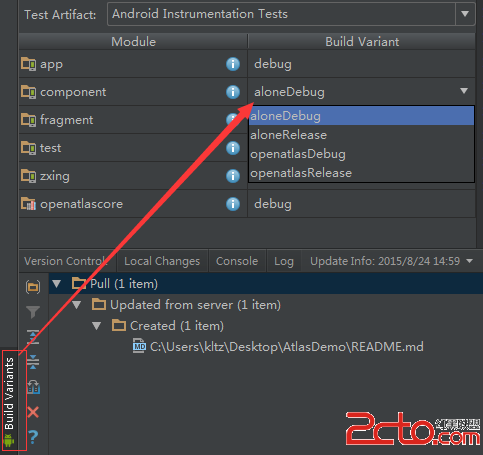 Android 插件化開發:OpenAtlas 四大組件與 Application 驗證
使用 OpenAtlas 進行插件化開發時,插件的撰寫方式接近一般 App,但需要驗證四大組件與 Application 是否能正確運作。本文以日誌輸出方式檢查各元件的生
 Android 基礎再學習:AIDL 進程間通信完整解析
AIDL 是 Android Interface Definition Language 的縮寫,本質上是一份「跨進程接口的契約」。它解決的是一個很現實的問題:Andro