

編輯:關於 Android 程式設計
讀取聯繫人是很多工具類應用的基礎能力。本文以一個可運行的例子,講解如何通過 ContactsContract 訪問系統通訊錄並把結果展示在列表裡。
先認識一下 Android 的通訊錄數據庫
Android 的通訊錄數據背後是一個 SQLite 數據庫,我們通過 ContentProvider 訪問它。需要特別注意的是,Google 從 1.x 到 2.x 版本對 Contacts 數據庫結構做過一次較大的調整,因此早期基於 Contacts 類的寫法在後續版本中已被 ContactsContract 取代。下面的示例直接採用新版本的 API。
核心讀取代碼
整個流程並不複雜:拿到 ContentResolver,查詢 Phone 表,遍歷 Cursor 取出姓名與號碼,裝進列表交給 SimpleAdapter 渲染。
package com.homer.phone;

import java.util.ArrayList;
import java.util.HashMap;
import android.app.Activity;
import android.database.Cursor;
import android.os.Bundle;
import android.provider.ContactsContract;
import android.provider.ContactsContract.CommonDataKinds.Phone;
import android.widget.ListView;
import android.widget.SimpleAdapter;

public class phoneRead extends Activity {
    @Override
    public void onCreate(Bundle savedInstanceState) {
        super.onCreate(savedInstanceState);
        showListView();
    }

    private void showListView() {
        ListView listView = new ListView(this);
        ArrayList<HashMap<String, String>> list = getPeopleInPhone2();
        SimpleAdapter adapter = new SimpleAdapter(
                this, list, android.R.layout.simple_list_item_2,
                new String[] {"peopleName", "phoneNum"},
                new int[]{android.R.id.text1, android.R.id.text2});
        listView.setAdapter(adapter);
        setContentView(listView);
    }

    private ArrayList<HashMap<String, String>> getPeopleInPhone2() {
        ArrayList<HashMap<String, String>> list = new ArrayList<HashMap<String, String>>();
        Cursor cursor = getContentResolver().query(
                ContactsContract.CommonDataKinds.Phone.CONTENT_URI,
                null, null, null, null);
        // 遍歷手機聯繫人
        while (cursor.moveToNext()) {
            HashMap<String, String> map = new HashMap<String, String>();
            int indexPeopleName = cursor.getColumnIndex(Phone.DISPLAY_NAME); // 姓名
            int indexPhoneNum = cursor.getColumnIndex(Phone.NUMBER);         // 號碼
            String strPeopleName = cursor.getString(indexPeopleName);
            String strPhoneNum = cursor.getString(indexPhoneNum);
            map.put("peopleName", strPeopleName);
            map.put("phoneNum", strPhoneNum);
            list.add(map);
        }
        if (!cursor.isClosed()) {
            cursor.close();
            cursor = null;
        }
        return list;
    }
}
別忘了申請權限
讀取聯繫人屬於敏感操作,必須在 AndroidManifest.xml 中聲明相應權限,否則運行時會直接拋出 SecurityException:
<uses-permission android:name="android.permission.READ_CONTACTS" />
此外,在 Android 6.0(API 23)及以後的版本上,光在清單文件裡聲明還不夠,還需要在運行時動態向用戶申請該權限,並處理用戶拒絕授權的情況。
運行效果
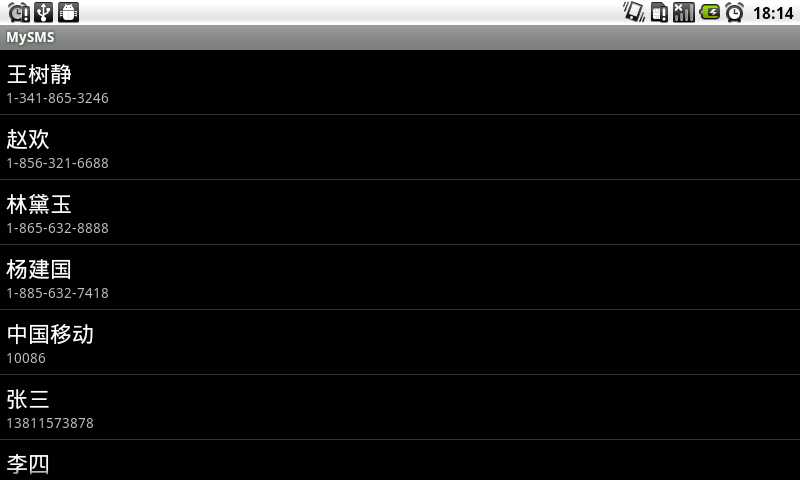
最後補充兩點實踐建議:Cursor 使用完畢一定要關閉,避免游標洩露;如果聯繫人數量很大,直接一次性全部裝進內存會造成明顯的流暢度下降,這時更合適的做法是分頁加載,或改用自定義 CursorAdapter 讓列表按需取數據。
 TraceView 圖文攻略:從資料採集到瓶頸定位
自從 Google 發布了一系列效能優化影片後,社群裡關於效能分析的文章也多了起來:有人分析效能瓶頸的成因,有人分享優化手法,也有人介紹可用的檢測工具。本文聚焦其中的 T
 取得正在呼叫 API 的應用程式名稱
在修改 AOSP framework 時,常有「想記錄到底是誰在呼叫這個 API」的需求——例如統計哪些 App 用了相機、音訊錄製或定位服務。這件事可以在 framew
 屬性動畫玩出花:打造一個有呼吸感的 Android 登錄界面
登錄界面大概是每個 Android 開發者都寫過的頁面。輸入賬號、輸入密碼、點擊登錄,功能上毫無難度。但如果想讓它「不那麼普通」,就需要在過場動畫上下功夫了。先看效果:(
 安卓基礎學習(一):開發環境建置與第一個 HelloWorld
在動手建置 Android 開發環境之前,先花點時間認識一下 Android 本身:它以 Java 為主要開發語言,核心基於 Linux,屬於自由且開放原始碼的作業系統,