

編輯:關於 Android 程式設計
本文透過實例,講解在 Android 中呼叫 Camera 時,如何處理預覽畫面方向不正確的問題。
在開發相機相關應用時,前置與後置鏡頭的行為往往並不一致。有時候後置鏡頭顯示正常,切換到前置鏡頭卻發現畫面旋轉了 180 度或其他角度,令人百思不得其解。查閱 Android 原始碼後發現,官方其實提供了相當優雅的解法,以下將原始碼記錄下來,方便日後查閱。
public static int getDisplayRotation(Activity activity) { int rotation = activity.getWindowManager().getDefaultDisplay() .getRotation(); switch (rotation) { case Surface.ROTATION_0: return 0; case Surface.ROTATION_90: return 90; case Surface.ROTATION_180: return 180; case Surface.ROTATION_270: return 270; } return 0; } public static void setCameraDisplayOrientation(Activity activity, int cameraId, Camera camera) { // See android.hardware.Camera.setCameraDisplayOrientation for // documentation. Camera.CameraInfo info = new Camera.CameraInfo(); Camera.getCameraInfo(cameraId, info); int degrees = getDisplayRotation(activity); int result; if (info.facing == Camera.CameraInfo.CAMERA_FACING_FRONT) { result = (info.orientation + degrees) % 360; result = (360 - result) % 360; // compensate the mirror } else { // back-facing result = (info.orientation - degrees + 360) % 360; } camera.setDisplayOrientation(result); }
使用時,只要在開啟 Camera 之後呼叫 setCameraDisplayOrientation 這個方法,並傳入正確的 cameraId,就能讓預覽畫面自動校正到符合直覺的方向。特別要注意的是,前置鏡頭因為存在鏡像效果,所以需要多做一次角度補償,這也是官方程式碼中特別處理的地方。希望本文所述能對大家的 Android 程式設計有所幫助。
 NavigationBottom:一款可定製的底部導航欄庫
如何引入項目 在 Module 下的 build.gradle 中加入以下依賴: compile com.github.youngkaaa:navigation-bot
 GreenDAO 入門:Android 輕量快速的 ORM 解決方案
Android 自帶的 SQLite,大家一定都用過。然而在使用的過程中,我們往往需要做許多額外的工作,比如編寫 SQL 語句、解析查詢結果等。於是,適用於 Androi
 Android Calendar Provider 完整解析:表結構、權限與 Intent 用法
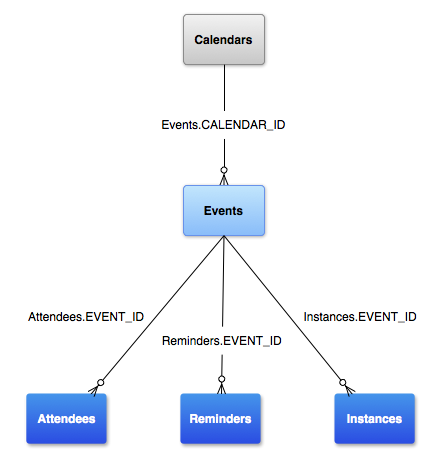
Calendar Provider 是系統內建的日曆資料倉庫,它透過 ContentProvider 的標準形式對外開放,讓應用程式能讀寫使用者在日曆應用中建立的事件。本
 Android 的 MVC、MVP 與 MVVM 架構解析(上):把 MVC 講透
前言:工欲善其事,必先利其器 工作一段時間之後,對這十個字的體會最深。剛入行時,並不真的理解自己在做什麼,上面分派任務,我就埋頭去做,很少停下來思考。後來才慢慢發現,做得