

編輯:關於 Android 程式設計
本文介紹如何在 Android 中調用系統震動功能,供大家參考。
調用 Android 系統震動只需要一個類——Vibrator,它位於 android.os 包中。由於屬於系統級服務,需要在 manifest.xml 中設置相應權限:
<?xml version="1.0" encoding="utf-8"?> <manifest xmlns:android="https://schemas.android.com/apk/res/android" package="uni.vibrator" android:versionCode="1" android:versionName="1.0"> <uses-sdk android:minSdkVersion="8" /> <application android:icon="@drawable/icon" android:label="@string/app_name"> <activity android:name=".VibratorDemoActivity" android:label="@string/app_name"> <intent-filter> <action android:name="android.intent.action.MAIN" /> <category android:name="android.intent.category.LAUNCHER" /> </intent-filter> </activity> </application> <uses-permission android:name="android.permission.VIBRATE" /> </manifest>
一起來看下 SDK 文檔:Vibrator 類用於操作設備上的震動,如果你的線程退出了,那麼啟動的震動也會停止。
public void vibrate(long[] pattern, int repeat) —— 根據給定的節奏震動。傳入一個整型數組作為關閉和開啟震動的持續時間(毫秒):第一個值表示等待震動開啟的毫秒數,下一個值表示保持震動的毫秒數,後續值交替表示震動關閉與開啟的時長。若希望節奏重複,可傳入 repeat 參數表示從數組哪個索引開始重複,-1 表示不重複。
此外還有一個 cancel() 方法,用於取消震動。
演示代碼:
/* * @author octobershiner * SE.HIT * 一個使用android手機震動的demo * */ package uni.vibrator; import android.app.Activity; import android.content.Context; import android.os.Bundle; import android.os.Vibrator; public class VibratorDemoActivity extends Activity { private Vibrator vibrator; /** Called when the activity is first created. */ @Override public void onCreate(Bundle savedInstanceState) { super.onCreate(savedInstanceState); setContentView(R.layout.main); /* * 想設置震動大小可以通過改變pattern來設定,如果開啟時間太短,震動效果可能感覺不到 * */ vibrator = (Vibrator)getSystemService(Context.VIBRATOR_SERVICE); long [] pattern = {100,400,100,400}; // 停止 開啟 停止 開啟 vibrator.vibrate(pattern,2); //重復兩次上面的pattern 如果只想震動一次,index設為-1 } public void onStop(){ super.onStop(); vibrator.cancel(); } }
以上就是調用 Android 系統震動的實現方法,希望對大家的開發有所幫助。
 RecyclerView 水平自動循環滾動圖片實作
循環滾動的概念要讓圖片水平自動循環,可讓 Adapter 回傳大量項目,並以取餘數方式讓每個位置對應到固定圖片集合。這樣即使滾動很久,也不會耗盡資料。持續滾動與同步透過
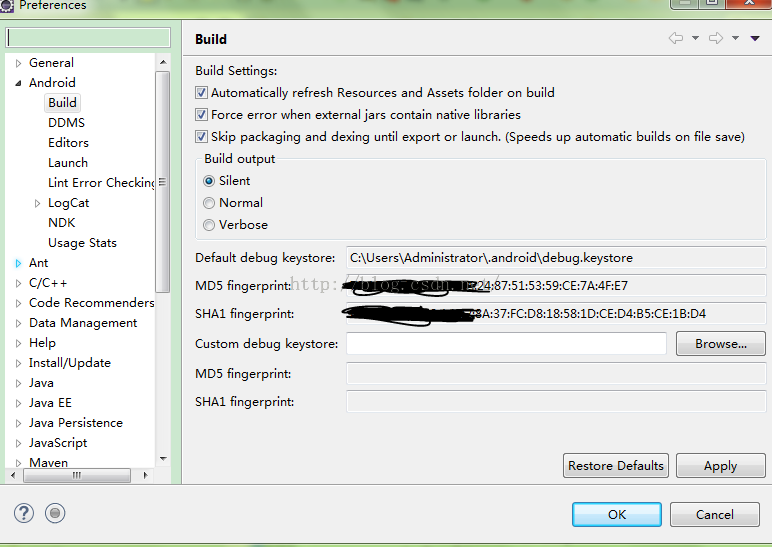 Android 分享微信好友與閃退問題的解決方案
一、申請微信 APPID 要讓 App 具備分享到微信的能力,第一步就是到微信開放平台申請一個 APPID。申請時需要填寫應用簽名與應用包名,這裡有兩個關鍵細節:包名必須
 自定義 View 打造垂直跑馬燈:完整思路與程式碼解析
先看效果: 畫面中間的色塊是影片轉 GIF 造成的失真,可以忽略。 大家都熟悉,水平方向的跑馬燈用 Android 原生的 TextView 加上跑馬燈屬性就能搞定;但
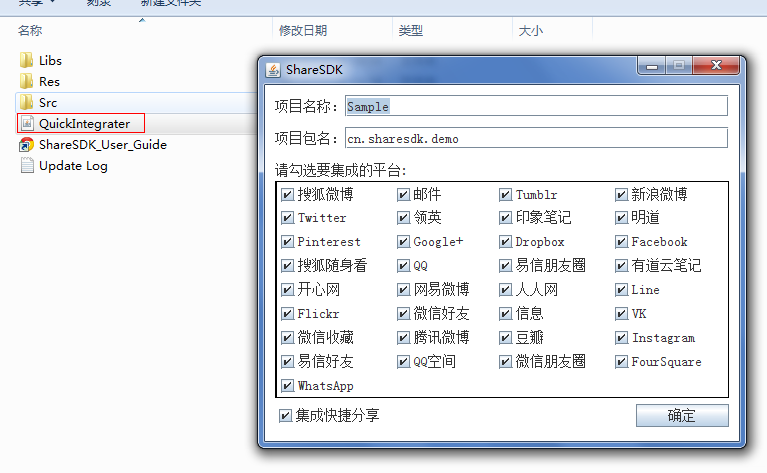 Android 快速接入 ShareSDK:從申請 AppKey 到跑通分享的完流程
對大多數 App 來說,「分享到第三方平台」是發版前必須補上的功能。ShareSDK 把新浪微博、微信、QQ、易信等平台的授權與分享流程封裝在一起,開發者只要完成幾步配置