

編輯:關於 Android 程式設計
Android 對獲取應用大小的方法進行了封裝,但我們沒有直接調用的權限,因此只能通過 AIDL,再利用 Java 反射機制去調用系統級方法。下面是核心代碼(注釋較為詳細):
/** * 作用:-----獲取包的大小----- * @param context 上下文 * @param pkgName app的包名 * @param appInfo 實體類,用於存放App的某些信息 */ public static void getPkgSize(final Context context, String pkgName, final PhoneAppInfo appInfo) { // getPackageSizeInfo是PackageManager中的一個private方法,所以需要通過反射的機制來調用 Method method; try { method = PackageManager.class.getMethod("getPackageSizeInfo", new Class[]{String.class, IPackageStatsObserver.class}); // 調用 getPackageSizeInfo 方法,需要兩個參數:1、需要檢測的應用包名;2、回調 method.invoke(context.getPackageManager(), pkgName, new IPackageStatsObserver.Stub() { @Override public void onGetStatsCompleted(PackageStats pStats, boolean succeeded) throws RemoteException { if (succeeded && pStats != null) { synchronized (PhoneAppInfo.class) { appInfo.setCatchSize(pStats.cacheSize);//緩存大小 appInfo.setDataSize(pStats.dataSize); //數據大小 appInfo.setCodeSize(pStats.codeSize); //應用大小 appInfo.setAppSize(pStats.cacheSize + pStats.codeSize + pStats.dataSize);//應用的總大小 Log.d("asdasdxx",appInfo.getAppSize()+""); } } } }); } catch (NoSuchMethodException | InvocationTargetException | IllegalAccessException e) { e.printStackTrace(); } }
下面是兩個 AIDL 文件的代碼。
1、在 main 文件夾下建立一個 aidl 文件夾;
2、建立一個包,包名為 android.content.pm;
3、結構圖如下:
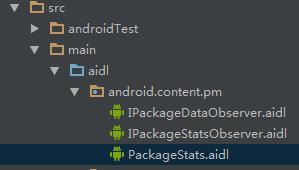
PackageStats.aidl 文件:
/* //device/java/android/android/view/WindowManager.aidl ** ** Copyright 2007, The Android Open Source Project ** ** Licensed under the Apache License, Version 2.0 (the "License"); ** you may not use this file except in compliance with the License. ** You may obtain a copy of the License at ** ** https://www.apache.org/licenses/LICENSE-2.0 ** ** Unless required by applicable law or agreed to in writing, software ** distributed under the License is distributed on an "AS IS" BASIS, ** WITHOUT WARRANTIES OR CONDITIONS OF ANY KIND, either express or implied. ** See the License for the specific language governing permissions and ** limitations under the License. */ package android.content.pm; parcelable PackageStats;
IPackageStatsObserver.aidl 文件:
/* ** ** Copyright 2007, The Android Open Source Project ** ** Licensed under the Apache License, Version 2.0 (the "License"); ** you may not use this file except in compliance with the License. ** You may obtain a copy of the License at ** ** https://www.apache.org/licenses/LICENSE-2.0 ** ** Unless required by applicable law or agreed to in writing, software ** distributed under the License is distributed on an "AS IS" BASIS, ** WITHOUT WARRANTIES OR CONDITIONS OF ANY KIND, either express or implied. ** See the License for the specific language governing permissions and ** limitations under the License. */ package android.content.pm; import android.content.pm.PackageStats; /** * API for package data change related callbacks from the Package Manager. * Some usage scenarios include deletion of cache directory, generate * statistics related to code, data, cache usage(TODO) * {@hide} */ oneway interface IPackageStatsObserver { void onGetStatsCompleted(in PackageStats pStats, boolean succeeded); }
以上就是通過反射與 AIDL 獲取 App 應用大小的完整方法,希望對大家的 Android 開發有所幫助。
 自定義控件第三講:obtainStyledAttributes 四大方法逐一拆解
寫自定義控件的時候,或多或少都會碰到 obtainStyledAttributes(AttributeSet, int[], int, int) 或者 obtainAtt
 Android TableLayout 常用屬性介紹
collapseColumnscollapseColumns 可依列索引隱藏指定欄位。若不設定此屬性,表格會完整顯示。若設定為 0,2,則第 0 與第 2 欄會被隱藏。s
 Android 網路框架設計實踐:從 Request 抽象到文件上傳
本文從零設計一個輕量 Android 網路框架,重點不在代碼行數,而在分層思路:請求如何抽象、佇列如何調度、結果如何回到主線程、文件上傳如何封裝。 一、構建思路 定
 Android Studio 中的 Gradle 基本用法整理
Gradle 是 Android Studio 的一大特色,也是許多人從 Eclipse 遷移過來時最不適應的部分。本文把日常開發會用到的設定與指令整理成一份可查閱的清單