

編輯:關於 Android 程式設計
想為App中的圖片加上精美的視覺效果嗎?本文整理了Android圖片處理的幾種常見技巧,包括圖形轉換、縮放、圓角與倒影效果,並提供完整的程式碼讓你輕鬆上手。
本文涵蓋的圖片處理方法包括:
轉換 — drawable To bitmap
縮放 — Zoom
圓角 — Round Corner
倒影 — Reflected
核心的 bitmapProcess 工具類別如下:
package com.learn.games; import android.graphics.Bitmap; import android.graphics.Canvas; import android.graphics.LinearGradient; import android.graphics.Matrix; import android.graphics.Paint; import android.graphics.PixelFormat; import android.graphics.PorterDuffXfermode; import android.graphics.Rect; import android.graphics.RectF; import android.graphics.Bitmap.Config; import android.graphics.PorterDuff.Mode; import android.graphics.Shader.TileMode; import android.graphics.drawable.Drawable; public class bitmapProcess { // zoom public static Bitmap zoomBitmap(Bitmap bitmap, int w, int h){ int width = bitmap.getWidth(); int height = bitmap.getHeight(); Matrix matrix = new Matrix(); float scaleWidth = w/(float)width; float scaleHeight = h/(float)height; matrix.postScale(scaleWidth, scaleHeight); Bitmap bitmap2 = Bitmap.createBitmap(bitmap, 0, 0, width, height, matrix, true); return bitmap2; } // drawable to bitmap public static Bitmap drawable2Bitmap(Drawable drawable){ int width = drawable.getIntrinsicHeight(); int height = drawable.getIntrinsicHeight(); Bitmap bitmap = Bitmap.createBitmap(width, height, drawable.getOpacity() != PixelFormat.OPAQUE ? Bitmap.Config.ARGB_8888 : Bitmap.Config.RGB_565); Canvas canvas = new Canvas(bitmap); drawable.setBounds(0, 0, width, height); drawable.draw(canvas); return bitmap; } // Round Corner Bitmap public static Bitmap getRoundCornerBitmap(Bitmap bitmap, float roundPX){ int width = bitmap.getWidth(); int height = bitmap.getHeight(); Bitmap bitmap2 = Bitmap.createBitmap(width, height, Config.ARGB_8888); Canvas canvas = new Canvas(bitmap2); final int color = 0xff424242; final Paint paint = new Paint(); final Rect rect = new Rect(0, 0, width, height); final RectF rectF = new RectF(rect); paint.setColor(color); paint.setAntiAlias(true); canvas.drawARGB(0, 0, 0, 0); canvas.drawRoundRect(rectF, roundPX, roundPX, paint); paint.setXfermode(new PorterDuffXfermode(Mode.SRC_IN)); canvas.drawBitmap(bitmap, rect, rect, paint); return bitmap2; } // Reflect Bitmap public static Bitmap createReflectedBitmap(Bitmap bitmap){ final int reflectedGap = 4; int width = bitmap.getWidth(); int height = bitmap.getHeight(); Matrix matrix = new Matrix(); matrix.preScale(1, -1); Bitmap reflectedImage = Bitmap.createBitmap(bitmap, 0, height/2, width, height/2, matrix, false); Bitmap reflectedBitmap = Bitmap.createBitmap(width, (height + height/2), Config.ARGB_8888); Canvas canvas = new Canvas(reflectedBitmap); canvas.drawBitmap(bitmap, 0, 0, null); Paint defaultPaint = new Paint(); canvas.drawRect(0, height, width, height + reflectedGap, defaultPaint); canvas.drawBitmap(reflectedImage, 0, height + reflectedGap, null); Paint paint = new Paint(); LinearGradient shader = new LinearGradient(0, bitmap.getHeight(), 0, reflectedBitmap.getHeight() + reflectedGap, 0x70ffffff, 0x00ffffff, TileMode.CLAMP); paint.setShader(shader); paint.setXfermode(new PorterDuffXfermode(Mode.DST_IN)); canvas.drawRect(0, height, width, reflectedBitmap.getHeight() + reflectedGap, paint); return reflectedBitmap; } }
接著在Activity中呼叫這些方法,將效果套用並顯示於各ImageView:
package com.learn.games; import android.app.Activity; import android.graphics.Bitmap; import android.graphics.drawable.BitmapDrawable; import android.graphics.drawable.Drawable; import android.os.Bundle; import android.widget.ImageView; public class MyBitmapProcessActivity extends Activity { private ImageView imgView1; private ImageView imgView2; private ImageView imgView3; private ImageView imgView4; /** Called when the activity is first created. */ @Override public void onCreate(Bundle savedInstanceState) { super.onCreate(savedInstanceState); setContentView(R.layout.main); drawBitmap(); } private void drawBitmap(){ imgView1 = (ImageView)findViewById(R.id.imgView1); imgView2 = (ImageView)findViewById(R.id.imgView2); imgView3 = (ImageView)findViewById(R.id.imgView3); imgView4 = (ImageView)findViewById(R.id.imgView4); Drawable drawable = this.getWallpaper(); Bitmap bitmap = bitmapProcess.drawable2Bitmap(drawable); // drawable to bitmap Bitmap zoomBitmap = bitmapProcess.zoomBitmap(bitmap, 100, 100); // zoom Bitmap roundBitmap = bitmapProcess.getRoundCornerBitmap(zoomBitmap, 10.0f); // round corner Bitmap reflectedBitmap = bitmapProcess.createReflectedBitmap(zoomBitmap); // reflect bitmap // drawable to bitmap imgView1.setImageBitmap(bitmap); imgView2.setImageBitmap(zoomBitmap); imgView3.setImageBitmap(roundBitmap); imgView4.setImageBitmap(reflectedBitmap); // bitmap to drawable Drawable roundDrawable = new BitmapDrawable(roundBitmap); Drawable reflectedDrawable = new BitmapDrawable(reflectedBitmap); imgView1.setBackgroundDrawable(roundDrawable); imgView2.setBackgroundDrawable(reflectedDrawable); } }
佈局檔:
<?xml version="1.0" encoding="utf-8"?> <LinearLayout xmlns:android="https://schemas.android.com/apk/res/android" android:orientation="vertical" android:layout_width="fill_parent" android:layout_height="fill_parent" > <ImageView android:id="@+id/imgView1" android:layout_width="wrap_content" android:layout_height="wrap_content"/> <ImageView android:id="@+id/imgView2" android:layout_width="wrap_content" android:layout_height="wrap_content"/> <ImageView android:id="@+id/imgView3" android:layout_width="wrap_content" android:layout_height="wrap_content"/> <ImageView android:id="@+id/imgView4" android:layout_width="wrap_content" android:layout_height="wrap_content"/> </LinearLayout>
各效果的呈現如下:
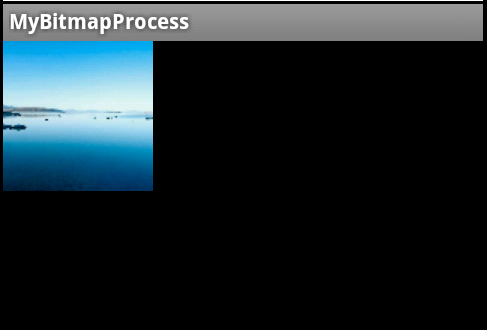
drawable2bitmap

zoom
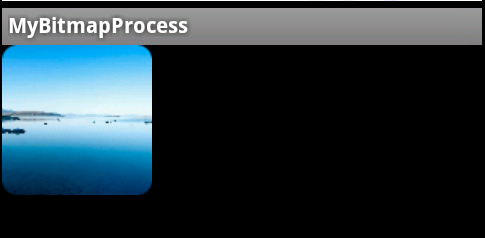
round corner
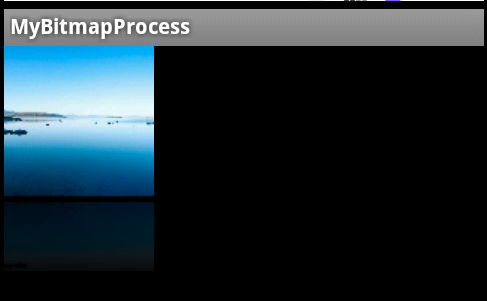
reflected bitmap
透過 Matrix 縮放、PorterDuff 混合模式製作圓角,以及 LinearGradient 漸層營造倒影,這幾個技巧能讓你的App圖片呈現更專業的視覺質感。
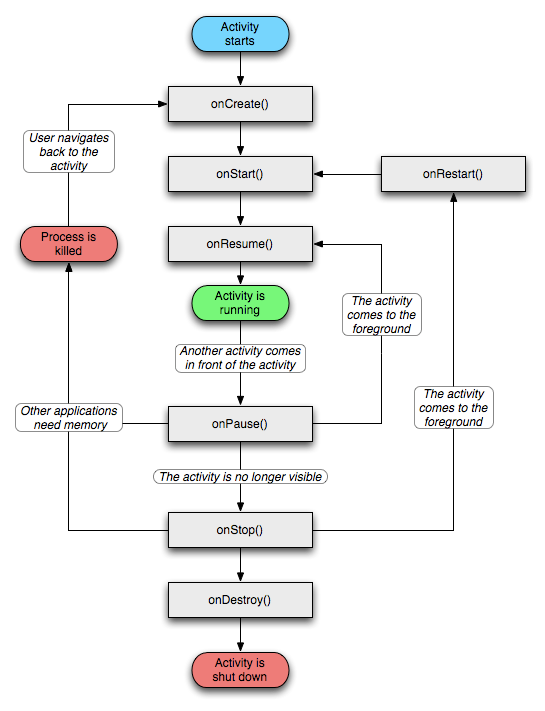 Android Activity 全解析:生命週期、資料傳遞、啟動模式與狀態保存
Activity 是 Android 應用中負責使用者互動的核心元件。它不僅管理畫面,也承擔生命週期、資料傳遞、返回結果與任務堆疊等責任。 生命週期與基本職責 Acti
 Android Root 原理與完整流程剖析
先搞清楚 RAM 與 ROM 手機內部儲存可以粗分兩類。RAM 是執行記憶體,斷電即失;ROM 的內容斷電後仍然存在。 規格表上寫的「2G RAM + 16G ROM」就
 Android 自訂 View 實作:在本機產生驗證碼
在 App 本機產生驗證碼,主要目的是避免使用者無腦連點「請求」按鈕。這個範例同時也是拿來練手自訂 View 的好題目,先看成果: 可自訂的項目包括: *干擾線數量*干
 Android 自訂 Toolbar 使用方法詳解
Toolbar 是 Android 中常用的頂部導覽列元件,可取代傳統 ActionBar,並提供更高的自訂彈性。本文從基本用法出發,再說明如何封裝自訂 Toolbar。