

編輯:關於 Android 程式設計
寫檔案管理器的時候,一定會遇到「點了檔案要能用對應的 App 開啟」這個需求。圖片交給相簿、PDF 交給閱讀器、Word 交給 Office——這些都不用自己實作播放器或檢視器,只要透過 Intent 把檔案交出去,系統會自動找出有能力的應用。
實作上可以拆成兩件事:一是判斷檔案副檔名屬於哪一類,二是針對各種類型準備對應的 MIME Type 與 Intent。
<?xml version="1.0" encoding="utf-8"?>
<resources>
    <array name="fileEndingImage">
        <item>.png</item><item>.gif</item><item>.jpg</item>
        <item>.jpeg</item><item>.bmp</item>
    </array>
    <array name="fileEndingAudio">
        <item>.mp3</item><item>.wav</item><item>.ogg</item><item>.midi</item>
    </array>
    <array name="fileEndingVideo">
        <item>.mp4</item><item>.rmvb</item><item>.avi</item><item>.flv</item>
    </array>
    <array name="fileEndingPackage">
        <item>.jar</item><item>.zip</item><item>.rar</item>
        <item>.gz</item><item>.apk</item><item>.img</item>
    </array>
    <array name="fileEndingWebText">
        <item>.htm</item><item>.html</item><item>.php</item><item>.jsp</item>
    </array>
    <array name="fileEndingText">
        <item>.txt</item><item>.java</item><item>.c</item><item>.cpp</item>
        <item>.py</item><item>.xml</item><item>.json</item><item>.log</item>
    </array>
    <array name="fileEndingWord"><item>.doc</item><item>.docx</item></array>
    <array name="fileEndingExcel"><item>.xls</item><item>.xlsx</item></array>
    <array name="fileEndingPPT"><item>.ppt</item><item>.pptx</item></array>
    <array name="fileEndingPdf"><item>.pdf</item></array>
</resources>
這個類別為每一種檔案格式提供一個靜態方法,輸入 File,輸出一個設定好 MIME Type 的 ACTION_VIEW Intent。
public class OpenFiles {
    // 開啟 HTML 檔
    public static Intent getHtmlFileIntent(File file) {
        Uri uri = Uri.parse(file.toString()).buildUpon()
                .encodedAuthority("com.android.htmlfileprovider")
                .scheme("content").encodedPath(file.toString()).build();
        Intent intent = new Intent("android.intent.action.VIEW");
        intent.setDataAndType(uri, "text/html");
        return intent;
    }

    // 開啟圖片
    public static Intent getImageFileIntent(File file) {
        Intent intent = new Intent("android.intent.action.VIEW");
        intent.addCategory("android.intent.category.DEFAULT");
        intent.addFlags(Intent.FLAG_ACTIVITY_NEW_TASK);
        intent.setDataAndType(Uri.fromFile(file), "image/*");
        return intent;
    }

    // 開啟 PDF
    public static Intent getPdfFileIntent(File file) {
        Intent intent = new Intent("android.intent.action.VIEW");
        intent.addCategory("android.intent.category.DEFAULT");
        intent.addFlags(Intent.FLAG_ACTIVITY_NEW_TASK);
        intent.setDataAndType(Uri.fromFile(file), "application/pdf");
        return intent;
    }

    // 開啟純文字
    public static Intent getTextFileIntent(File file) {
        Intent intent = new Intent("android.intent.action.VIEW");
        intent.addCategory("android.intent.category.DEFAULT");
        intent.addFlags(Intent.FLAG_ACTIVITY_NEW_TASK);
        intent.setDataAndType(Uri.fromFile(file), "text/plain");
        return intent;
    }

    // 開啟音訊
    public static Intent getAudioFileIntent(File file) {
        Intent intent = new Intent("android.intent.action.VIEW");
        intent.addFlags(Intent.FLAG_ACTIVITY_CLEAR_TOP);
        intent.putExtra("oneshot", 0);
        intent.putExtra("configchange", 0);
        intent.setDataAndType(Uri.fromFile(file), "audio/*");
        return intent;
    }

    // 開啟影片
    public static Intent getVideoFileIntent(File file) {
        Intent intent = new Intent("android.intent.action.VIEW");
        intent.addFlags(Intent.FLAG_ACTIVITY_CLEAR_TOP);
        intent.putExtra("oneshot", 0);
        intent.putExtra("configchange", 0);
        intent.setDataAndType(Uri.fromFile(file), "video/*");
        return intent;
    }

    // 開啟 CHM
    public static Intent getChmFileIntent(File file) {
        Intent intent = new Intent("android.intent.action.VIEW");
        intent.addCategory("android.intent.category.DEFAULT");
        intent.addFlags(Intent.FLAG_ACTIVITY_NEW_TASK);
        intent.setDataAndType(Uri.fromFile(file), "application/x-chm");
        return intent;
    }

    // 開啟 Word
    public static Intent getWordFileIntent(File file) {
        Intent intent = new Intent("android.intent.action.VIEW");
        intent.addCategory("android.intent.category.DEFAULT");
        intent.addFlags(Intent.FLAG_ACTIVITY_NEW_TASK);
        intent.setDataAndType(Uri.fromFile(file), "application/msword");
        return intent;
    }

    // 開啟 Excel
    public static Intent getExcelFileIntent(File file) {
        Intent intent = new Intent("android.intent.action.VIEW");
        intent.addCategory("android.intent.category.DEFAULT");
        intent.addFlags(Intent.FLAG_ACTIVITY_NEW_TASK);
        intent.setDataAndType(Uri.fromFile(file), "application/vnd.ms-excel");
        return intent;
    }

    // 開啟 PPT
    public static Intent getPPTFileIntent(File file) {
        Intent intent = new Intent("android.intent.action.VIEW");
        intent.addCategory("android.intent.category.DEFAULT");
        intent.addFlags(Intent.FLAG_ACTIVITY_NEW_TASK);
        intent.setDataAndType(Uri.fromFile(file), "application/vnd.ms-powerpoint");
        return intent;
    }

    // 開啟 APK(會進入安裝流程)
    public static Intent getApkFileIntent(File file) {
        Intent intent = new Intent();
        intent.addFlags(Intent.FLAG_ACTIVITY_NEW_TASK);
        intent.setAction(android.content.Intent.ACTION_VIEW);
        intent.setDataAndType(Uri.fromFile(file), "application/vnd.android.package-archive");
        return intent;
    }
}
private boolean checkEndsWithInStringArray(String checkItsEnd, String[] fileEndings) {
    for (String aEnd : fileEndings) {
        if (checkItsEnd.endsWith(aEnd)) return true;
    }
    return false;
}
if (currentPath != null && currentPath.isFile()) {
    String fileName = currentPath.toString();
    Intent intent;
    if (checkEndsWithInStringArray(fileName, getResources().getStringArray(R.array.fileEndingImage))) {
        intent = OpenFiles.getImageFileIntent(currentPath);
        startActivity(intent);
    } else if (checkEndsWithInStringArray(fileName, getResources().getStringArray(R.array.fileEndingWebText))) {
        intent = OpenFiles.getHtmlFileIntent(currentPath);
        startActivity(intent);
    } else if (checkEndsWithInStringArray(fileName, getResources().getStringArray(R.array.fileEndingPackage))) {
        intent = OpenFiles.getApkFileIntent(currentPath);
        startActivity(intent);
    } else if (checkEndsWithInStringArray(fileName, getResources().getStringArray(R.array.fileEndingAudio))) {
        intent = OpenFiles.getAudioFileIntent(currentPath);
        startActivity(intent);
    } else if (checkEndsWithInStringArray(fileName, getResources().getStringArray(R.array.fileEndingVideo))) {
        intent = OpenFiles.getVideoFileIntent(currentPath);
        startActivity(intent);
    } else if (checkEndsWithInStringArray(fileName, getResources().getStringArray(R.array.fileEndingText))) {
        intent = OpenFiles.getTextFileIntent(currentPath);
        startActivity(intent);
    } else if (checkEndsWithInStringArray(fileName, getResources().getStringArray(R.array.fileEndingPdf))) {
        intent = OpenFiles.getPdfFileIntent(currentPath);
        startActivity(intent);
    } else if (checkEndsWithInStringArray(fileName, getResources().getStringArray(R.array.fileEndingWord))) {
        intent = OpenFiles.getWordFileIntent(currentPath);
        startActivity(intent);
    } else if (checkEndsWithInStringArray(fileName, getResources().getStringArray(R.array.fileEndingExcel))) {
        intent = OpenFiles.getExcelFileIntent(currentPath);
        startActivity(intent);
    } else if (checkEndsWithInStringArray(fileName, getResources().getStringArray(R.array.fileEndingPPT))) {
        intent = OpenFiles.getPPTFileIntent(currentPath);
        startActivity(intent);
    } else {
        showMessage("無法開啟,請安裝對應的軟體!");
    }
} else {
    showMessage("對不起,這不是檔案!");
}
第一,清單中的副檔名順序會影響判斷結果。把 .apk 放在 Package 群組,而 Package 又排在 Text 之後,若某個檔名同時符合多組規則,先比對到的會勝出,因此建議把較具體的規則放在前面。
第二,從 Android 7.0 開始,Uri.fromFile() 產生的 file:// URI 在跨應用傳遞時會被拒絕,必須改用 FileProvider 取得 content:// URI,並透過 Intent.FLAG_GRANT_READ_URI_PERMISSION 授予暫存權限。上面的範例是早期寫法,新版專案請務必替換。
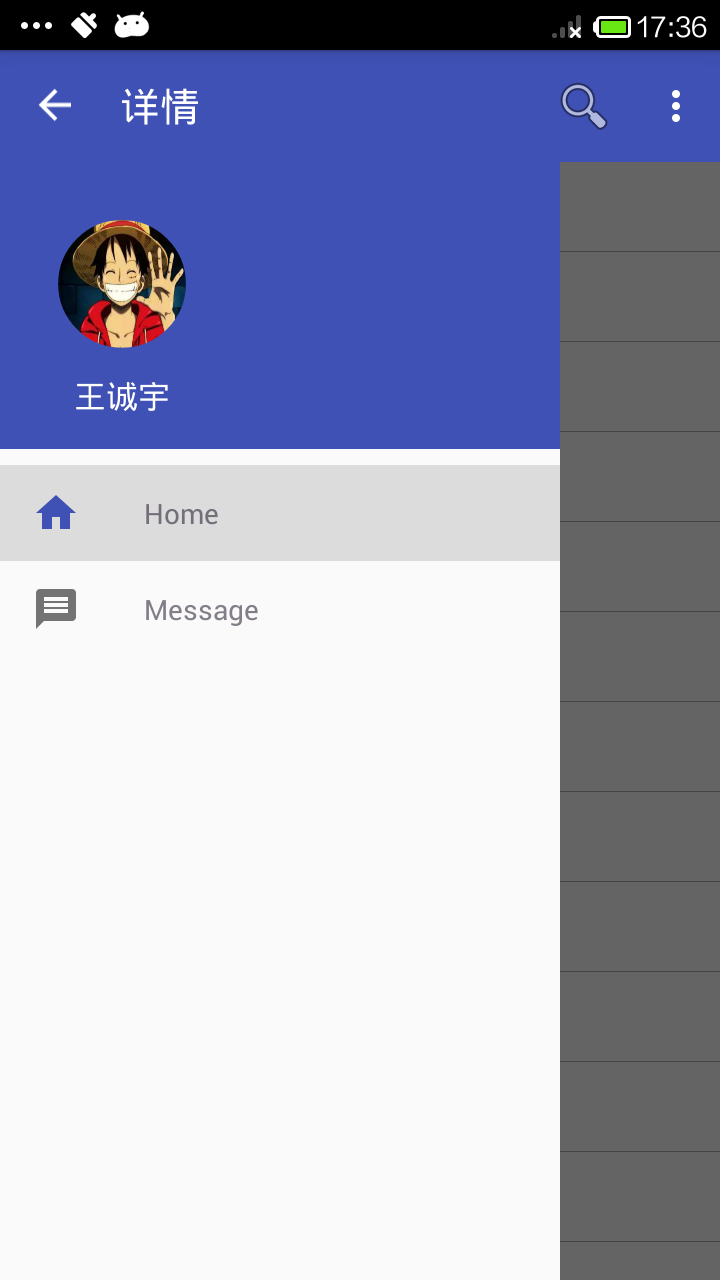 Android Design Support Library 三大控件:NavigationView、FloatingActionButton 與 Snackbar
1. Navigation View 它代表 Material Design 中標準的側滑導航菜單,菜單內容由菜單資源文件填充。 NavigationView 通常被放
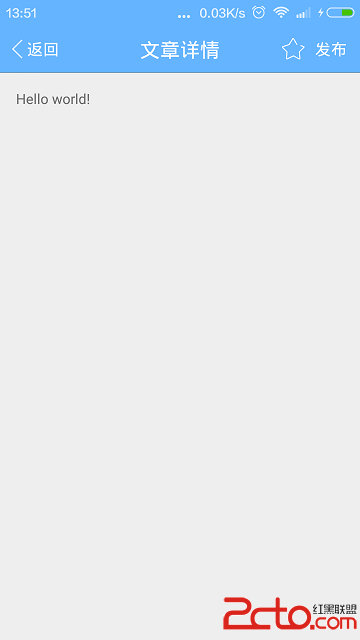 在 Android 上實現仿 iOS 風格的導航欄 TitleBar
TitleBar:一款簡潔易用的 iOS 風格導航欄 GitHub 地址見文末。 這是一個簡單易用的導航欄 TitleBar,可以輕鬆還原 iOS 導航欄的各種效果。整套
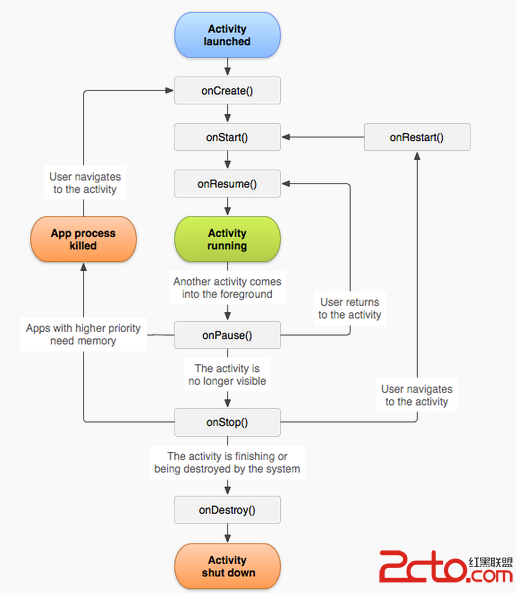 Android Activity 生命週期:從 onCreate 到 onDestroy
Activity 是 Android 中最重要的元件之一。理解 Activity 的生命週期,有助於正確管理資源、避免記憶體洩漏,並處理畫面切換時的狀態保存與恢復。生命週
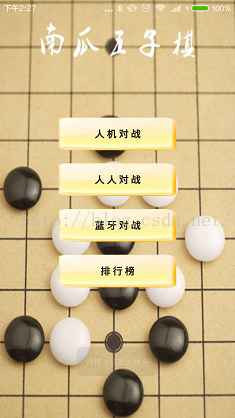 Android 藍牙對戰五子棋項目實戰(含人機對戰功能)
這是上周花了一週時間完成的課程設計項目,主要實現了以下功能: 基本功能 (1)該 App 能透過藍牙自動搜索周圍其他安裝了本應用的手機,用戶可選擇其中某一台發起對戰邀請,