

編輯:關於 Android 程式設計
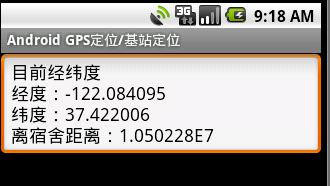
本實例希望 Service 每隔 1 秒執行一次定位,優先使用 GPS,若 GPS 無法取得位置,則改用基地台定位,最後將經緯度即時顯示在畫面上。
<uses-permission android:name="android.permission.ACCESS_FINE_LOCATION"/>
<uses-permission android:name="android.permission.ACCESS_COARSE_LOCATION"/>
<uses-permission android:name="android.permission.INTERNET"/>
<uses-permission android:name="android.permission.READ_PHONE_STATE"/>
Gps 類別負責封裝 LocationManager,取得目前位置。GpsService 在背景執行,每秒取得經緯度;若 GPS 定位為空,則改以基地台資訊向網路服務查詢。最後透過廣播將 lat、lon 傳給 GpsActivity。
public class GpsService extends Service {
    private Gps gps = null;
    private boolean threadDisable = false;

    @Override
    public void onCreate() {
        super.onCreate();
        gps = new Gps(GpsService.this);
        new Thread(new Runnable() {
            @Override
            public void run() {
                while (!threadDisable) {
                    try {
                        Thread.sleep(1000);
                    } catch (InterruptedException e) {
                        e.printStackTrace();
                    }
                    if (gps != null) {
                        Location location = gps.getLocation();
                        if (location == null) {
                            try {
                                location = UtilTool.callGear(GpsService.this, UtilTool.init(GpsService.this));
                            } catch (Exception e) {
                                location = null;
                                e.printStackTrace();
                            }
                        }
                        Intent intent = new Intent();
                        intent.putExtra("lat", location == null ? "" : String.valueOf(location.getLatitude()));
                        intent.putExtra("lon", location == null ? "" : String.valueOf(location.getLongitude()));
                        intent.setAction("com.ljq.activity.GpsService");
                        sendBroadcast(intent);
                    }
                }
            }
        }).start();
    }

    @Override
    public void onDestroy() {
        threadDisable = true;
        if (gps != null) {
            gps.closeLocation();
            gps = null;
        }
        super.onDestroy();
    }

    @Override
    public IBinder onBind(Intent arg0) {
        return null;
    }
}
GpsActivity 註冊廣播接收器,收到 lat 與 lon 後即可更新畫面。若需要計算距離,也可使用 Location.distanceBetween() 進行換算。
基地台定位通常依賴網路服務與電信資訊,實際部署時應確認相關服務是否仍可使用。
 Android pullToRefresh 下拉刷新庫的導入與使用心得
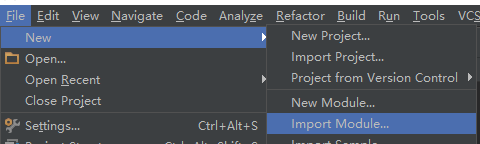
pullToRefresh 的導入首先點擊 New 按鈕,選擇 Import Module。接著在 New Module 介面中,選擇本機已含源碼的 pullToRefr
 Android 實戰教學第四篇之簡單實現簡訊發送器
本文為大家分享 Android 發簡訊功能的實現方法,供各位參考,具體內容如下。首先配置一個佈局: <LinearLayout xmlns:android=http
 ViewPagerIndicator 製作 Tab 標籤
用 ViewPagerIndicator 做出完整 Tab 體驗 ViewPagerIndicator 是一個常見的開源庫,可與 ViewPager 搭配,快速做出頂部
 自製可下拉刷新、上滑載入更多的 RecyclerView(復刻 XListView 手感)
先看成果。 下拉刷新: 上滑載入: 一、為什麼要自己寫一個 專案迭代時遇到一個需求:把舊的 XListView 換成 RecyclerView,而且換完之後整體視