

編輯:關於 Android 程式設計
粒子系統是遊戲特效的萬用工具——爆炸、煙火、下雪、魔法光效,背後都是同一套原理:產生大量微小粒子,各自帶有速度與生命週期,逐帧更新並繪製。
Explosion 負責持有粒子陣列,並以 STATE_ALIVE/STATE_DEAD 兩個狀態判斷這場爆炸是否還在進行。當所有粒子都死亡時,整場爆炸即標記為結束,主迴圈便可將它從待繪製清單中移除。
 package net.obviam.particles.model;

import android.graphics.Canvas;
import android.graphics.Rect;
import android.util.Log;

public class Explosion {

private static final String TAG = Explosion.class.getSimpleName();

public static final int STATE_ALIVE = 0; // at least 1 particle is alive
public static final int STATE_DEAD = 1; // all particles are dead

private Particle[] particles; // particles in the explosion
private int x, y; // the explosion's origin
private float gravity; // the gravity of the explosion (+ upward, - down)
private float wind; // speed of wind on horizontal
private int size; // number of particles
private int state; // whether it's still active or not

public Explosion(int particleNr, int x, int y) {
Log.d(TAG, "Explosion created at " + x + "," + y);
this.state = STATE_ALIVE;
this.particles = new Particle[particleNr];
for (int i = 0; i < this.particles.length; i++) {
Particle p = new Particle(x, y);
this.particles[i] = p;
}
this.size = particleNr;
}

public Particle[] getParticles() {
return particles;
}

public void setParticles(Particle[] particles) {
this.particles = particles;
}

public int getX() {
return x;
}

public void setX(int x) {
this.x = x;
}

public int getY() {
return y;
}

public void setY(int y) {
this.y = y;
}

public float getGravity() {
return gravity;
}

public void setGravity(float gravity) {
this.gravity = gravity;
}

public float getWind() {
return wind;
}

public void setWind(float wind) {
this.wind = wind;
}

public int getSize() {
return size;
}

public void setSize(int size) {
this.size = size;
}

public int getState() {
return state;
}

public void setState(int state) {
this.state = state;
}

// helper methods -------------------------

public boolean isAlive() {
return this.state == STATE_ALIVE;
}

public boolean isDead() {
return this.state == STATE_DEAD;
}

public void update() {
if (this.state != STATE_DEAD) {
boolean isDead = true;
for (int i = 0; i < this.particles.length; i++) {
if (this.particles[i].isAlive()) {
this.particles[i].update();
isDead = false;
}
}
if (isDead) this.state = STATE_DEAD;
}
}

public void update(Rect container) {
if (this.state != STATE_DEAD) {
boolean isDead = true;
for (int i = 0; i < this.particles.length; i++) {
if (this.particles[i].isAlive()) {
this.particles[i].update(container);
isDead = false;
}
}
if (isDead) this.state = STATE_DEAD;
}
}

public void draw(Canvas canvas) {
for(int i = 0; i < this.particles.length; i++) {
if (this.particles[i].isAlive()) {
this.particles[i].draw(canvas);
}
}
}
}
每個粒子在建立時隨機決定尺寸、顏色與速度向量,並有一個 lifetime。更新時一方面依速度移動,另一方面逐步衰減 alpha 通道;當 alpha 歸零或年齡超過壽命,粒子便標記為死亡。
 package net.obviam.particles.model;

import android.graphics.Canvas;
import android.graphics.Color;
import android.graphics.Paint;
import android.graphics.Rect;

public class Particle {

public static final int STATE_ALIVE = 0; // particle is alive
public static final int STATE_DEAD = 1; // particle is dead

public static final int DEFAULT_LIFETIME = 200; // play with this
public static final int MAX_DIMENSION = 5; // the maximum width or height
public static final int MAX_SPEED = 10; // maximum speed (per update)

private int state; // particle is alive or dead
private float widht; // width of the particle
private float height; // height of the particle
private float x, y; // horizontal and vertical position
private double xv, yv; // vertical and horizontal velocity
private int age; // current age of the particle
private int lifetime; // particle dies when it reaches this value
private int color; // the color of the particle
private Paint paint; // internal use to avoid instantiation

public int getState() {
return state;
}

public void setState(int state) {
this.state = state;
}

public float getWidht() {
return widht;
}

public void setWidht(float widht) {
this.widht = widht;
}

public float getHeight() {
return height;
}

public void setHeight(float height) {
this.height = height;
}

public float getX() {
return x;
}

public void setX(float x) {
this.x = x;
}

public float getY() {
return y;
}

public void setY(float y) {
this.y = y;
}

public double getXv() {
return xv;
}

public void setXv(double xv) {
this.xv = xv;
}

public double getYv() {
return yv;
}

public void setYv(double yv) {
this.yv = yv;
}

public int getAge() {
return age;
}

public void setAge(int age) {
this.age = age;
}

public int getLifetime() {
return lifetime;
}

public void setLifetime(int lifetime) {
this.lifetime = lifetime;
}

public int getColor() {
return color;
}

public void setColor(int color) {
this.color = color;
}

// helper methods -------------------------

public boolean isAlive() {
return this.state == STATE_ALIVE;
}

public boolean isDead() {
return this.state == STATE_DEAD;
}

public Particle(int x, int y) {
this.x = x;
this.y = y;
this.state = Particle.STATE_ALIVE;

this.widht = rndInt(1, MAX_DIMENSION);
this.height = this.widht;
this.lifetime = DEFAULT_LIFETIME;
this.age = 0;

this.xv = (rndDbl(0, MAX_SPEED * 2) - MAX_SPEED);
this.yv = (rndDbl(0, MAX_SPEED * 2) - MAX_SPEED);

// smoothing out the diagonal speed
if (xv * xv + yv * yv > MAX_SPEED * MAX_SPEED) {
xv *= 0.7;
yv *= 0.7;
}

this.color = Color.argb(255, rndInt(0, 255), rndInt(0, 255), rndInt(0, 255));
this.paint = new Paint(this.color);
}

/**
* Resets the particle
* @param x
* @param y
*/
public void reset(float x, float y) {
this.state = Particle.STATE_ALIVE;
this.x = x;
this.y = y;
this.age = 0;
}

// Return an integer that ranges from min inclusive to max inclusive.
static int rndInt(int min, int max) {
return (int) (min + Math.random() * (max - min + 1));
}

static double rndDbl(double min, double max) {
return min + (max - min) * Math.random();
}

public void update() {
if (this.state != STATE_DEAD) {
this.x += this.xv;
this.y += this.yv;

// extract alpha
int a = this.color >>> 24;
a -= 2; // fade by 5

if (a <= 0) {
// if reached transparency kill the particle
this.state = STATE_DEAD;
} else {
this.color = (this.color & 0x00ffffff) + (a << 24); // set the new alpha
this.paint.setAlpha(a);
this.age++; // increase the age of the particle
}

if (this.age >= this.lifetime) {
// reached the end if its life
this.state = STATE_DEAD;
}

// https://lab.polygonal.de/2007/05/10/bitwise-gems-fast-integer-math/
// 32bit
// var color:uint = 0xff336699;
// var a:uint = color >>> 24;
// var r:uint = color >>> 16 & 0xFF;
// var g:uint = color >>> 8 & 0xFF;
// var b:uint = color & 0xFF;
}
}
}

public void update(Rect container) {
// update with collision
if (this.isAlive()) {
if (this.x <= container.left || this.x >= container.right - this.widht) {
this.xv *= -1;
}
// Bottom is 480 and top is 0 !!!
if (this.y <= container.top || this.y >= container.bottom - this.height) {
this.yv *= -1;
}
}
update();
}

public void draw(Canvas canvas) {
paint.setColor(this.color);
canvas.drawRect(this.x, this.y, this.x + this.widht, this.y + this.height, paint);
}
}
另外,Explosion 的 gravity 與 wind 欄位目前尚未實際套用到粒子更新中,若想加入重力與風力效果,可在 Particle.update() 中對 yv 與 xv 做累加即可。
 Android Mms 深度解析:訊息接收流程(圖文詳解)
訊息的接收工作由底層完成,當有一則新訊息時,底層完成接收後會以 Intent 的方式通知上層應用,訊息的相關內容也包含在 Intent 中。Android 所支援的訊息
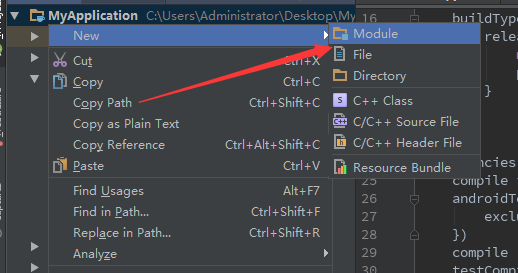 用 Gradle 將 Android 模組匯出為 JAR,並打包 assets 資源
先說結論與限制 把 Android 專案打成 JAR 給外部使用時,有個先天限制:JAR 裡的 res 資源是無法被編譯使用的。如果模組中需要用到圖片,可行的做法是把圖片
 Android 開發系列(二十三):打造帶圖示的自定義 Toast 提示框
Toast 是 Android 中最常見的輕量提示元件,但預設樣式只是一行純文字。若想讓提示更具辨識度,可以放進圖示,甚至完全自定義版面。 實作起來並不難,核心只有兩步:
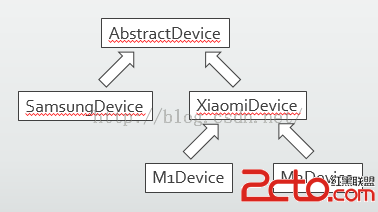 Android 開發中的適配:先搞清楚要適配什麼,再談怎麼適配
Android 的碎片化問題已經被談到爛了。與其再抱怨一次,不如把「適配什麼」與「怎麼適配」做一次有條理的整理。 三類被適配的對象 第一類:作業系統版本 從 Androi