本篇將通過 ViewPager + Fragment + TabPageIndicator 的組合,實現一個標簽欄主界面。
效果圖:
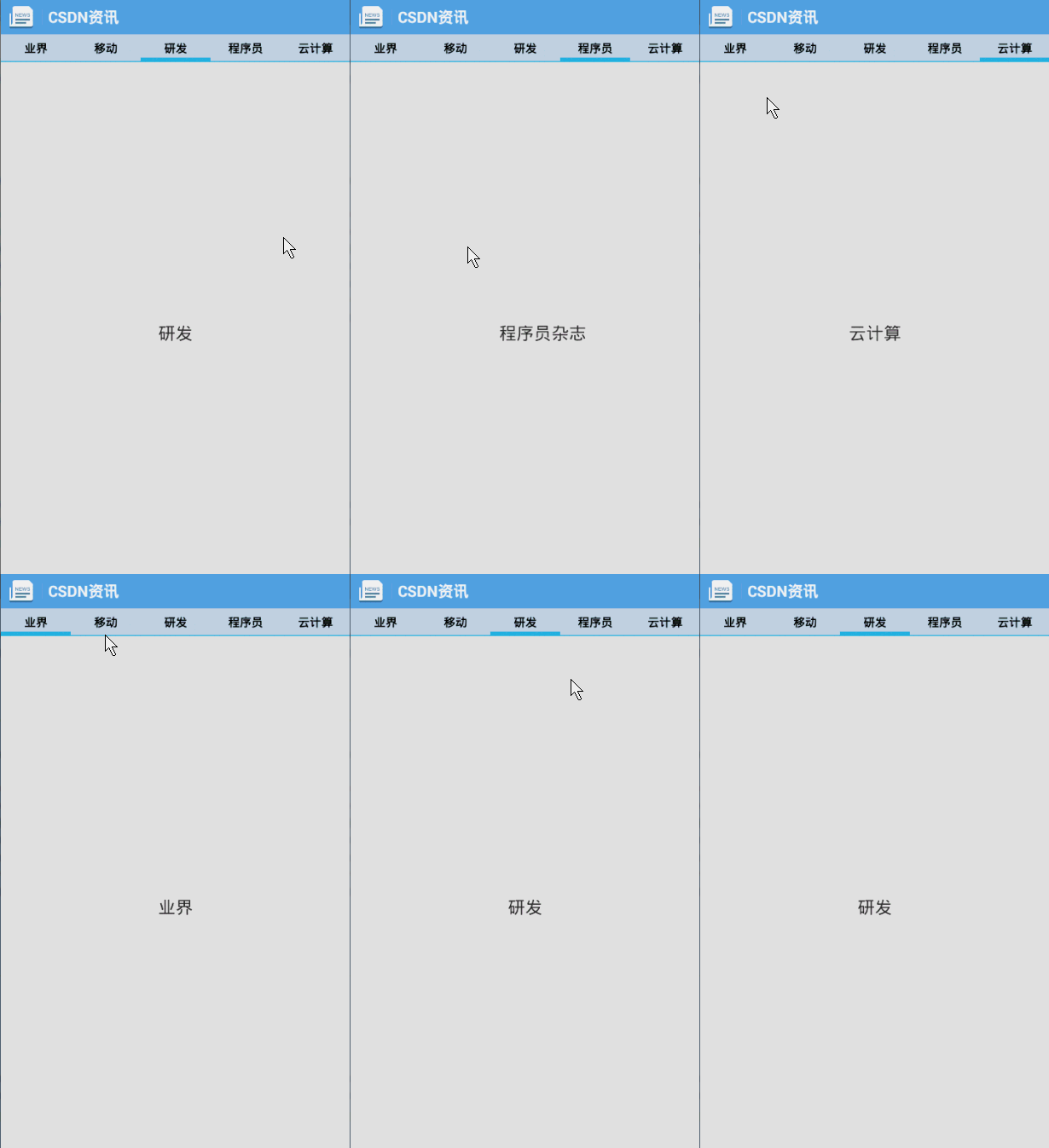
1、首先是頭部布局文件,結構很簡單,主要顯示一個圖標和一個標題:
- <?xml version="1.0" encoding="utf-8"?>
- android:layout_height="wrap_content"
- android:background="@color/light_blue"
- android:orientation="horizontal">
-
- <imageview 顯示圖標 />
- <imageview 顯示分隔線 />
-
- <textview
- android:id="@+id/headTV"
- android:layout_width="0dp"
- android:layout_height="wrap_content"
- android:layout_gravity="center_vertical"
- android:layout_weight="1"
- android:text="CSDN資訊"
- android:textColor="@color/white"
- android:textSize="21sp"
- android:textStyle="bold">
2、主布局文件,包含一個 TabPageIndicator 和一個 ViewPager:
- android:layout_width="match_parent"
- android:layout_height="match_parent"
- android:background="#eee"
- android:orientation="vertical">
-
- <com.viewpagerindicator.tabpageindicator
- android:id="@+id/id_indicator"
- android:layout_width="fill_parent"
- android:layout_height="wrap_content"
- android:background="@color/transparentblue">
-
- <viewpager
- android:id="@+id/id_pager"
- android:layout_width="fill_parent"
- android:layout_height="0dp"
- android:layout_weight="1"/>
3、主 Activity 的代碼,通過 TabAdapter 為 ViewPager 提供數據,並用 TabPageIndicator 進行綁定:
- package com.zhy.csdndemo;
-
- import com.viewpagerindicator.TabPageIndicator;
- import android.os.Bundle;
- import android.support.v4.app.FragmentActivity;
- import android.support.v4.app.FragmentPagerAdapter;
- import android.support.v4.view.ViewPager;
-
- public class MainActivity extends FragmentActivity {
- private TabPageIndicator mIndicator;
- private ViewPager mViewPager;
- private FragmentPagerAdapter mAdapter;
-
- @Override
- protected void onCreate(Bundle savedInstanceState) {
- super.onCreate(savedInstanceState);
- setContentView(R.layout.activity_main);
-
- mIndicator = (TabPageIndicator) findViewById(R.id.id_indicator);
- mViewPager = (ViewPager) findViewById(R.id.id_pager);
- mAdapter = new TabAdapter(getSupportFragmentManager());
- mViewPager.setAdapter(mAdapter);
- mIndicator.setViewPager(mViewPager, 0);
-
- }
- }
TabAdapter.java 負責提供標簽標題與對應的 Fragment,其中定義了「業界、移動、研發、程序員雜志、雲計算」等標題,getPageTitle 返回對應標題,getItem 返回對應的 MainFragment。
MainFragment.java 是每個標簽頁面的內容,通過傳入的 newsType 參數,顯示對應的標題文字。
4、在 styles.xml 中自定義 Theme,配置 TabPageIndicator 的樣式(背景、指示器、文字大小、顏色等),並在 AndroidManifest 中註冊使用該自定義主題。


 Android 分組 ListView 實作詳解
 紅米Pro與紅米Note3對比 差別到底在哪
 Android Camera 預覽過程的資料流解析
 深入解析 Android 的 MVC 設計模式實戰