

編輯:關於 Android 程式設計
默認情況下 RadioButton 的圓形選中按鈕位於文字左側,但有時設計要求把選中按鈕放到文字右邊。實現起來並不難,關鍵是先把默認的 button 圖形設為 null,再通過 drawableRight 把圖標放到指定位置。先看效果:
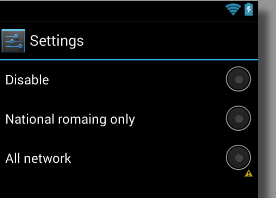
布局代碼如下:
<?xml version="1.0" encoding="utf-8"?>
<LinearLayout xmlns:android="https://schemas.android.com/apk/res/android"
    android:layout_width="match_parent"
    android:layout_height="match_parent"
    android:orientation="vertical"
    android:layout_marginRight="5dp"
    android:layout_marginLeft="10dp">

    <RadioGroup
        android:layout_width="match_parent"
        android:layout_height="wrap_content" >

        <RadioButton
            android:id="@+id/rb_disable"
            android:layout_width="match_parent"
            android:layout_height="wrap_content"
            android:button="@null"
            android:drawableRight="@android:drawable/btn_radio"
            android:text="@string/data_romaing_disable" />

        <RadioButton
            android:id="@+id/rb_national_romaing_only"
            android:layout_width="match_parent"
            android:layout_height="wrap_content"
            android:button="@null"
            android:drawableRight="@android:drawable/btn_radio"
            android:text="@string/data_romaing_national_romaing_only" />

        <RadioButton
            android:id="@+id/rb_all_network"
            android:layout_width="match_parent"
            android:layout_height="wrap_content"
            android:button="@null"
            android:drawableRight="@android:drawable/btn_radio"
            android:text="@string/data_romaing_all_network" />

    </RadioGroup>
</LinearLayout>
要點很簡單:先把 android:button 設為 @null 去掉默認的圓鈕,再用 android:drawableRight 指定要顯示的選中按鈕圖標,就能把它放到文字右側了。
 小米 4 刷入 Windows 10 教學與注意事項
小米 4 是少數可嘗試刷入 Windows 10 的安卓手機之一。以下整理流程與風險提醒,操作前請務必備份資料。準備工具1. 一台可正常連接手機的 Windows 10
 Android 學習小 Demo(18):仿 QQ 滑動刪除待辦任務
一般情況下,若想為 ListView 上的 ListItem 實現滑動刪除、或仿 QQ 的滑動顯示刪除按鈕效果,只需繼承 ListView 並自定義一個即可。不過由於之前
 Android 自定義 Dialog 標題:setCustomTitle 美化彈窗
系統預設 Dialog 標題較為單調,若需要更完整的品牌視覺,可以使用 AlertDialog.Builder 的 setCustomTitle,將自訂 View 設為標
 CoordinatorLayout 完全指南:Behavior 機制與三種典型組合
一、CoordinatorLayout 的定位 官方把它稱為「super-powered FrameLayout」,核心職責只有兩件事:作為頂層容器,以及調度協調子布局。