

編輯:關於 Android 程式設計
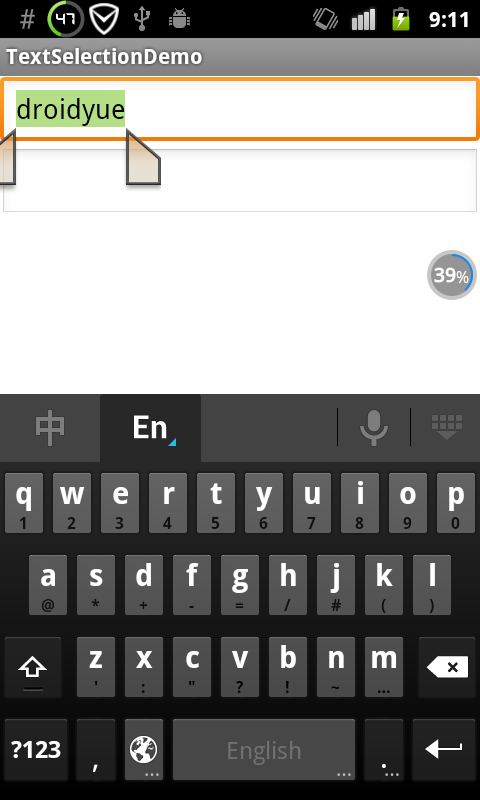
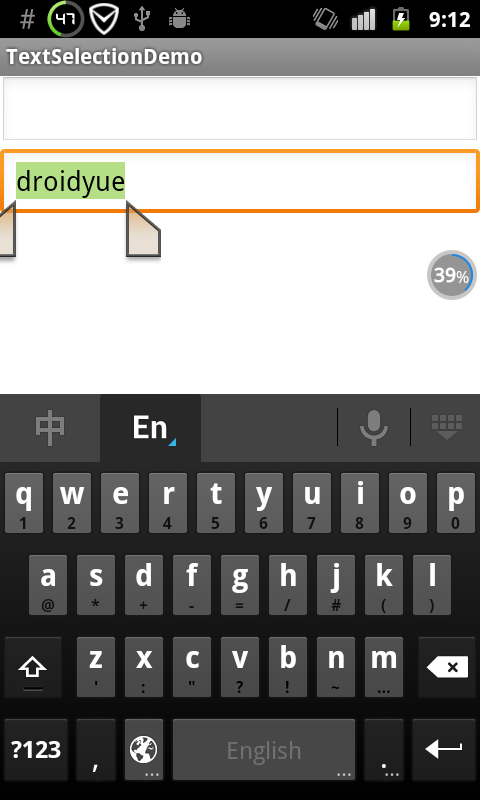
大多數 Android ROM 上,文字選取時的背景色都是清爽的鮮綠色,但在某些三星手機上卻是藍色,觀感實在不佳。好消息是,這個預設的選取背景色完全可以透過程式自行調整。
需要用到的 API 是:
android:textColorHighlight Color of the text selection highlight.
EditText 的效果
AutoCompleteTextView 的效果
實作程式碼
<?xml version="1.0" encoding="utf-8"?>
<LinearLayout xmlns:android="https://schemas.android.com/apk/res/android"
android:layout_width="match_parent"
android:layout_height="match_parent"
android:orientation="vertical" >
<EditText
android:id="@+id/et_inputBox"
android:layout_height="wrap_content"
android:layout_width="match_parent"
android:textColorHighlight="#B4DF87"
/>
<AutoCompleteTextView
android:id="@+id/act_input"
android:layout_below="@id/et_inputBox"
android:layout_width="fill_parent"
android:layout_height="wrap_content"
android:textColorHighlight="#B4DF87"
/>
</LinearLayout>
只要為控制項加上 android:textColorHighlight 並指定喜歡的色值,就能自訂文字選取時的高亮色彩,讓介面更貼近品牌調性。
 打造一個 Android 3D 立體旋轉容器
1. 概述 回到正題,這次要帶給大家的效果,是一個 Android 的 3D 立體旋轉效果。當然,靈感的來源是早些時間在微博上看到的效果圖,非常酷有木有!作為程序猿,我當
 Fragment 切換後如何保留狀態?hide/show 與 replace 的生命週期差異
第一篇 Fragment 實例裡,我用的是 FragmentTransaction.replace(),這大概也是多數人剛入門時的寫法。但很快會碰到一個惱人的問題。 r
 Android 入門:LinearLayout 與 AbsoluteLayout 用法實例講解
本文以實例介紹 Android 的 LinearLayout 與 AbsoluteLayout,希望對剛入門的朋友有些幫助。 Android 的 UI 佈局都以 Lay
 Android 隱藏狀態欄與判斷 Activity 是否可啟動
在 Android 開發中,全螢幕或客製化遊戲畫面經常需要隱藏標題列與狀態列;另外,在啟動外部元件前,也可能需要先確認該 Activity 是否存在。以下兩個技巧都很實用