

編輯:關於 Android 程式設計
2048 是一款規則極簡單的數字合併遊戲:在 4×4 的棋盤上滑動,相同數字相撞即合併,目標是湊出 2048。正因規則簡單,它很適合作為 Android 遊戲開發的練習題。本文解析一個開源實作的架構與關鍵程式碼。
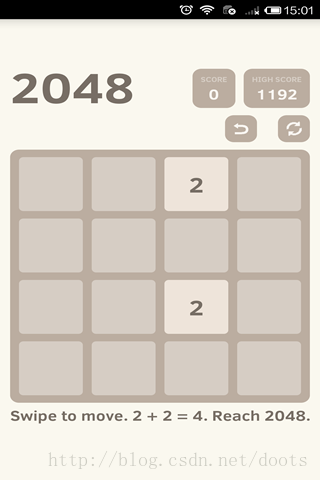
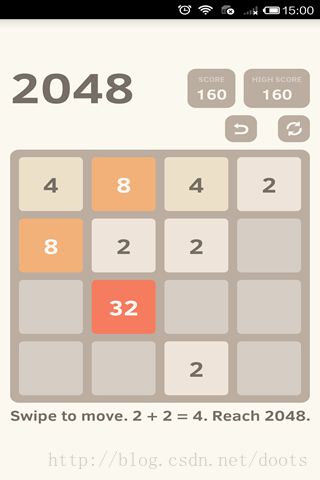
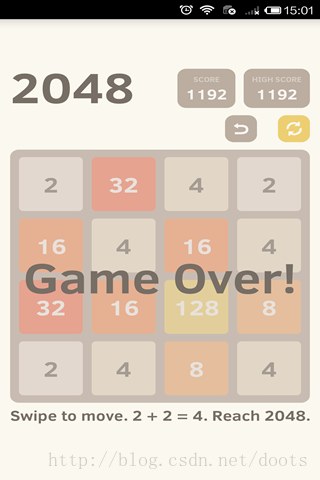
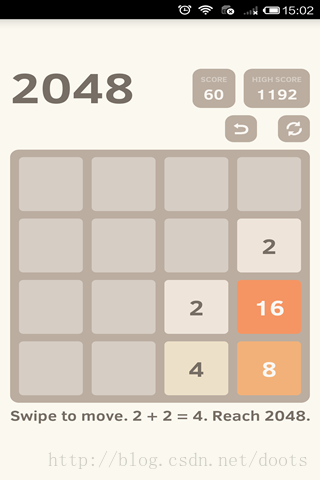
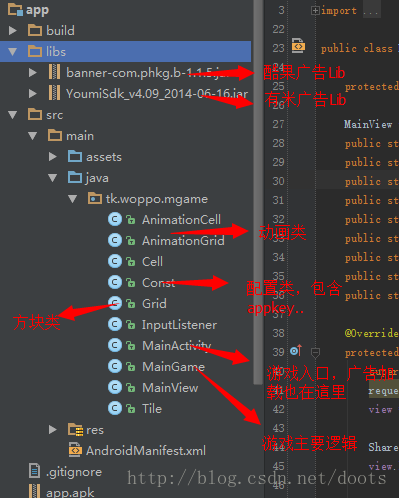
整體可以拆成三層:MainView 負責繪製與觸控輸入、MainGame 負責遊戲規則與狀態、Grid/Tile/Cell 則是棋盤的資料結構。
建構子中載入資源(棋格背景、文字顏色、字型)並註冊觸控監聽器;onSizeChanged 則依實際尺寸重算棋格座標並建立快取用的 Bitmap,這是效能的關鍵——避免每格都在 onDraw 中重新繪製。
public MainView(Context context) {
    super(context);
    Resources resources = context.getResources();
    game = new MainGame(context, this);
    try {
        backgroundRectangle = resources.getDrawable(R.drawable.background_rectangle);
        lightUpRectangle = resources.getDrawable(R.drawable.light_up_rectangle);
        fadeRectangle = resources.getDrawable(R.drawable.fade_rectangle);
        TEXT_WHITE = resources.getColor(R.color.text_white);
        TEXT_BLACK = resources.getColor(R.color.text_black);
        TEXT_BROWN = resources.getColor(R.color.text_brown);
        this.setBackgroundColor(resources.getColor(R.color.background));
        Typeface font = Typeface.createFromAsset(resources.getAssets(), "ClearSans-Bold.ttf");
        paint.setTypeface(font);
        paint.setAntiAlias(true);
    } catch (Exception e) {
        System.out.println("Error getting assets!");
    }
    setOnTouchListener(new InputListener(this));
    game.newGame();
}

@Override
protected void onSizeChanged(int width, int height, int oldw, int oldh) {
    super.onSizeChanged(width, height, oldw, oldh);
    getLayout(width, height);
    createBitmapCells();
    createBackgroundBitmap(width, height);
    createOverlays();
}
這個類別掌管棋盤狀態、分數、最高分(以 SharedPreferences 持久化)以及動畫狀態。move(int direction) 是核心:依方向建立走訪順序,逐格找出能移動到的最遠位置,若目標格數字相同就合併並加分,否則直接平移。
public class MainGame {
    public static final int SPAWN_ANIMATION = -1;
    public static final int MOVE_ANIMATION = 0;
    public static final int MERGE_ANIMATION = 1;
    public static final int FADE_GLOBAL_ANIMATION = 0;

    private static final String HIGH_SCORE = "high score";
    public static final int startingMaxValue = 2048;
    public static int endingMaxValue;

    public static final int GAME_WIN = 1;
    public static final int GAME_LOST = -1;
    public static final int GAME_NORMAL = 0;
    public static final int GAME_NORMAL_WON = 1;
    public static final int GAME_ENDLESS = 2;
    public static final int GAME_ENDLESS_WON = 3;

    public Grid grid = null;
    public AnimationGrid aGrid;
    final int numSquaresX = 4;
    final int numSquaresY = 4;
    final int startTiles = 2;
    public int gameState = 0;
    public boolean canUndo;
    public long score = 0;
    public long highScore = 0;

    public MainGame(Context context, MainView view) {
        mContext = context;
        mView = view;
        endingMaxValue = (int) Math.pow(2, view.numCellTypes - 1);
    }

    public void newGame() {
        if (grid == null) {
            grid = new Grid(numSquaresX, numSquaresY);
        } else {
            prepareUndoState();
            saveUndoState();
            grid.clearGrid();
        }
        aGrid = new AnimationGrid(numSquaresX, numSquaresY);
        highScore = getHighScore();
        score = 0;
        gameState = GAME_NORMAL;
        addStartTiles();          // 開局放兩顆方塊
        mView.refreshLastTime = true;
        mView.resyncTime();
        mView.invalidate();
    }

    private void addRandomTile() {
        if (grid.isCellsAvailable()) {
            // 90% 機率產生 2,10% 機率產生 4
            int value = Math.random() < 0.9 ? 2 : 4;
            Tile tile = new Tile(grid.randomAvailableCell(), value);
            spawnTile(tile);
        }
    }

    public void move(int direction) {
        aGrid.cancelAnimations();
        // 0: up, 1: right, 2: down, 3: left
        if (!isActive()) return;
        prepareUndoState();
        Cell vector = getVector(direction);
        List<Integer> traversalsX = buildTraversalsX(vector);
        List<Integer> traversalsY = buildTraversalsY(vector);
        boolean moved = false;
        prepareTiles();

        for (int xx : traversalsX) {
            for (int yy : traversalsY) {
                Cell cell = new Cell(xx, yy);
                Tile tile = grid.getCellContent(cell);
                if (tile != null) {
                    Cell[] positions = findFarthestPosition(cell, vector);
                    Tile next = grid.getCellContent(positions[1]);
                    if (next != null && next.getValue() == tile.getValue()
                            && next.getMergedFrom() == null) {
                        Tile merged = new Tile(positions[1], tile.getValue() * 2);
                        Tile[] temp = { tile, next };
                        merged.setMergedFrom(temp);
                        grid.insertTile(merged);
                        grid.removeTile(tile);
                        tile.updatePosition(positions[1]);
                        aGrid.startAnimation(merged.getX(), merged.getY(),
                                MOVE_ANIMATION, MOVE_ANIMATION_TIME, 0, new int[]{xx, yy});
                        aGrid.startAnimation(merged.getX(), merged.getY(),
                                MERGE_ANIMATION, SPAWN_ANIMATION_TIME, MOVE_ANIMATION_TIME, null);
                        score = score + merged.getValue();   // 合併即加分
                        highScore = Math.max(score, highScore);
                        if (merged.getValue() >= winValue() && !gameWon()) {
                            gameState = gameState + GAME_WIN;
                            endGame();
                        }
                    } else {
                        moveTile(tile, positions[0]);
                        aGrid.startAnimation(positions[0].getX(), positions[0].getY(),
                                MOVE_ANIMATION, MOVE_ANIMATION_TIME, 0, new int[]{xx, yy, 0});
                    }
                    if (!positionsEqual(cell, tile)) moved = true;
                }
            }
        }
        if (moved) {
            saveUndoState();
            addRandomTile();   // 有效移動後才產生新方塊
            checkLose();
        }
        mView.resyncTime();
        mView.invalidate();
    }

    private Cell getVector(int direction) {
        Cell[] map = {
            new Cell(0, -1),  // up
            new Cell(1, 0),   // right
            new Cell(0, 1),   // down
            new Cell(-1, 0)   // left
        };
        return map[direction];
    }

    // 依方向決定走訪起點,right/down 需反向走訪,否則會從錯誤的一端開始合併
    private List<Integer> buildTraversalsX(Cell vector) {
        List<Integer> traversals = new ArrayList<Integer>();
        for (int xx = 0; xx < numSquaresX; xx++) traversals.add(xx);
        if (vector.getX() == 1) Collections.reverse(traversals);
        return traversals;
    }

    private Cell[] findFarthestPosition(Cell cell, Cell vector) {
        Cell previous;
        Cell nextCell = new Cell(cell.getX(), cell.getY());
        do {
            previous = nextCell;
            nextCell = new Cell(previous.getX() + vector.getX(),
                                previous.getY() + vector.getY());
        } while (grid.isCellWithinBounds(nextCell) && grid.isCellAvailable(nextCell));
        return new Cell[] { previous, nextCell };
    }

    private void checkLose() {
        if (!movesAvailable() && !gameWon()) {
            gameState = GAME_LOST;
            endGame();
        }
    }

    private long getHighScore() {
        SharedPreferences settings = PreferenceManager.getDefaultSharedPreferences(mContext);
        return settings.getLong(HIGH_SCORE, -1);
    }

    private void recordHighScore() {
        SharedPreferences settings = PreferenceManager.getDefaultSharedPreferences(mContext);
        SharedPreferences.Editor editor = settings.edit();
        editor.putLong(HIGH_SCORE, highScore);
        editor.commit();
    }
    // 其餘:saveUndoState / revertUndoState / movesAvailable / tileMatchesAvailable 等輔助方法略
}
動畫與資料分離。棋盤的邏輯狀態存在 Grid 中,動畫資訊另外存在 AnimationGrid,因此規則運算完全不受動畫影響,測試與擴充都更容易。
走訪方向決定合併結果。往右或往下移動時必須從相反方向開始走訪,否則會從錯誤的一端合併,得到不符合規則的結果。這是實作 2048 最容易出錯的地方。
只有在有效移動時才產生新方塊。moved 旗標確保使用者對著牆壁滑動不會白白多出一格。
支援復原與無盡模式。透过 prepareSaveTiles/revertTiles 保存棋盤快照即可實作 undo;gameState 用奇偶與位值編碼來區分「進行中/已獲勝/無盡模式」等狀態。
匯入方式:Android Studio 可直接 Import project。若使用 Eclipse,則建立一個套件名稱相同的空專案,把原專案的 src 與 libs 複製到對應目錄,再用原專案的 AndroidManifest.xml 覆蓋新專案的清單檔即可。
若打算發布上架,務必替換套件名稱(applicationId)、更換應用圖示與主題色,並確認字型檔(ClearSans-Bold.ttf)的授權允許商業使用。
原始專案示範了如何整合第三方廣告 SDK:在 AndroidManifest.xml 加入 INTERNET、ACCESS_NETWORK_STATE 等權限並宣告 SDK 的 Activity/Service/Receiver,再以 addContentView() 把 AdView 疊到畫面底部。實作時要注意幾點:廣告的專案 App ID 必須換成自己申請的值;GET_TASKS、SYSTEM_ALERT_WINDOW 這類敏感權限會影響上架審核,非必要不要加入;同時應遵守平台政策,避免在誤觸率高的位置放置廣告。
把 numSquaresX/numSquaresY 從 4 改成 5 就能做出 5×5 版本;調整 startingMaxValue 可改變勝利門檻;把 addRandomTile 的機率與數值改一改,遊戲難度手感就會完全不同。由於規則與繪製已徹底分離,這類改動通常只需動到幾個常數。
源碼地址:https://github.com/iQuick/2048
 Android 仿美團商品分類下拉選單:PopupWindow 與圓形載入動畫
電商列表常見的篩選互動在商品列表頁中,分類、排序與優惠活動通常會放在頂部。點擊任一標題後,下方展開對應選單,是使用者非常熟悉的操作方式。本文以美團風格為例,說明如何用 P
 Android 學習小 Demo:SQLiteDatabase 使用
SQLiteDatabase 是 Android 中很常用的本機資料庫方案。本文以一個待辦清單的小範例,說明如何建立資料庫、封裝增刪改查,並與 ListView 結合。
 Android Studio 應用調試技巧(下):ADM 進階、ADB 命令與 WiFi 調試
Android Device Monitor(以下簡稱 ADM)是動態調試安卓程序的核心幫手,提供了大量實用的工具。上一章講的 log 調試,就是靠 ADM 的 logc
 Android 源碼 URLUtil 文件名解析問題排查
今天修復了一個使用系統方法 android.webkit.URLUtil.guessFileName(String url, String contentDisposit