

編輯:關於 Android 程式設計
Fragment 是 Android API 中的一個類,它代表 Activity 介面中的一個部分模組;你可以在同一個 Activity 中使用多個 Fragment,也可以在不同 Activity 之間重用同一個 Fragment。
本文將介紹 Fragment 的定義、創建、添加、移除與生命週期等,如需查閱官方原文,可參考《Fragments》。
可以把 Fragment 想像成 Activity 中的一個模組,它擁有自己的生命週期、能接收輸入事件,並可在 Activity 運行時被動態添加或移除。
Fragment 必須嵌入在 Activity 中才能生存,其生命週期直接受宿主 Activity 的影響。比如,當宿主 Activity 進入 pause 狀態,它所管轄的 Fragment 也會進入 pause;而當 Activity 處於 resume 時,你可以獨立控制每一個 Fragment,如添加或刪除。執行 Fragment 事務時,還可將它加入由宿主 Activity 管轄的後退堆疊,按下返回鍵即可依次彈出。
將 Fragment 加入 Activity 佈局有兩種方式:一是使用 fragment 標籤靜態加入(父視圖須為 ViewGroup);二是透過程式碼動態加入,並指定一個 ViewGroup 作為容器。某些情況下,Fragment 並不承擔可見 UI,僅作為無介面的功能性元件存在。
Fragment 是 Android 3.0(API level 11)新增的 API,主要目的是讓 UI 在不同尺寸的螢幕上表現得更靈活。由於平板螢幕遠大於手機,可呈現更多內容,而 Fragment 能讓同一套佈局在不同尺寸的螢幕上呈現不同效果,並可在運行時動態替換、保存至 Activity 管轄的後退堆疊。
舉例來說,一個新聞應用運行在平板上時,一個 Activity 可同時裝載兩個 Fragment:左側顯示新聞標題,右側顯示對應內容;若運行在手機上,一個 Activity 無法容納兩個 Fragment,則分別裝入兩個 Activity 中:
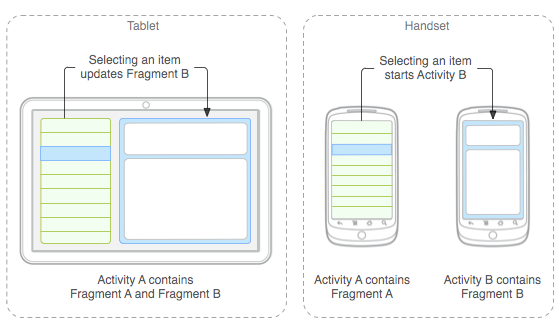
要創建 Fragment,需繼承 Fragment 類並實作其生命週期回呼方法,如 onCreate()、onStart()、onPause()、onStop() 等。實質上,只需把原本的 Activity 替換為 Fragment,並將 Activity 的生命週期回呼簡單改寫為 Fragment 的回呼即可。
一般至少應重寫以下三個方法:
onCreate():創建 Fragment 實例時回呼,用於初始化必要元件,確保它在 Fragment 處於 pause 或 stop 時仍然存在。
onCreateView():第一次繪製 UI 時回呼,返回一個代表 Fragment 根視圖的 View;若 Fragment 無需展示視圖,則可返回 null。
onPause():使用者離開 Fragment 時回呼(並不意味 Fragment 被銷毀),可用於持久化保存資料。
大多數情況下需重寫上述三個方法,有時還需重寫其他回呼。Fragment 的生命週期如下:
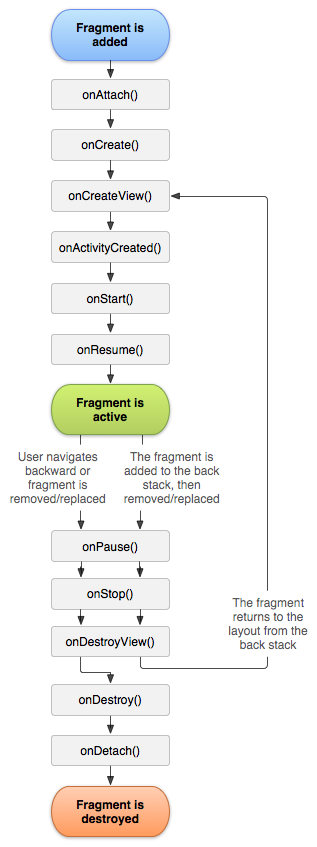
Fragment 有一些便捷的子類:
DialogFragment:可展示懸浮對話框,能很好地替換由 Activity 方法創建的對話框,並像其他 Fragment 一樣被壓入宿主 Activity 管理的堆疊中。
ListFragment:展示一個內建的 AdapterView(由 Adapter 管理,如 SimpleCursorAdapter),類似 ListActivity,提供大量管理清單的方法,如處理點擊事件的 onListItemClick()。
PreferenceFragment:展示層級嵌套的 Preference 清單,類似 PreferenceActivity,通常用於編寫設置頁面。
必須重寫 onCreateView() 為 Fragment 綁定佈局,其返回的 View 即為 Fragment 的根視圖。
!請注意:若繼承的是 ListFragment,onCreateView() 已預設返回 ListView 對象,無需再重寫。
以下示例將 example_fragment.xml 綁定至 ExampleFragment:
public static class ExampleFragment extends Fragment {
    @Override
    public View onCreateView(LayoutInflater inflater, ViewGroup container, Bundle savedInstanceState) {
        // 為此 Fragment 加載佈局
        return inflater.inflate(R.layout.example_fragment, container, false);
    }
}
onCreateView() 的第二個參數 ViewGroup 來自宿主 Activity 的容器佈局,Fragment 的佈局將作為子視圖插入其中;第三個參數 Bundle 用於回傳之前佔據該位置的 Fragment 實例所保存的資料。
inflate() 方法需要三個參數:
參數 1(int):需綁定的 Layout 資源 ID;
參數 2(ViewGroup):綁定佈局的父視圖;
參數 3(boolean):是否將參數 1 的佈局依附於參數 2 的 ViewGroup 上,上例為 false(系統已預設插入,若為 true 則會產生冗餘視圖層)。
一般地,Fragment 的 UI 作為宿主 Activity 的一部分嵌套在整個層級視圖中。添加方式有兩種:
方式一:在 Activity 的佈局檔案中用 fragment 標籤靜態聲明:
<LinearLayout xmlns:android="https://schemas.android.com/apk/res/android"
    android:layout_width="match_parent"
    android:layout_height="match_parent"
    android:orientation="horizontal">
    <fragment
        android:id="@+id/list"
        android:layout_width="0dp"
        android:layout_height="match_parent"
        android:layout_weight="1"
        android:name="com.example.news.ArticleListFragment"/>
    <fragment
        android:id="@+id/viewer"
        android:layout_width="0dp"
        android:layout_height="match_parent"
        android:layout_weight="2"
        android:name="com.example.news.ArticleReaderFragment"/>
</LinearLayout>
標籤中的 android:name 屬性指定了要在佈局中實例化的 Fragment 類全限定名。當系統加載 Activity 佈局時,會同時加載 Fragment 的視圖並回呼其 onCreateView(),並用返回的 View 替換 fragment 標籤。
!請注意:必須為 fragment 設定唯一標識,以便宿主 Activity 重啟時能恢復它。
設定唯一標識有三種方式:
透過 android:id 指定唯一 ID;
透過 android:tag 指定唯一字串標識;
若兩者皆未指定,則以其父容器控制項的 ID 作為標識。
方式二:透過程式碼將 Fragment 動態添加到現有的 ViewGroup。當 Activity 處於 running 時,只需指定 Fragment 的父容器即可。
要在 Activity 中對 Fragment 進行添加、刪除、替換等操作,需呼叫 FragmentTransaction:
FragmentManager fragmentManager = getFragmentManager();
FragmentTransaction fragmentTransaction = fragmentManager.beginTransaction();
使用 add() 添加 Fragment 並指定位置,最後呼叫 commit() 提交事務:
ExampleFragment fragment = new ExampleFragment();
fragmentTransaction.add(R.id.fragment_container, fragment);
fragmentTransaction.commit();有時為了讓 Fragment 執行一些後台行為,可以不為它綁定 UI。此時需呼叫 add(Fragment, String),其中第二個字串參數為 Fragment 指定唯一 tag(而非視圖 ID)。由於未綁定 UI,無需重寫 onCreateView()。若要在 Activity 中獲取該 Fragment,需呼叫 findFragmentByTag()。SDK 中的 FragmentRetainInstance.java 就是一個無 UI Fragment 的示例。
要在 Activity 中管理 Fragment,需呼叫 getFragmentManager() 獲取 FragmentManager 實例。你可以用它:透過 findFragmentById() 獲取綁定 UI 的 Fragment;透過 findFragmentByTag() 獲取任意 Fragment;透過 popBackStack() 將 Fragment 從後退堆疊彈出;透過 addOnBackStackChangedListener() 註冊監聽器以監聽堆疊變化。
使用 Fragment 最大的好處,就是能動態添加、刪除、替換,實現與使用者的互動。每一組向 Activity 提交的變化稱為一個事務(transaction),可用 FragmentTransaction 操作,並可保存至宿主 Activity 管轄的後退堆疊中。
每個事務都是一組希望同時執行的變化,包括 add()、remove()、replace() 等操作,最後需呼叫 commit() 使其生效。在呼叫 commit() 之前,可呼叫 addToBackStack() 將事務加入後退堆疊,讓使用者能透過返回鍵查看 Fragment 的變化。
示例如下:
// 創建新的 fragment 與事務
Fragment newFragment = new ExampleFragment();
FragmentTransaction transaction = getFragmentManager().beginTransaction();
// 用此 fragment 替換 fragment_container 容器中的內容,並將事務加入後退堆疊
transaction.replace(R.id.fragment_container, newFragment);
transaction.addToBackStack(null);
// 提交事務
transaction.commit();
在上述示例中,newFragment 的 UI 被替換至 ID 為 R.id.fragment_container 的容器中,並透過 addToBackStack() 加入後退堆疊。如此,使用者點擊返回鍵即可回到替換之前的 Fragment。
若在一組事務中進行了不止一項操作(如同時呼叫 add()、remove()),並 addToBackStack() 加入堆疊,則這些操作會作為一個整體存在於堆疊中,返回鍵將整體回退。
使用 FragmentTransaction 時,操作順序無硬性規定,但兩點必須注意:
commit() 必須最後呼叫;
若在一個容器中添加多個 Fragment,加入順序決定了它們在視圖層級中的先後。
若事務中執行了 remove 且在提交前未呼叫 addToBackStack(),該 Fragment 會被 destroy,使用者無法透過返回鍵找回;反之,若呼叫了 addToBackStack(),Fragment 將處於 stopped 狀態,返回鍵可找回。
對於每個 Fragment 事務,可在呼叫 commit() 前呼叫 setTransition() 為變化添加動畫。
呼叫 commit() 並不會立即執行事務,而是把它排程到 UI 線程(主線程)空閒時執行。如有必要,可在 UI 線程呼叫 executePendingTransactions() 立即執行,但一般無此必要。此外,commit() 應在「Activity 保存狀態之前」呼叫,否則系統將拋出異常。
儘管一個 Fragment 獨立於 Activity,且可被多個 Activity 重用,但 Activity 所包含的 Fragment 直接由其管轄。
具體來說,Fragment 可透過 getActivity() 獲取宿主 Activity 的引用,並藉此呼叫 Activity 的 findViewById() 取得視圖控制項:
View listView = getActivity().findViewById(R.id.list);類似地,也可在 Activity 中獲取 Fragment 實例:
ExampleFragment fragment = (ExampleFragment) getFragmentManager().findFragmentById(R.id.example_fragment);有些情況下,你需要 Fragment 響應 Activity 的事件。好的做法是在 Fragment 中定義回呼介面,並在其宿主 Activity 中實作。當 Activity 透過介面接收回呼後,可將資訊共享給佈局中的其他 Fragment。
舉例來說,一個新聞應用的 Activity 包含兩個 Fragment:Fragment A 顯示標題,Fragment B 顯示內容。Fragment A 必須告訴 Activity 列表項何時被點擊,以便 Activity 控制 Fragment B 顯示內容。因此需在 Fragment A 中定義事件監聽介面 OnArticleSelectedListener:
public static class FragmentA extends ListFragment {
    // 容器 Activity 必須實作此介面
    public interface OnArticleSelectedListener {
        public void onArticleSelected(Uri articleUri);
    }
}
接著在 Activity 中實作 OnArticleSelectedListener 並重寫 onArticleSelected(),通知 Fragment B 來自 Fragment A 的點擊事件。為保證宿主 Activity 確實實作了該介面,需在 Fragment A 的回呼 onAttach()(Fragment 被添加至 Activity 時回呼)中做如下檢查:
public static class FragmentA extends ListFragment {
    OnArticleSelectedListener mListener;
    @Override
    public void onAttach(Activity activity) {
        super.onAttach(activity);
        try {
            mListener = (OnArticleSelectedListener) activity;
        } catch (ClassCastException e) {
            throw new ClassCastException(activity.toString() + " must implement OnArticleSelectedListener");
        }
    }
}
若宿主 Activity 未實作該介面,Fragment 將拋出 ClassCastException 異常。正常情況下,Fragment A 透過成員變量 mListener 持有介面引用,在用戶點擊列表項時,onListItemClick() 被回呼,進而呼叫 onArticleSelected() 將事件傳遞出去。
在 Fragment 中回呼 onCreateOptionsMenu() 可創建菜單項,為保證該方法被系統回呼,必須在 onCreate() 中呼叫 setHasOptionsMenu()。當菜單項被點擊時,Fragment 同樣透過 onOptionsItemSelected() 回呼響應。
與 Activity 類似,Fragment 也有三種狀態:
Resumed:在處於 running 的 Activity 中,Fragment 可見;
Paused:另一個 Activity 位於前台並獲得焦點,但該 Fragment 的宿主 Activity 並未被完全遮擋;
Stopped:Fragment 不可見,可能因為宿主 Activity 已不可見或 Fragment 已被移除(但仍在後退堆疊中)。stopped 的 Fragment 仍存活,但當宿主 Activity 被 kill 時它也會被 kill。
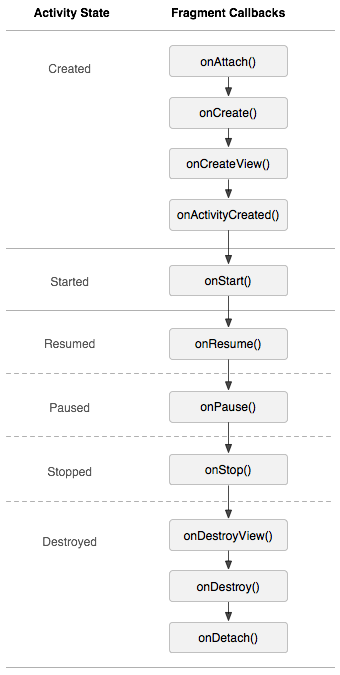
與 Activity 類似,你可使用 Bundle 保存 Fragment 的狀態資訊,以防宿主 Activity 所在進程被 kill 後 Fragment 重建時狀態丟失。做法是重寫 onSaveInstanceState() 保存狀態,再在 onCreate()、onCreateView()、onActivityCreated() 中讀取。
Activity 與 Fragment 生命週期的一個最大區別,在於它們的實例如何存儲在各自的後退堆疊中:
預設情況下,Activity 實例在 stop 時會被壓入由系統管理的 Activity 後退堆疊,使用者可透過返回鍵恢復。
而 Fragment 只能在操作事務時顯式呼叫 addToBackStack() 才被壓入由宿主 Activity 管理的 Fragment 後退堆疊。
除此之外,Fragment 與 Activity 的生命週期非常相似,你只需了解 Activity 的生命週期如何影響 Fragment 即可。
!請注意:如需在 Fragment 中使用 Context 對象,可呼叫 getActivity(),但只能在 Fragment 已依附於 Activity 後呼叫。當 Fragment 未依附、或已處於生命週期末尾不再依附於 Activity 時,getActivity() 會返回 null。
宿主 Activity 的生命週期直接影響其管轄的 Fragment。Activity 的每個生命週期回呼之後,Fragment 的對應回呼也會跟著觸發,如 Activity 回呼 onPause() 時,Fragment 也會回呼 onPause()。
Fragment 的其他生命週期方法包括:
onAttach():Fragment 依附於 Activity 時回呼,Activity 引用會傳入其中;
onCreateView():為 Fragment 綁定 UI 視圖時回呼;
onActivityCreated():宿主 Activity 的 onCreate() 返回後回呼;
onDestroyView():與 Fragment 綁定的 UI 視圖被移除時回呼;
onDetach():Fragment 不再依附於 Activity 時回呼。
除上述方法外,其他 Fragment 生命週期方法均由宿主 Activity 直接影響。有些 Activity 回呼會連帶觸發多個 Fragment 回呼,例如 Activity 的 onCreate() 被回呼時,將導致 Fragment 的 onAttach()、onCreate()、onCreateView()、onActivityCreated() 被連續回呼。
一旦 Activity 處於 resume 狀態,你就能自由地添加或移除 Fragment——也就是說,只有在 Activity 為 resume 時,Fragment 才能自由控制自己的生命週期;否則其生命週期將由宿主 Activity 掌控。
 從 Java 執行緒到 Android 執行緒:Handler 與計時器實作
從 Java 執行緒到 Android 執行緒 許多 Android 開發者從 Java 入門,但直接在 Android 中以 Java 執行緒更新 UI,往往會遇到問題
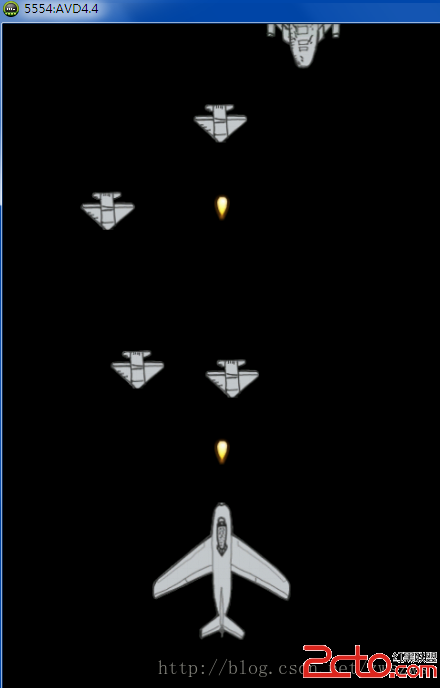 Android 小遊戲打飛機(三):為遊戲添加敵機
8 月 9 日,晴。「江城如畫裡,山曉望晴空。雨水夾明鏡,雙橋落彩虹。人煙寒橘柚,秋色老梧桐。」 上一篇已讓飛機載入子彈、音效及背景音樂,本篇主要為遊戲添加敵機。 本篇用
 Android 手勢識別與處理:雙擊、滑動與拖曳完整解析
概述 View 類有個 View.OnTouchListener 內部介面,透過重寫 onTouch(View v, MotionEvent event) 可以處理 to
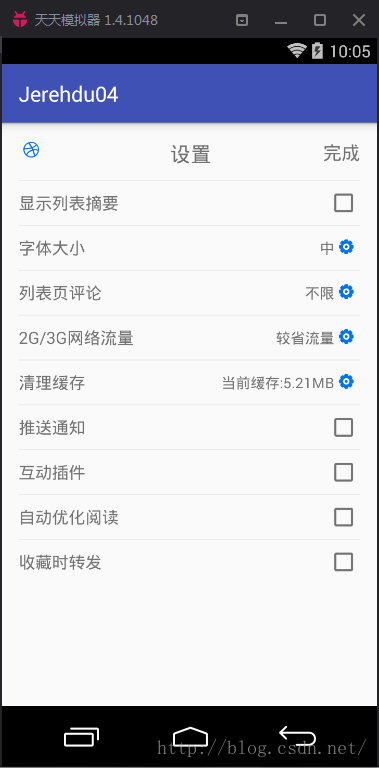 Android 如何保存用戶設定?以實體類為媒介存入內部儲存與 SD 卡
本次實例要做的,是把用戶的設定資訊,以實體類為媒介,保存到內部儲存或 SD 卡的檔案裡。再次打開應用時,程式會自動讀取檔案中的實體類,並對設定資訊進行套用,使其恢復到用戶