

編輯:關於 Android 程式設計
先前談過一般進度條的用法,涵蓋標題欄進度與水平進度條兩種形式。不過在實務專案裡,還有一種更常被拿出來的寫法:把進度做成一個獨立彈出的對話框。它在背景執行耗時工作、需要明確告知使用者「請稍候」的場景中特別合適。
畫面上只需要一顆按鈕用來觸發,其餘交給程式碼動態產生。
<LinearLayout xmlns:android="https://schemas.android.com/apk/res/android"
    xmlns:tools="https://schemas.android.com/tools"
    android:layout_width="match_parent"
    android:layout_height="match_parent" >

    <Button
        android:id="@+id/main_btn_show"
        android:layout_width="wrap_content"
        android:layout_height="wrap_content"
        android:text="顯示進度條對話框" />
</LinearLayout>
把 ProgressDialog 的建立交給 Activity 的對話框管理機制,的好處是旋轉螢幕等狀態改變時,系統能自動幫你還原與釋放,不必自己寫一堆 null 檢查。
package com.home;

import android.app.Activity;
import android.app.Dialog;
import android.app.ProgressDialog;
import android.os.Bundle;
import android.view.View;
import android.view.View.OnClickListener;
import android.widget.Button;

public class MainActivity extends Activity {

    private Button showProgressDialogBtn;

    @Override
    protected void onCreate(Bundle savedInstanceState) {
        super.onCreate(savedInstanceState);
        setContentView(R.layout.main);

        showProgressDialogBtn = (Button) findViewById(R.id.main_btn_show);
        showProgressDialogBtn.setOnClickListener(new OnClickListener() {
            @Override
            public void onClick(View arg0) {
                showDialog(0); // 觸發 onCreateDialog
            }
        });
    }

    @Override
    protected Dialog onCreateDialog(int id) {
        ProgressDialog dialog = new ProgressDialog(this);
        dialog.setTitle("測試進度條對話框");
        dialog.setIndeterminate(true);   // 不確定進度,只轉圈
        dialog.setMessage("程序正在加載請稍後。。。");
        dialog.setCancelable(true);      // 允許使用者取消
        return dialog;
    }
}
setIndeterminate(true) 與 false 是兩種截然不同的情境:前者只適合「不知道還要多久」的等待,後者則要搭配 setProgress() 與 setMax() 顯示百分比。另外,如果任務進行到一半使用者按下返回鍵就關閉對話框,背景執行緒仍 Should 具備中止機制,否則容易出現「畫面已關閉、下載還在跑」的尷尬狀態。
效果如下圖:

 Android 系統 CPU 資源查詢與開發者選項解析
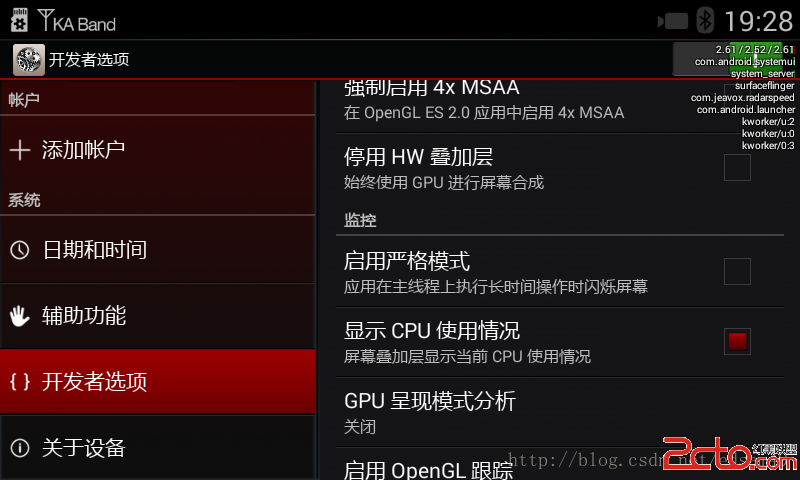
Android 基於 Linux 核心,因此在系統層面保留了許多熟悉的資源監控能力。例如命令列中的 top 可以查看 CPU 使用率、平均負載與行程資訊;在 Androi
 動手做一個自己的新聞閱讀平台:PHP 服務端加上 Android 客戶端
本文示範如何從零打造一個屬於自己的新聞展示平台,分成資料庫建置、服務端輸出 JSON、Android 客戶端抓取與呈現三個部分。 一、建立新聞資料庫 這裡使用 MySQ
 Android 必備知識:Fragment 使用、參數傳遞與宿主通訊
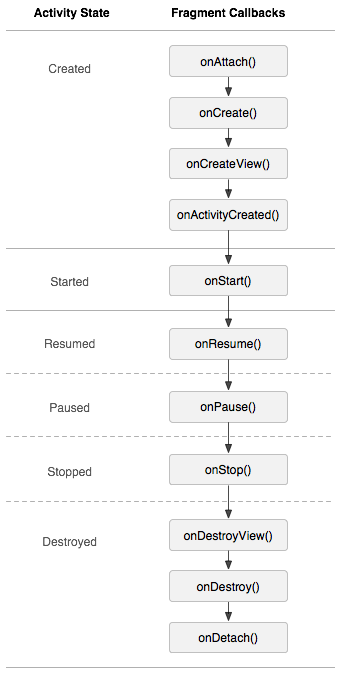
Fragment 是 Android 中用來表示 Activity 中一部分介面的元件。它可以被多個 Activity 重用,也可以在同一個 Activity 中組合多個
 Android 教學:利用 FontMetrics 精準繪製文字的方法
本文透過實例,說明 Android 開發中如何運用 FontMetrics 繪製文字,分享給大家參考。當 Canvas 用於繪製文字時,可以搭配 FontMetrics