

編輯:關於 Android 程式設計
近來寫 GridView 與 Gallery,處處都要用到 Adapter,於是乾脆專門查了一下。
Adapter 是 Java 裡常見的設計模式,目的是讓兩個原本不相干的類別能協同運作。打個比方:水管 A 口徑 25mm,水管 B 口徑 40mm,要把它們接在一起,就需要一段一頭 25mm、一頭 40mm 的轉接頭。Adapter 扮演的正是這個角色。
在 Android 裡,Adapter 是 View 與 Data 之間的橋樑:它一方面提供對資料的存取,另一方面負責為每一筆資料產生對應的視圖。三者關係可以概括為:資料交給 Adapter,Adapter 生成子視圖,容器負責排列顯示。
Adapter 家族成員眾多,其中 BaseAdapter 因為最靈活而最常使用;SimpleCursorAdapter 也相當常見,它能直接綁定 Cursor 來顯示資料。
無論繼承哪一種 Adapter,以下四個方法幾乎都要重載:
// 資料共有幾項
int getCount();

// 回傳指定位置的資料項
Object getItem(int position);

// 回傳指定位置資料項的 ID
long getItemId(int position);

// 為每一筆資料產生對應的視圖
View getView(int position, View convertView, ViewGroup parent);
有朋友翻過原始碼後發現,getItem() 與 getItemId() 對 Android 本身其實沒有實際作用,純粹是為了呼叫端方便;我曾嘗試只重載這兩個方法來設定初始 position,結果完全沒有效果——真正決定顯示內容的是 getView()。
擴展 BaseAdapter 的自訂寫法在 ListView、GridView、Gallery 相關文章中已有說明,這裡示範如何用 SimpleCursorAdapter 讀取聯絡人:
listView = new ListView(this);

// 查詢系統的聯絡人資料表
Cursor cursor = getContentResolver().query(People.CONTENT_URI, null, null, null, null);
startManagingCursor(cursor);

ListAdapter listAdapter = new SimpleCursorAdapter(
        this,                                          // 上下文
        android.R.layout.simple_expandable_list_item_1, // 項目版面
        cursor,                                        // 資料源
        new String[] { People.NAME },                  // 對應的資料欄位
        new int[] { android.R.id.text1 });             // 要顯示到哪個控制項

listView.setAdapter(listAdapter);
setContentView(listView);
五個參數的順序值得記住:上下文、版面資源、Cursor、資料欄位陣列、控制項 id 陣列——後兩者一一對應,位置不能錯位。
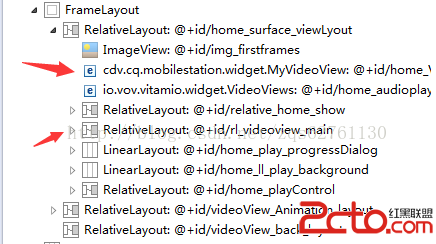 用 LayoutParams 在代碼中動態控制控件位置與尺寸
XML 布局能解決的問題不要用代碼去做,但有些場景——比如尺寸和位置來自服務端下發的配置——就必須在運行時動態設置。這時候 LayoutParams 是唯一的工具。 L
 Android SurfaceView 實戰:打造精美抽獎轉盤
一、概述 今天為大家帶來一個 SurfaceView 的實戰案例。自定義 View 寫過不少,卻一直沒寫過 SurfaceView。它是個什麼東西?什麼時候用它比較合適
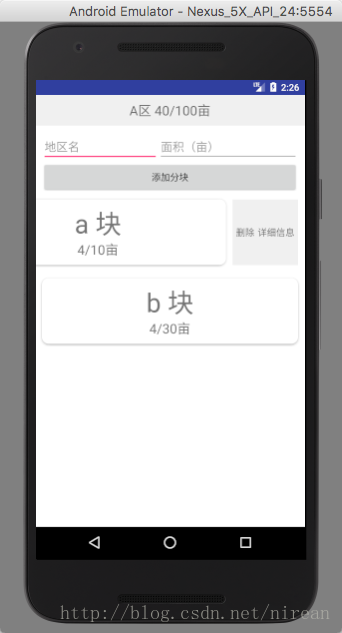 Android 自定義 SwipeLayout 實現列表項左滑顯示刪除按鈕
滑動刪除可以拆成兩個區域來看:內容區用於承載正常顯示的 View,操作區用於放置刪除按鈕。預設狀態下操作區隱藏,內容區填滿整個容器,操作區永遠位於內容區右側。開始滑動時,
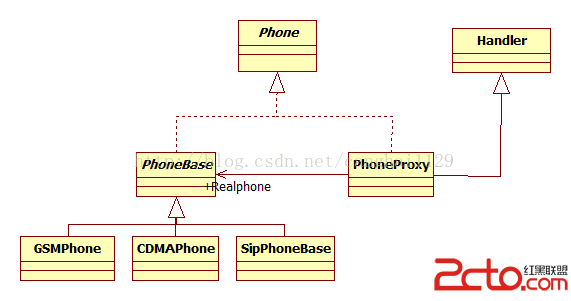 Android 與設計模式——代理(Proxy)模式
閻宏博士在《JAVA 與模式》一書的開篇,對代理(Proxy)模式下了這樣的定義: 代理模式屬於對象的結構型模式。它為某個對象提供一個代理對象,並由代理對象來控制對原對象