

編輯:關於 Android 程式設計
開發環境:Android 4.1
這個看起來很單純的計算機,其實包辦了 Android 入門階段最該練會的三件事:Intent 帶值跳頁、跨 Activity 取回資料、以及用程式碼動態建立選單。
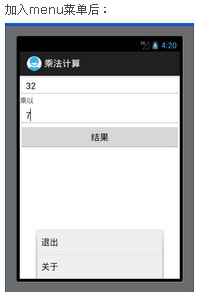
第一個畫面有兩個輸入框,分別填入乘數。按下「結果」按鈕後,程式會跳到第二個畫面並顯示兩數相乘的答案。若在第一個畫面按下系統 Menu 鍵,會彈出一個包含「退出」與「關於」兩項的選單,點選退出即結束程式。
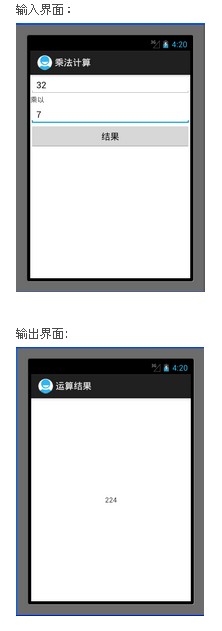
第一個 Activity:建立監聽器 → 建立 Intent 並用 putExtra 以鍵值對形式塞入兩個數字 → 指定要跳去哪個 Activity → 啟動 Intent → 把監聽器綁到按鈕上。
第二個 Activity:建立監聽器 → 用 getIntent() 取出 Intent,再以 getStringExtra 依鍵名讀回字串 → 把字串轉為整數並相乘 → 將結果顯示在 TextView。
選單:覆寫 onCreateOptionsMenu() 加入選項,完全不需要在 XML 佈局裡放任何控制項;選項被點擊時則由 onOptionsItemSelected() 接手處理。
在 Android 專案裡 import 套件時,大小寫必須完全正確,View 與 view 是兩回事,這類錯誤相當常見。
字串轉整數用 Integer.parseInt(string)。反過來說,Java 的運算中只要其中一項是字串,另一項也會被自動轉成字串進行串接,這在組字串時很方便,但在做加法時卻是常見的 bug 來源,值得留意。
為了達到國際化的目的,顯示文字盡量不要寫死在 Java 裡,而應放在 strings.xml 中,程式碼只負責引用資源 id。這樣未來要支援多語系,只要換一份 XML 即可,不必動任何邏輯。
內部類在 Java 裡很常見,可以直接存取外部類的成員變數與方法,寫監聽器時特別順手。而 Menu 控制項的特別之處在於:它不需要在 XML 中宣告,純粹靠覆寫回呼函數產生。
最後,Intent 不只能在同一支程式的 Activity 之間傳遞資料,也能跨應用程式溝通——這是 Android 鬆耦合設計的精髓所在。
package com.example.factor;

import android.app.Activity;
import android.content.Intent;
import android.os.Bundle;
import android.view.Menu;
import android.view.MenuItem;
import android.view.View;
import android.view.View.OnClickListener;
import android.widget.Button;
import android.widget.EditText;
import android.widget.TextView;

public class MainActivity extends Activity {

    private TextView factor;
    private EditText factor1;
    private EditText factor2;
    private Button result;

    @Override
    public void onCreate(Bundle savedInstanceState) {
        super.onCreate(savedInstanceState);
        setContentView(R.layout.activity_main);

        factor = (TextView) findViewById(R.id.factor);
        factor1 = (EditText) findViewById(R.id.factor1);
        factor2 = (EditText) findViewById(R.id.factor2);
        result = (Button) findViewById(R.id.result);

        factor.setText(R.string.factor);
        result.setText(R.string.result);

        // 綁定監聽器
        result.setOnClickListener(new onResultClickListener());
    }

    // 按下 Menu 鍵時由系統自動回呼
    @Override
    public boolean onCreateOptionsMenu(Menu menu) {
        menu.add(0, 1, 1, R.string.exit);
        menu.add(0, 2, 2, R.string.about);
        return super.onCreateOptionsMenu(menu);
    }

    // 選單項被選擇時的回呼
    @Override
    public boolean onOptionsItemSelected(MenuItem item) {
        if (1 == item.getItemId()) {
            finish();
        }
        return super.onOptionsItemSelected(item);
    }

    class onResultClickListener implements OnClickListener {
        public void onClick(View v) {
            String factor1_str = factor1.getText().toString();
            String factor2_str = factor2.getText().toString();

            // 建立 Intent、帶入資料、指定目標,然後啟動
            Intent intent = new Intent();
            intent.putExtra("factor1", factor1_str);
            intent.putExtra("factor2", factor2_str);
            intent.setClass(MainActivity.this, ResultActivity.class);
            MainActivity.this.startActivity(intent);
        }
    }
}
package com.example.factor;

import android.app.Activity;
import android.content.Intent;
import android.os.Bundle;
import android.view.Menu;
import android.widget.TextView;

public class ResultActivity extends Activity {

    private TextView result_dis;

    @Override
    public void onCreate(Bundle savedInstanceState) {
        super.onCreate(savedInstanceState);
        setContentView(R.layout.activity_result);

        result_dis = (TextView) findViewById(R.id.result_view);

        Intent intent = getIntent();
        String factor_str1 = intent.getStringExtra("factor1");
        String factor_str2 = intent.getStringExtra("factor2");

        // 字串轉整數後相乘
        int factor_int1 = Integer.parseInt(factor_str1);
        int factor_int2 = Integer.parseInt(factor_str2);
        int result = factor_int1 * factor_int2;

        // 數字與空字串串接,即自動轉為字串
        result_dis.setText(result + "");
    }

    @Override
    public boolean onCreateOptionsMenu(Menu menu) {
        getMenuInflater().inflate(R.menu.activity_result, menu);
        return true;
    }
}
<LinearLayout xmlns:android="https://schemas.android.com/apk/res/android"
    android:layout_width="match_parent"
    android:layout_height="match_parent"
    android:orientation="vertical">

    <EditText
        android:id="@+id/factor1"
        android:layout_width="fill_parent"
        android:layout_height="wrap_content" />

    <TextView
        android:id="@+id/factor"
        android:layout_width="fill_parent"
        android:layout_height="wrap_content" />

    <EditText
        android:id="@+id/factor2"
        android:layout_width="fill_parent"
        android:layout_height="wrap_content" />

    <Button
        android:id="@+id/result"
        android:layout_width="fill_parent"
        android:layout_height="wrap_content" />

</LinearLayout>
<RelativeLayout xmlns:android="https://schemas.android.com/apk/res/android"
    xmlns:tools="https://schemas.android.com/tools"
    android:layout_width="match_parent"
    android:layout_height="match_parent">

    <TextView
        android:id="@+id/result_view"
        android:layout_width="wrap_content"
        android:layout_height="wrap_content"
        android:layout_centerHorizontal="true"
        android:layout_centerVertical="true"></TextView>

</RelativeLayout>
這次透過一個看似簡單的乘法,把 Intent 的用法摸了一遍,也順便感受到 Java 與 C++ 在語法與設計思路上的差異。真正該帶走的是那句:資料不要寫死在程式碼裡,跳頁不要直接 new 對方,把溝通交給 Intent。
作者:tornadomeet
 仿去哪兒首頁效果:用 Canvas、Matrix 與縮放動畫打造可點擊的功能方塊
第一張是進入頁面的樣子:頂部一個可滑動的 ViewPager,下面是一格格自定義的功能方塊 HomeButton。第二張是手指按下方塊時的狀態——方塊整體縮小,中間浮
 為 RecyclerView 的 Item 添加點擊事件
由於 RecyclerView 不再負責 Item 的布局與顯示,它也沒有像 ListView 那樣內置 OnItemClickListener。要實現 Item 點擊,
 Android 開發筆記(一百零六):支付繳費 SDK 集成實踐
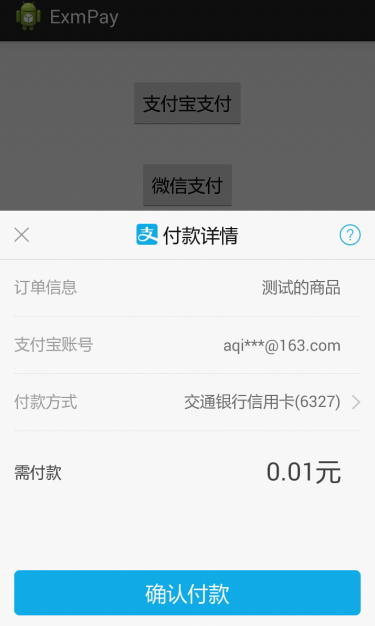
第三方支付概述 第三方支付指的是第三方平台與各大銀行簽約,在買方與賣方之間充當中介擔保,從而增強交易的安全性。國內常用的支付平台以支付寶和微信支付為主,二者合計佔據了約八
 Android 日期時間元件實戰:TimePicker 與 DatePicker 搭配使用
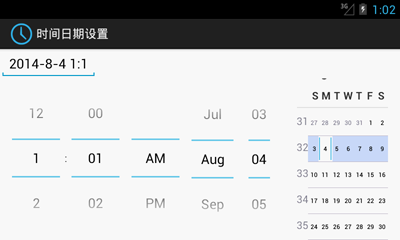
延續上一篇關於時間日期設定的討論,這次把焦點放在版面元件本身,說明 TimePicker 與 DatePicker 這兩個官方控制項怎麼放進畫面、怎麼監聽變化,以及怎麼把