

編輯:關於 Android 程式設計
這個範例示範如何用 TCP 完成一套簡易的檔案下載服務:
1. 伺服器端提供檔案下載,支援多用戶同時連線。
2. 客戶端(Android)連到伺服器並下載指定檔案,同樣以獨立執行緒處理傳輸。
伺服器跑在 PC 上、以標準 Java 執行環境運行;客戶端則是 Android App。
設計上有幾個重點。首先,每個連線都交由一個独立的執行緒物件 ServerOneDownload 處理,主程式只負責 accept,這樣多個客戶端下載時不會互相阻塞。其次,通訊協定很簡單:客戶端送出一行「檔案相對路徑@ 密碼」,伺服器先回傳一個 long 型別的檔案長度,若長度為 -1 代表拒絕(檔案不存在或密碼錯誤),否則接著就開始推送檔案內容。
// file: DownloadServer.java
import java.io.*;
import java.net.*;

class ServerOneDownload extends Thread {

    private Socket socket = null;
    private String downloadRoot = null;
    private static final int Buffer = 8 * 1024;

    public ServerOneDownload(Socket socket, String downloadRoot) {
        super();
        this.socket = socket;
        this.downloadRoot = downloadRoot;
        start();
    }

    // 檢查檔案是否存在、密碼是否正確;失敗回傳 -1,成功回傳檔案長度
    private long getFileLength(String fileName, String password) {
        if ((fileName == null) || (password == null)) return -1;
        if ((fileName.length() == 0) || (password.length() == 0)) return -1;

        String filePath = downloadRoot + fileName;
        System.out.println("DownloadServer getFileLength----->" + filePath);

        File file = new File(filePath);
        if (!file.exists()) return -1;

        return file.length();
    }

    // 把指定檔案寫入輸出流
    private void sendFile(DataOutputStream out, String fileName) throws Exception {
        String filePath = downloadRoot + fileName;
        FileInputStream in = new FileInputStream(filePath);
        System.out.println("DownloadServer sendFile----->" + filePath);

        byte[] buf = new byte[Buffer];
        int len;

        // 反覆讀取,直到 read 回傳 -1
        while ((len = in.read(buf)) >= 0) {
            out.write(buf, 0, len);
            out.flush();
        }

        out.close();
        in.close();
    }

    // 提供下載服務
    public void download() throws IOException {
        System.out.println("啟動下載... ");
        System.out.println("DownloadServer currentThread--->" + currentThread().getName());
        System.out.println("DownloadServer currentThread--->" + currentThread().getId());

        BufferedReader in = new BufferedReader(
                new InputStreamReader(socket.getInputStream()));
        DataOutputStream out = new DataOutputStream(socket.getOutputStream());

        try {
            String parameterString = in.readLine();

            // 請求格式:相對路徑 + "@ " + 密碼
            String[] parameter = parameterString.split("@ ");
            String fileName = parameter[0];
            String password = parameter[1];

            System.out.print(socket.getInetAddress().getHostAddress() + "提出下載請求, ");
            System.out.println("請求下載文件: " + fileName);

            long len = getFileLength(fileName, password);
            out.writeLong(len);   // 先回傳檔案大小
            out.flush();

            if (len >= 0) {
                System.out.println("允許下載 ");
                sendFile(out, fileName);
                System.out.println(fileName + ": 下載完畢 ");
            } else {
                System.out.println("下載文件不存在或密碼錯誤,拒絕下載! ");
            }
        } catch (Exception e) {
            System.out.println(e.toString());
        } finally {
            socket.close();
        }
    }

    @Override
    public void run() {
        try {
            download();
        } catch (IOException e) {
            e.printStackTrace();
        }
        super.run();
    }
}

public class DownloadServer {

    private final static int port = 65525;
    private static String root = "C://";   // 下載根目錄

    public static void main(String[] args) throws IOException {
        String temp = null;

        try {
            BufferedReader systemIn = new BufferedReader(
                    new InputStreamReader(System.in));

            while (true) {
                System.out.print("請輸入下載服務器的下載根目錄: ");
                root = systemIn.readLine().trim();

                File file = new File(root);
                if ((file.exists()) && (file.isDirectory())) {
                    temp = root.substring(root.length() - 1, root.length());
                    if (!temp.equals("//")) root += "//";
                    break;
                }
            }
        } catch (Exception e) {
            System.out.println(e.toString());
        }

        ServerSocket serverSocket = new ServerSocket(port);
        System.out.println("Server start...");

        try {
            while (true) {
                Socket socket = serverSocket.accept();
                new ServerOneDownload(socket, root);   // 每個連線一條執行緒
            }
        } finally {
            serverSocket.close();
        }
    }
}
客戶端畫面上只有三個輸入欄位:伺服器 IP、要下載的檔名,以及一顆下載按鈕。按下按鈕後先建立 Socket 連線,再把下載工作交給另一條執行緒。
// file: DownLoadClient.java
package org.piaozhiye.study;

import java.io.IOException;
import java.net.Socket;

import android.app.Activity;
import android.os.Bundle;
import android.view.View;
import android.widget.Button;
import android.widget.EditText;

public class DownLoadClient extends Activity {

    private Button download = null;
    private EditText et_serverIP = null;
    private EditText et_fileName = null;

    private String downloadFile = null;
    private final static int PORT = 65525;
    private final static String defaultIP = "192.168.0.100";
    private static String serverIP = null;

    private Socket socket;

    @Override
    public void onCreate(Bundle savedInstanceState) {
        super.onCreate(savedInstanceState);
        setContentView(R.layout.main);

        download = (Button) findViewById(R.id.download);
        et_serverIP = (EditText) findViewById(R.id.et_serverip);
        et_fileName = (EditText) findViewById(R.id.et_filename);
        et_serverIP.setText("192.168.0.100");

        download.setOnClickListener(new View.OnClickListener() {
            @Override
            public void onClick(View v) {
                serverIP = et_serverIP.getText().toString();
                if (serverIP == null) {
                    serverIP = defaultIP;
                }

                System.out.println("DownLoadClient serverIP--->" + serverIP);
                System.out.println("DownLoadClient MainThread--->"
                        + Thread.currentThread().getId());

                try {
                    socket = new Socket(serverIP, PORT);
                } catch (IOException e) {
                    e.printStackTrace();
                }

                downloadFile = et_fileName.getText().toString();

                // 下載耗時,必須放在獨立執行緒
                Thread downFileThread = new Thread(new DownFileThread(socket, downloadFile));
                downFileThread.start();

                System.out.println("DownLoadClient downloadFile--->" + downloadFile);
            }
        });
    }
}
// file: DownFileThread.java
package org.piaozhiye.study;

import java.io.BufferedInputStream;
import java.io.DataInputStream;
import java.io.FileOutputStream;
import java.io.IOException;
import java.io.OutputStreamWriter;
import java.io.PrintWriter;
import java.net.Socket;

public class DownFileThread extends Thread {

    private Socket socket;
    private String downloadFile;
    private final static int Buffer = 8 * 1024;

    public DownFileThread(Socket socket, String downloadFile) {
        super();
        this.socket = socket;
        this.downloadFile = downloadFile;
    }

    // 提出下載請求,回傳檔案大小
    private long request(String fileName, String password) throws IOException {
        DataInputStream in = new DataInputStream(socket.getInputStream());
        PrintWriter out = new PrintWriter(
                new OutputStreamWriter(socket.getOutputStream()));

        String requestString = fileName + "@ " + password;
        out.println(requestString);
        out.flush();

        return in.readLong();
    }

    // 接收並存檔
    private void receiveFile(String localFile) throws Exception {
        BufferedInputStream in = new BufferedInputStream(socket.getInputStream());
        FileOutputStream out = new FileOutputStream(localFile);

        byte[] buf = new byte[Buffer];
        int len;

        while ((len = in.read(buf)) >= 0) {
            out.write(buf, 0, len);
            out.flush();
        }

        out.close();
        in.close();
    }

    public void download(String downloadFile) throws Exception {
        try {
            String password = "password";
            String localpath = "/sdcard/";
            String localFile = localpath + downloadFile;

            long fileLength = request(downloadFile, password);

            if (fileLength >= 0) {
                System.out.println("fileLength: " + fileLength + " B");
                System.out.println("downing...");
                receiveFile(localFile);
                System.out.println("file:" + downloadFile + " had save to " + localFile);
            } else {
                System.out.println("download " + downloadFile + " error! ");
            }
        } catch (IOException e) {
            System.out.println(e.toString());
        } finally {
            socket.close();
        }
    }

    @Override
    public void run() {
        System.out.println("DownFileThread currentThread--->"
                + DownFileThread.currentThread().getId());
        try {
            download(downloadFile);
        } catch (Exception e) {
            e.printStackTrace();
        }
        super.run();
    }
}
<?xml version="1.0" encoding="utf-8"?>
<LinearLayout xmlns:android="https://schemas.android.com/apk/res/android"
    android:orientation="vertical"
    android:layout_width="fill_parent"
    android:layout_height="fill_parent">

    <TextView
        android:layout_width="wrap_content"
        android:layout_height="wrap_content"
        android:paddingLeft="10dp"
        android:paddingRight="10dp"
        android:paddingTop="5dp"
        android:paddingBottom="5dp"
        android:text="服務器IP:" />

    <EditText
        android:id="@+id/et_serverip"
        android:layout_width="fill_parent"
        android:layout_height="wrap_content"
        android:paddingLeft="10dp"
        android:paddingRight="10dp"
        android:paddingTop="5dp"
        android:paddingBottom="5dp" />

    <TextView
        android:layout_width="wrap_content"
        android:layout_height="wrap_content"
        android:paddingLeft="10dp"
        android:paddingRight="10dp"
        android:paddingTop="5dp"
        android:paddingBottom="5dp"
        android:text="下載文件名:" />

    <EditText
        android:id="@+id/et_filename"
        android:layout_width="fill_parent"
        android:layout_height="wrap_content"
        android:paddingLeft="10dp"
        android:paddingRight="10dp"
        android:paddingTop="5dp"
        android:paddingBottom="5dp" />

    <Button
        android:id="@+id/download"
        android:layout_width="fill_parent"
        android:layout_height="wrap_content"
        android:text="download" />

</LinearLayout>
網路存取權限一定要補,否則連線階段就會失敗:
<uses-permission android:name="android.permission.INTERNET" />
範例的目的是把 TCP 傳輸的骨架講清楚,因此刻意簡化了不少地方。若要用在正式專案,至少還需要補上:
進度回饋。目前完全沒有告知使用者下載到哪了。既然伺服器已經先回傳檔案長度,客戶端就能在 receiveFile() 的迴圈裡累加已讀位元組,換算百分比並更新介面。
密碼驗證只是佔位。伺服器端只要密碼非空就算通過,等於沒有防護。實務上應改為雜湊比對,並對下載根目錄做路徑檢查,避免 ../ 這類路徑穿越攻擊讀到根目錄以外的檔案。
檔案 stor 路徑過時。寫死 /sdcard/ 在新版 Android 上會失敗,建議改用 getExternalFilesDir() 或 MediaStore,並視 targetSdkVersion 處理分區儲存的規範。
缺少錯誤處理與連線逾時。伺服器關機、IP 填錯、網路中途斷線,目前都可能讓程式卡住或崩潰,應加上 setSoTimeout() 與友善的錯誤提示。
沒有斷點續傳。檔案較大時,支援 Range 請求並記錄已下載位置,會讓使用體驗好很多。
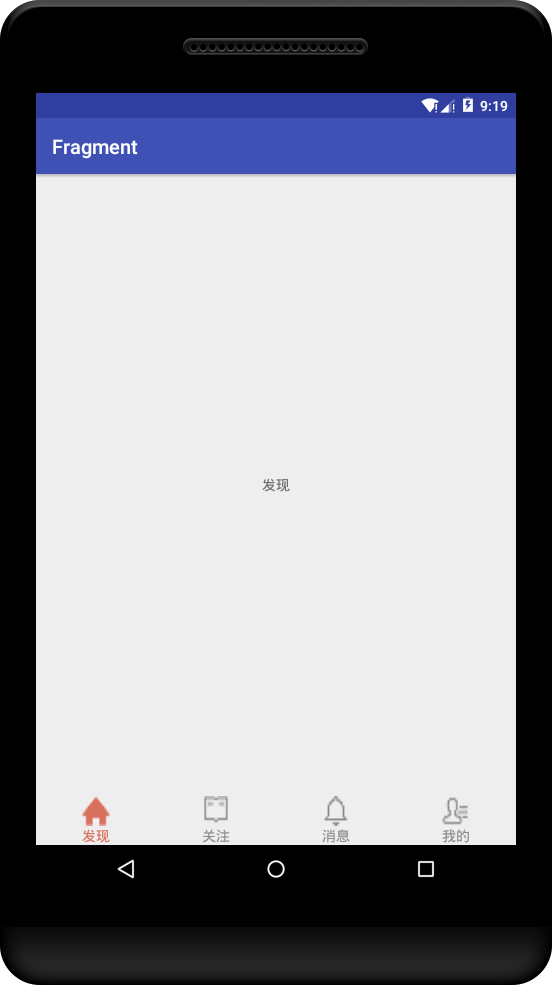 仿微信底部導覽欄的三種實作方案對比
微信那種「底部四個 Tab,點擊切換、也能左右滑動」的導覽列,是無數 App 的骨架。實作方式有好幾種,本文整理三組最常見的搭配,並說清各自的取捨。 三種組合: view
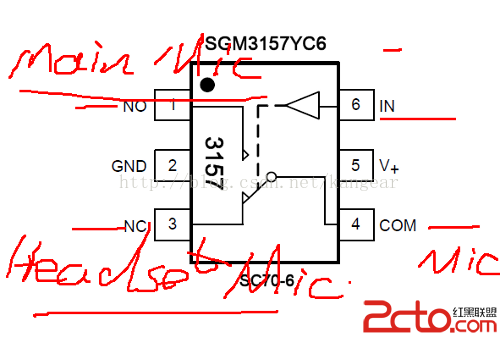 Android 底層開發:音訊輸入通道的軟硬體全面解析
在手機與平板這類裝置上,最常見的麥克風形式是整合在四段式耳機插頭中的 Mic。不過並非所有情境都如此單一,例如在普通 PC 上安裝 Android 系統時,就可能遇到麥克
 Android 漫畫閱讀器實作:大圖載入與 OOM 的拉扯
資源來之不易,程式碼部分反而沒什麼好說的。真正值得記錄的是過程中踩到的幾個坑。 問題一:漫畫頁面的記憶體 每一話大概二十幾頁,實際都是 JPG。要在螢幕上順暢翻頁,同時
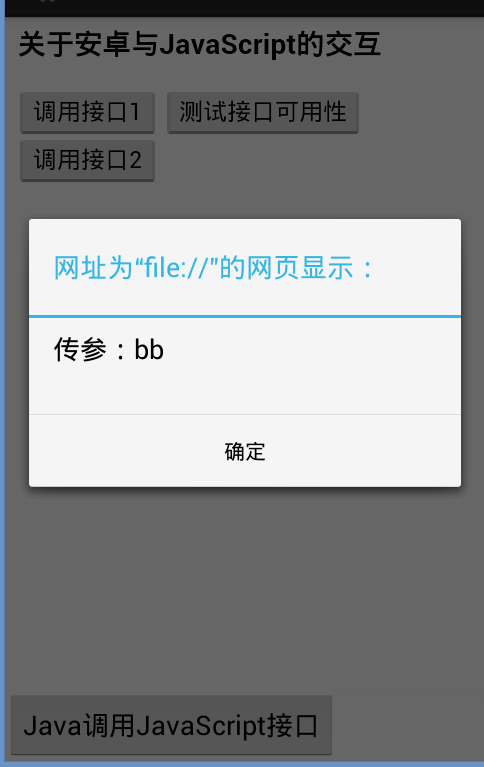 WebView 中介紹 JavaScript 與 Java 雙向調用的完整實踐
混合開發中經常需要網頁調用原生能力,比如拍照、選相冊、錄音。Android 的 WebView 基於 WebKit 內核,內建了 JS 與 Java 互調的接口,接入並不