

編輯:關於 Android 程式設計
這份實作示範了如何抓取一個網頁的 HTML 原始碼,用 Regular Expression 從中找出圖片連結,再把圖片一張張下載到本機。程式拆成兩個類別:GetContentPicture 負責抓網頁、比對規則與下載;FileNumber 負責維護圖片檔名的流水號,讓中斷後再次執行時能接續編號。
裡面有三個主要方法:getHtmlCode 用 BufferedReader 逐行讀回整份網頁並拼成字串;get 用兩組正則表達式分別比對相對路徑與絕對路徑的圖片連結;getHtmlPicture 則負責實際的位元串流下載與寫檔。
package cn.mypic;

import java.io.BufferedInputStream;
import java.io.BufferedReader;
import java.io.File;
import java.io.FileNotFoundException;
import java.io.FileOutputStream;
import java.io.IOException;
import java.io.InputStreamReader;
import java.net.MalformedURLException;
import java.net.URL;
import java.util.regex.Matcher;
import java.util.regex.Pattern;

public class GetContentPicture {

    // 取得圖片位址並下載圖片
    public void getHtmlPicture(String httpUrl) {
        URL url;
        BufferedInputStream in;
        FileOutputStream file;
        int count;                    // 圖片檔名序號
        FileNumber num = new FileNumber();     // 圖片檔名序號類
        count = num.NumberReadFromFile();      // 取得圖片檔名序號
        try {
            System.out.println("獲取網絡圖片");
            // 序號加上原圖的副檔名
            String fileName = (String.valueOf(count))
                    .concat(httpUrl.substring(httpUrl.lastIndexOf(".")));
            String filePath = "d:/image/";      // 圖片儲存位置
            url = new URL(httpUrl);

            in = new BufferedInputStream(url.openStream());

            file = new FileOutputStream(new File(filePath + fileName));
            int t;
            while ((t = in.read()) != -1) {
                file.write(t);
            }
            file.close();
            in.close();
            System.out.println("圖片獲取成功");
            count = count + 1;                 // 序號加一
            num.NumberWriteToFile(count);      // 保存序號
        } catch (MalformedURLException e) {
            e.printStackTrace();
        } catch (FileNotFoundException e) {
            e.printStackTrace();
        } catch (IOException e) {
            e.printStackTrace();
        }
    }

    // 取得網頁程式碼並保存在 String 格式的 content 中
    public String getHtmlCode(String httpUrl) throws IOException {
        String content = "";
        URL uu = new URL(httpUrl);             // 建立 URL 物件
        // 以 openStream 得到輸入流並據此建立 BufferedReader
        BufferedReader ii = new BufferedReader(new InputStreamReader(uu.openStream()));
        String input;
        while ((input = ii.readLine()) != null) {   // 讀取迴圈
            content += input;
        }
        ii.close();
        return content;
    }

    // 分析網頁程式碼,找出符合條件的圖片位址
    public void get(String url) throws IOException {

        // 比對相對路徑的圖片連結
        String searchImgReg = "(?x)(src|SRC|background|BACKGROUND)=('|\")/?(([\\w-]+/)*([\\w-]+\\.(jpg|JPG|png|PNG|gif|GIF)))('|\")";
        // 比對帶有 https:// 的絕對路徑
        String searchImgReg2 = "(?x)(src|SRC|background|BACKGROUND)=('|\")(https://([\\w-]+\\.)+[\\w-]+(:[0-9]+)*(/[\\w-]+)*(/[\\w-]+\\.(jpg|JPG|png|PNG|gif|GIF)))('|\")";

        String content = this.getHtmlCode(url);

        Pattern pattern = Pattern.compile(searchImgReg);
        Matcher matcher = pattern.matcher(content);
        while (matcher.find()) {
            System.out.println(matcher.group(3));// 輸出圖片連結
            this.getHtmlPicture(matcher.group(3));// 下載並存檔
        }

        pattern = Pattern.compile(searchImgReg2);
        matcher = pattern.matcher(content);
        while (matcher.find()) {
            System.out.println(matcher.group(3));
            this.getHtmlPicture(matcher.group(3));
        }
    }

    // 主函式,參數為網頁位址
    public static void main(String[] args) throws IOException {
        String url = "https://www.baidu.com";
        GetContentPicture gcp = new GetContentPicture();
        gcp.get(url);
    }
}
用 DataOutputStream 把整數寫進 number.txt,下次執行時再用 DataInputStream 讀回,就能避免覆蓋掉先前抓過的圖片:
package cn.mypic;

import java.io.*;

public class FileNumber {

    // 檔案寫入
    public void NumberWriteToFile(int x) {
        int c = 0;
        c = x;
        File filePath = new File("d:/image");// number.txt 的儲存位置
        File f1 = new File(filePath, "number.txt");
        try {
            FileOutputStream fout = new FileOutputStream(f1);
            DataOutputStream out = new DataOutputStream(fout);
            out.writeInt(c);
            out.close();
        } catch (FileNotFoundException e) {
            System.err.println(e);
        } catch (IOException e) {
            System.err.println(e);
        }
    }

    // 檔案讀取
    public int NumberReadFromFile() {
        int c1 = 0;
        File filePath = new File("d:/image");
        File f1 = new File(filePath, "number.txt");
        try {
            FileInputStream fin = new FileInputStream(f1);
            DataInputStream in = new DataInputStream(fin);
            c1 = in.readInt();
            System.out.println(c1);// 輸出內容
            in.close();
        } catch (FileNotFoundException e) {
            System.err.println(e);
        } catch (IOException e) {
            System.err.println(e);
        }
    }
}
這份程式原本是桌面 Java 寫法,直接搬到 App 上會遇到幾個問題,值得先講清楚:
"d:/image/" 在 Android 上不存在,應改為 getExternalFilesDir(null) 或 getFilesDir() 取得應用程式專屬目錄。in.read() 一個 byte 一次寫入效率極差,改用 byte[] buffer 搭配 read(buffer) 一次搬 4KB 會快上幾十倍。另外提醒,抓取他人網站內容與圖片時應留意 robots.txt 與著作權規範,本站有授權或提供 API 時優先使用 API,並控制請求頻率以免造成對方伺服器負擔。
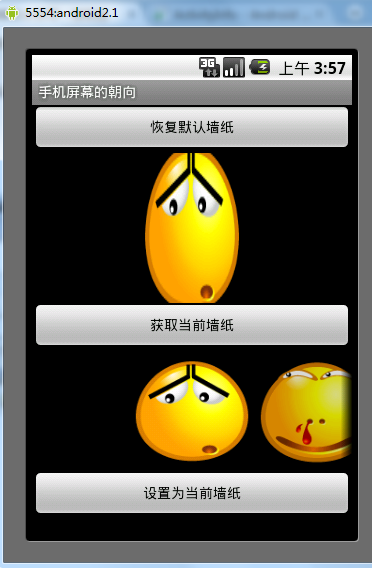 Android 更換手機壁紙:Gallery 搭配 WallpaperManager
更換壁紙涉及三件事:取得目前的壁紙、從一組圖片中挑選、把選中的圖片設為壁紙。Android 把這些能力集中在 Context 的 setWallpaper()/getWa
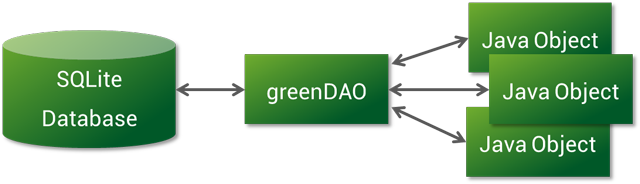 GreenDAO —— Android ORM 框架入門(一)
簡介 GreenDAO 是一個開放的 Android 程式庫,提供容易使用的 SQLite 資料庫介面,幫助開發者更高效地處理資料——將開發者從底層的資料庫操作中解放出來
 自定義 ListView 實現 iOS 風格側滑子菜單
老規矩,先看效果,完整 DEMO 在文末。 當年剛接觸 Android 時看到這個效果只有膜拜的份,現在自己動手把它做出來,也算是圓了當年的一個念頭。 一、思路拆解
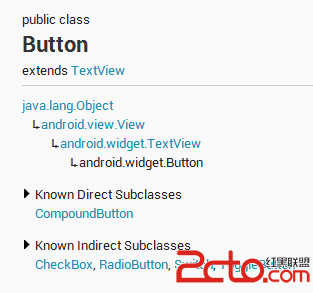 自製滑動開關:從 CompoundButton 源碼到 SwitchButton 實作
版本 1.0,2014.5.17 起筆、2014.6.1 補完。版權 © 2014 kince,轉載請註明出處。 要自己寫一個滑動開關,先回頭看系統是怎麼做的會省很多力氣