

編輯:關於 Android 程式設計
在一個 Android 應用中,Layout(佈局)是開發環節中極為重要的一環,也是構成 UI 不可或缺的一部分。本文將系統性地梳理 Android 的五大佈局及其常用屬性。
在 Android 中構建 UI 的方式主要有三種:
Android SDK 中關於 UI 的核心類是 android.view.View 與 android.view.ViewGroup。常見的 UI 元件都繼承自這兩個類,其中一部分專門用來控制子 View 的位置與大小,我們稱之為佈局管理器。
LayoutParams 是 ViewGroup 的內部類,用來告訴父容器它希望以何種方式(大小與位置)佈局。所有在 LayoutParams 及其子類中定義的屬性,在 XML 中都是透過 layout_*** 的形式設定。
LayoutParams 提供兩個基本參數:
layout_width   元素的寬度 (fill_parent | match_parent | wrap_content | *dip)
layout_height  元素的高度 (同上)
MarginLayoutParams 繼承自 LayoutParams,額外增加了四個邊距參數:
layout_marginLeft    相對於本元素左邊界的偏移
layout_marginRight   相對於本元素右邊界的偏移
layout_marginTop     相對於本元素上邊界的偏移
layout_marginBottom  相對於本元素下邊界的偏移
以上兩種參數,所有佈局中的子 ViewGroup 與子 View 均可使用。
線性佈局是最簡單、也最實用的佈局。透過 android:orientation 指定排列方向:vertical(垂直)或 horizontal(水平)。
特殊參數:
layout_weight   權重
layout_gravity  相對於父元素的重力值 (top|bottom|left|right|center ...)
需要特別區分兩個相似屬性 android:gravity 與 android:layout_gravity:
android:gravity 用於設定 View「內部內容」相對於 View 本身的对齊方式,例如按鈕上文字要靠左或靠右。android:layout_gravity 則用於設定 View「本身」相對於父容器的位置。這兩者的原理與 android:paddingLeft 和 android:layout_marginLeft 的關係類似:
android:paddingLeft="30px"     按鈕內的內容離按鈕左邊界 30 像素
android:layout_marginLeft="30px"  整個按鈕離左邊界 30 像素
例如,透過 android:gravity="center" 可讓 EditText 中的文字置中;再透過 android:layout_gravity="right" 讓該 EditText 在 LinearLayout 中靠右顯示。
<LinearLayout xmlns:android="https://schemas.android.com/apk/res/android"
    android:orientation="vertical"
    android:layout_width="fill_parent"
    android:layout_height="fill_parent" >
    <EditText
        android:layout_width="wrap_content"
        android:gravity="center"
        android:layout_height="wrap_content"
        android:text="one"
        android:layout_gravity="right"/>
</LinearLayout>
RelativeLayout 允許子元素透過 ID 指定相對於其他元素或父元素的位置,可以實現靠右對齊、上下排列或置中等多樣效果。元素按順序排列,若使用 XML 定義,被關聯的元素必須先被定義。這是最靈活的佈局,複雜介面通常都採用它。
特殊參數分為三類:
(1)屬性值為 true 或 false:
android:layout_centerHorizontal    水平居中
android:layout_centerVertical      垂直居中
android:layout_centerInParent      相對於父元素完全居中
android:layout_alignParentBottom   貼緊父元素下邊緣
android:layout_alignParentLeft     貼緊父元素左邊緣
android:layout_alignParentRight    貼緊父元素右邊緣
android:layout_alignParentTop      貼緊父元素上邊緣
(2)屬性值為 id 引用 "@id/id-name":
android:layout_below      在某元素的下方
android:layout_above      在某元素的上方
android:layout_toLeftOf   在某元素的左邊
android:layout_toRightOf  在某元素的右邊
android:layout_alignTop   本元素上邊緣與某元素上邊緣對齊
android:layout_alignLeft  本元素左邊緣與某元素左邊緣對齊
android:layout_alignBottom 本元素下邊緣與某元素下邊緣對齊
android:layout_alignRight 本元素右邊緣與某元素右邊緣對齊
(3)屬性值為具體像素值,如 30dip、40px:
android:layout_marginBottom  離某元素底邊緣的距離
android:layout_marginLeft    離某元素左邊緣的距離
android:layout_marginRight   離某元素右邊緣的距離
android:layout_marginTop     離某元素上邊緣的距離
TableLayout 將子元素分配到列與行中,由多個 TableRow 組成,每個 TableRow 定義一個 row。TableLayout 容器不會顯示 row、column 或 cell 的邊框線。每個 row 擁有零個或多個 cell,每個 cell 擁有一個 View 物件。值得注意的是,表格中的 cell 無法跨列,這與 HTML 不同。
特殊參數:
android:stretchColumns   伸展的列的索引
android:shrinkColumns    收縮的列的索引
android:collapseColumns  隱藏的列的索引
它也可以在程式碼中動態添加行列:
TableLayout tableLayout = (TableLayout) findViewById(R.id.table01);
TableRow tableRow = new TableRow(this);
TextView temp = new TextView(this);
temp.setText("text的值");
tableRow.addView(temp);
其中 android:stretchColumns="1,2,3,4" 代表自動拉伸第 1、2、3、4 列。
AbsoluteLayout 讓子元素指定精確的 x/y 座標並顯示於螢幕上,(0, 0) 為左上角,往右下移動時座標值變大。它沒有邊框,允許元素互相重疊。由於會使介面過於僵化,在不同裝置上可能無法良好呈現,因此官方並不推薦使用。
特殊參數:
layout_x   x 方向的座標
layout_y   y 方向的座標
FrameLayout 是最簡單的佈局物件,可視為螢幕上一塊空白的備用區域。所有子元素都會固定在左上角,無法為個別子元素指定位置;後加入的子元素會覆蓋在前者之上,將其部分或全部遮擋(除非後者是透明的)。
特殊參數:
layout_gravity 相對於父元素的重力值 (用法同 LinearLayout)
android:layout_x、android:layout_y 用到 LinearLayout 或 RelativeLayout,或把 RelativeLayout 的 below、toRightOf 等屬性套用到其他佈局。這樣雖然不會報錯,卻達不到預期效果。layout_width="fill_parent" 與 layout_height="wrap_content":wrap_content 表示寬高會隨內部元件變化,fill_parent 則讓佈局填滿整個父容器。另外還有 match_parent,本質上與 fill_parent 相同,並自 API Level 8 起取代 fill_parent。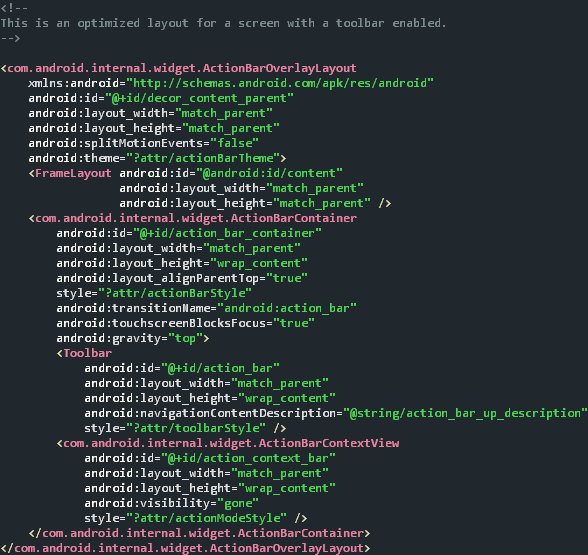 從 setContentView 源碼看 Android 佈局為何多出好幾層
寫在前面: 幾個月前做佈局優化,用 Hierarchy Viewer 檢視層級結構時,我發現最上層的佈局竟然不是我 XML 裡寫的根節點,而是被額外包了好幾層 Layou
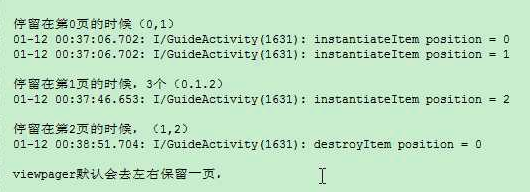 Android 智慧北京專案實戰:ViewPager 預加載、底部 Fragment 導航與事件傳遞機制全解析
本篇文章以「智慧北京」這個綜合性專案為載體,串起 Android 開發中幾個非常關鍵的知识点:ViewPager 的预加载机制、控件宽高的本质、客户端与服务端的 Json
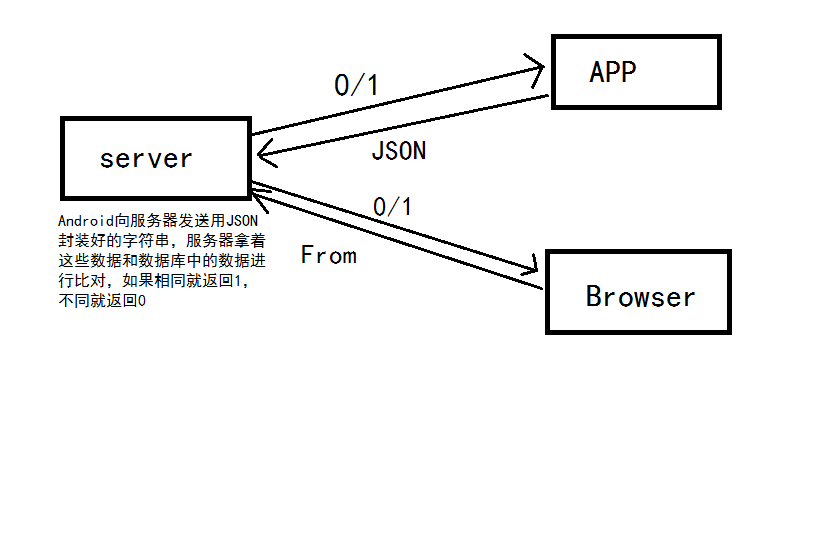 Android通過PHP服務器實現登錄功能
本文講解Android客戶端如何與PHP、MySQL搭建的服務器進行簡單交互,從而實現登錄功能。 實現原理圖: Handler消息機制原理: Handler機制主要包含
 Android TV 開發入門(一):打造 TV App 前必備的知識
前言:近年來智慧電視發展得如火如荼,Google 也在大力推進 TV 及穿戴設備的布局。站在互聯網的風口上,那句「站在風口,豬都能飛」的調侃並非毫無道理。如今,傳統電視機