

編輯:關於 Android 程式設計
如果想在自定義的 View 之上再顯示 Button 等其他控制項,該怎麼做呢?可以透過 FrameLayout 來實現多組件的疊加顯示,整個過程可以拆成兩個步驟。
在自定義 View 類別中覆寫父類的構造方法(注意要使用「兩個參數」的那個版本),並在 onDraw 中繪製你想要的內容:
public class MyView2 extends View { public MyView2(Context context, AttributeSet att) { super(context, att); } public void onDraw(Canvas c) { // 在這裡繪製你要的內容 }}
接著在佈局檔中,用 FrameLayout 把自定義 View 與其他控制項疊放安排:
<?xml version="1.0" encoding="utf-8"?><FrameLayout xmlns:android="https://schemas.android.com/apk/res/android" android:orientation="vertical" android:layout_width="fill_parent" android:layout_height="fill_parent"> <com.lovose.MyView2 android:id="@+id/View01" android:layout_width="fill_parent" android:layout_height="fill_parent"> </com.lovose.MyView2> <AbsoluteLayout android:id="@+id/AbsoluteLayout01" android:layout_width="wrap_content" android:layout_height="wrap_content"> <Button android:text="Button01" android:id="@+id/Button01" android:layout_width="wrap_content" android:layout_height="wrap_content" android:layout_x="100dip" android:layout_y="100dip"></Button> </AbsoluteLayout></FrameLayout>
透過這種方式,自定義 View 與 Button 等控制項就能在 FrameLayout 中彼此疊放,你可以自由地安排 UI 的呈現方式了。
 Android AIDL IPC 機制詳解
AIDL 是 Android 提供的介面定義語言,主要用於不同進程之間的通訊。當一個應用需要呼叫另一個應用或服務中的方法,且希望以接近本地物件的方式操作時,AIDL 能簡
 用 RecyclerView 取代 ListView:實作差異與遷移重點
RecyclerView 是 Android 5.0 的重要新特性,可以直接取代 ListView 與 GridView,還能實現瀑布流。它最大的價值在於只關心資源的回收
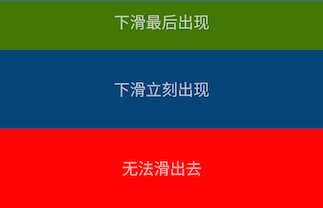 AppBarLayout 與 scrollFlags 的滾動行為
AppBarLayout 的三段式滑動 AppBarLayout 可以粗略分為三種行為:滑到最後才出現、下滑立刻出現、以及永遠無法滑出。前兩者都屬於可滾動內容,後者則固定
 AsyncTask 實戰:為什麼你的非同步任務老是慢半拍
關於 AsyncTask 的基本用法,官方文件與〈深入理解多線程 AsyncTask〉已經講得很清楚,這裡直接進入實務問題。 一個令人費解的现象 前陣子遇到一個很奇怪的