

編輯:關於 Android 程式設計
當 ListView 的顯示需求超出系統預設時,自訂 Adapter 就成了必備利器。透過繼承 BaseAdapter,我們能完全掌控每一個列表項的呈現方式,並善用「視圖重用」機制大幅提升效能。
一個典型的 BaseAdapter 需要持有資料集合、列表項佈局 id,以及一個用來把 XML 轉成 View 物件的 LayoutInflater:
public class PersonAdapter extends BaseAdapter {
    private List persons;      // 要綁定的資料
    private int resource;      // 單一條目界面的 id,此例為 item.xml
    private LayoutInflater inflater; // 佈局填充器,可用一個 xml 生成 View 物件

    public PersonAdapter(Context context, List persons, int resource) {
        inflater = (LayoutInflater) context.getSystemService(Context.LAYOUT_INFLATER_SERVICE);
        this.resource = resource;
        this.persons = persons;
    }
    @Override
    public int getCount() {          // 資料總數
        return persons.size();
    }
    @Override
    public Object getItem(int position) { // 取得指定索引的物件
        return persons.get(position);
    }
    @Override
    public long getItemId(int position) { // 取得條目 id
        return position;
}getView() 是自訂 Adapter 的心臟。ListView 具備快取功能:顯示第一頁時會建立 View 物件,捲動到後續頁面時則會重用先前建立好的物件。透過 convertView 是否為 null 來判斷,並搭配 ViewCache( also 稱為 ViewHolder)快取控制項引用,可避免重複呼叫 findViewById,顯著提升捲動流暢度:
@Override
public View getView(int position, View convertView, ViewGroup parent) {
    TextView nameView;
    TextView phoneView;
    TextView amountView;
    if (convertView == null) { // 顯示第一頁時 convertView 為空
        convertView = inflater.inflate(resource, null); // 生成條目物件
        nameView = (TextView) convertView.findViewById(R.id.name);
        phoneView = (TextView) convertView.findViewById(R.id.phone);
        amountView = (TextView) convertView.findViewById(R.id.amount);
        ViewCache cache = new ViewCache();
        cache.amountView = amountView;
        cache.nameView = nameView;
        cache.phoneView = phoneView;
        convertView.setTag(cache);
    } else { // 重用已建立的 View,直接取出快取的控制項
        ViewCache cache = (ViewCache) convertView.getTag();
        amountView = cache.amountView;
        nameView = cache.nameView;
        phoneView = cache.phoneView;
    }
    Person person = persons.get(position); // 進行資料綁定
    nameView.setText(person.getName());
    phoneView.setText(person.getPhone());
    amountView.setText(person.getAmount());
    return convertView;
}
private final class ViewCache {
    public TextView nameView;
    public TextView phoneView;
    public TextView amountView;
}
透過 ViewCache 快取控制項的巧思,能有效避免在每次 getView 時反覆呼叫 findViewById 所造成的效能損耗,這是自訂 Adapter 效能優化中最重要的一環。
 單例模式在 Android 中的多種實現與實戰
單例模式(Singleton)概述 單例模式屬於對象的創建模式,它能確保某個類只有一個唯一的實例存在,同時能夠自行實例化並將這個唯一實例提供給外界調用,在實際項目開發中被
 第八章:Activity 與任務調用棧深度解析
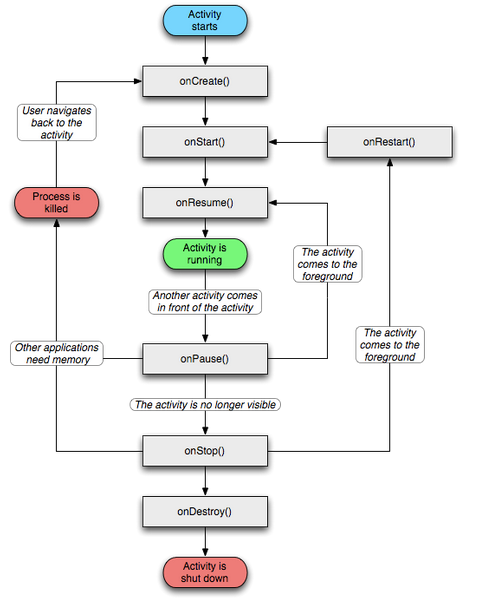
知識點目錄 8.1 Activity 8.1.1 起源 8.1.2 Activity 形態 8.1.3 生命週期 8.2 Activity 任務棧簡介 8.3 Acti
 SVG-Android 相容性與效能優化:讓向量圖支援 Android 2.3 以上
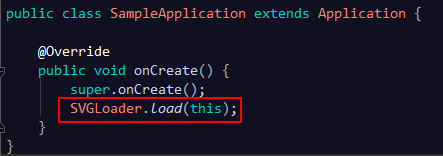
SVG 向量圖在縮放、清晰度與可維護性上通常優於 PNG 位圖。Android 5.0 之後提供了 VectorDrawable,但在相容性、效能與使用便利性上仍有不足。
 ES 檔案瀏覽器遠端管理功能怎麼用
ES 檔案瀏覽器是 Android 上常見的檔案管理器。除了基本的檔案操作,它還能讓其他裝置透過 WiFi 遠端連進手機的檔案系統——不用拉線,電腦就能直接讀寫手機裡的東