

編輯:關於 Android 程式設計
在 Android 中,狀態列提醒(Notification)是一種不會打斷使用者當前操作的通知方式。相比於彈出式、會搶走焦點的 AlertDialog,Notification 更為友善——想像使用者正在玩遊戲時收到一條簡訊,若用 AlertDialog 強制打斷,體驗必然糟糕;而用 Notification,使用者完全可以打完遊戲再從容查看。因此在開發中,應依實際需求選擇合適的通知形式。
<Button
    android:id="@+id/showButton"
    android:layout_width="fill_parent"
    android:layout_height="wrap_content"
    android:text="showNotification" />
<Button
    android:id="@+id/cancelButton"
    android:layout_width="fill_parent"
    android:layout_height="wrap_content"
android:text="cancelNotification" />讓 Activity 實作 OnClickListener 介面,即可用簡潔的方式為多個按鈕綁定點擊事件。核心元件是 NotificationManager(負責發送與取消通知)與 Notification(承載通知內容):
public class MainActivity extends Activity implements OnClickListener {
    private Context mContext = this;
    private Button showbtn, calclebtn;
    private Notification noti;
    private NotificationManager notiManger;
    private static int NOTIFICATION_ID = 0x0001;

    @Override
    protected void onCreate(Bundle savedInstanceState) {
        super.onCreate(savedInstanceState);
        setContentView(R.layout.activity_main);
        setUpViews();
    }
    private void setUpViews() {
        showbtn = (Button) findViewById(R.id.showButton);
        calclebtn = (Button) findViewById(R.id.cancelButton);
        noti = new Notification(R.drawable.ic_launcher, "this is a notification", System.currentTimeMillis());
        noti.defaults = Notification.DEFAULT_SOUND;   // 使用預設提示音
        noti.defaults |= Notification.DEFAULT_VIBRATE; // 加上震動
        notiManger = (NotificationManager) this.getSystemService(mContext.NOTIFICATION_SERVICE);
        showbtn.setOnClickListener(this);
        calclebtn.setOnClickListener(this);
    }
    // 按鈕點擊回應
    @Override
    public void onClick(View v) {
        if (v == showbtn) {
            Intent intent = new Intent(this.getApplicationContext(), this.getClass());
            intent.setFlags(Intent.FLAG_ACTIVITY_NEW_TASK);
            PendingIntent contentIntent = PendingIntent.getActivity(this, 0, intent, 0);
            // setLatestEventInfo(上下文, 標題, 內容, PendingIntent)
            noti.setLatestEventInfo(this, "10086", "你從此以後免除所有話費", contentIntent);
            notiManger.notify(NOTIFICATION_ID, noti); // 發送通知
        } else if (v == calclebtn) {
            notiManger.cancel(NOTIFICATION_ID); // 取消通知
        }
    }
}
這裡的關鍵概念是 PendingIntent:它封裝了一個「未來要執行的意圖」,當使用者點擊通知時,系統便會執行它、跳轉到指定頁面。透過 notify() 發送、cancel() 取消,就能完整掌握通知的顯示與消失時機。
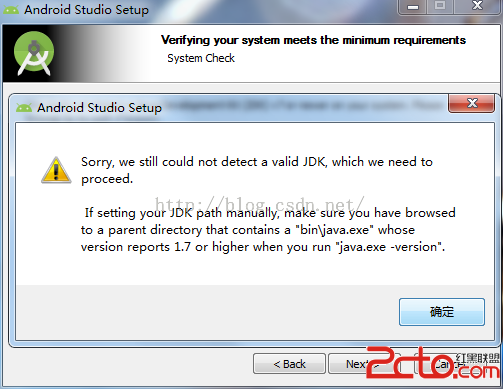 Android Studio 安裝指南與 Genymotion 配置
本文記錄 Android Studio 與 Genymotion 的安裝配置流程。首次安裝前,需要先準備 Java JDK,版本建議高於 1.7,否則可能出現提示。點擊提
 Android 開發最佳實踐:Futurice 團隊經驗整理
本文整理自 Futurice 公司 Android 開發團隊歸納的最佳實踐,遵循這些準則可以避免重複造輪子。若你同時關注 iOS 或 Windows Phone 開發,該
 打造可播放 GIF 動畫的 GifImageView 自定義控件
Android 原生控件並不支持播放 GIF 圖片。我們知道,若想顯示一張圖片,通常會借助 ImageView,但如果把一張 GIF 設置給 ImageView,它只會顯
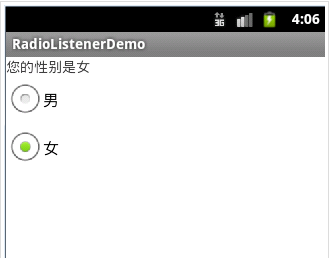 Android RadioGroup 單選按鈕使用詳解
先看效果單選按鈕是表單與設定頁面中常見的元件。Android 通常以 RadioGroup 搭配多個 RadioButton 來實作,讓同一群組中的選項只能有一個被選取。