

編輯:關於 Android 程式設計
開啟 Android SDK 的本地幫助文檔時,若覺得速度慢得讓人抓狂,問題往往出在文檔中的網頁嵌入了會連網載入的 JavaScript。把它註釋掉就能明顯改善。
本地 HTML 檔中含有類似下面這行會連網的 script:
<script src="https://www.google.com/jsapi" type="text/javascript"</script>由於每個頁面都會嘗試連網載入這段程式,離線或網路不佳時自然就慢。將其註釋掉即可解決。
以下程式會遞迴走訪 docs 目錄,把每個 HTML 中的那行 script 註釋掉:
package cn.sd.fxd.android;

import java.io.BufferedReader;
import java.io.BufferedWriter;
import java.io.File;
import java.io.FileNotFoundException;
import java.io.FileReader;
import java.io.FileWriter;
import java.io.IOException;

public class FormatDoc {
    public static int j = 1;

    public static void main(String[] args) {
        File file = new File("D:/android/android-sdk-windows/docs/");
        searchDirectory(file, 0);
        System.out.println("OVER");
    }

    public static void searchDirectory(File f, int depth) {
        if (!f.isDirectory()) {
            String fileName = f.getName();
            if (fileName.matches(".*?.html")) {
                String src = "<script src=\"https://www.google.com/jsapi\" type=\"text/javascript\"></script>";
                String dst = "<!-- <script src=\"https://www.google.com/jsapi\" type=\"text/javascript\"></script> -->";
                annotation(f, src, dst);
            }
        } else {
            File[] fs = f.listFiles();
            depth++;
            for (int i = 0; i < fs.length; ++i) {
                searchDirectory(fs[i], depth);
            }
        }
    }

    public static void annotation(File f, String src, String dst) {
        String content = read(f);
        content = content.replaceAll(src, dst);
        write(content, f);
        System.out.println(j++);
    }

    public static String read(File src) {
        StringBuffer res = new StringBuffer();
        String line = null;
        try {
            BufferedReader reader = new BufferedReader(new FileReader(src));
            int i = 0;
            while ((line = reader.readLine()) != null) {
                if (i != 0) {
                    res.append('\n');
                }
                res.append(line);
                i++;
            }
            reader.close();
        } catch (FileNotFoundException e) {
            e.printStackTrace();
        } catch (IOException e) {
            e.printStackTrace();
        }
        return res.toString();
    }

    public static boolean write(String cont, File dist) {
        try {
            BufferedWriter writer = new BufferedWriter(new FileWriter(dist));
            writer.write(cont);
            writer.flush();
            writer.close();
            return true;
        } catch (IOException e) {
            e.printStackTrace();
            return false;
        }
    }
}其實用 shell 一行就能搞定,比寫 Java 簡潔太多了:
find . -name "*.html" | xargs grep -l "jsapi" | xargs sed -i '/jsapi/d'最偷懶的辦法就是直接斷網,或改用 IE、Firefox 的離線瀏覽模式開啟文檔,避開連網等待即可。
三種方法各有優劣:Java 適合不熟 shell 的人,shell 一行最省事,而斷網則是零成本的應急之計,可依自身情況挑選。
 Android 短信驗證碼倒計時按鈕的兩種實作方式
驗證碼功能裡最常見的需求就是:點擊「取得驗證碼」之後,按鈕進入倒數計時並暫時禁用,倒數結束再恢復可點擊。這裡整理兩種常用寫法,都可以直接拿去用。 先看效果 這裡倒數從
 Android 開發最佳實踐:通知、下拉刷新、搜索、內存與性能
一、Notification 通知 通知是 Android 中使用頻率極高的事件提示機制。以下實踐主要基於 Support Library 中的 Notification
 Android 3D 立體旋轉動畫實作與封裝(X/Y/Z 三軸皆可)
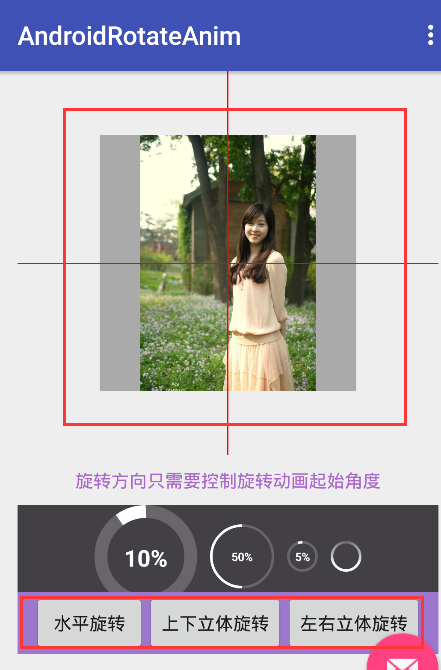
本文要動手做一個 Android 上的立體旋轉(3D 翻轉)動畫,下圖是最終跑出來的樣子。 立體旋轉其實只有三種基本型態: 1. 繞 X 軸 翻轉 2. 繞 Y 軸 翻
 Android 逆向入門:以 CrackMe 理解 APK 反編譯與分析流程
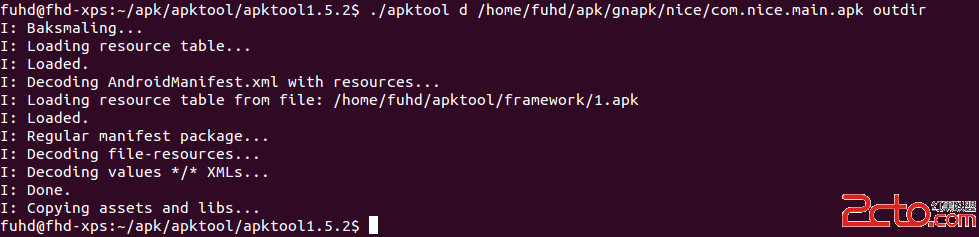
本文以一個專門供練習用的 CrackMe 程序為例,介紹 Android 逆向分析的基本流程,幫助讀者理解 APK 的結構與運行機制,這也是安全研究與軟件保護的入門知識。